On this page
- ›iOS App Development Statistics: 2026 Snapshot
- ›Developer Overview: Who’s Building iOS Apps in 2026?
- ›Tooling Trends in iOS Development
- ›Key Challenges for iOS Developers in 2026
- ›Evolving Platforms and Future Directions
- ›Cross-Platform Development: Flutter, React Native & Vapor
- ›Developer Sentiment: How Developers Feel About Apple
- ›Monetization Models and Revenue Sources
- ›iOS and the Larger Mobile App Ecosystem
- ›Major Trends Shaping iOS App Development’s Future
iOS App Development Statistics: 2026 Snapshot
iOS app development in 2026, by the numbers
- The App Store hosts about 2.2 million apps, around 2.4 million by live third-party count.
- Apple counts over 60 million registered developers worldwide.
- iOS 26 runs on 79% of all active iPhones, and 86% of iPhones from the last four years.
- New App Store submissions must build with Xcode 26 and the iOS 26 SDK, required since April 28, 2026.
- The App Store took in about $90.6 billion in 2025, against roughly $52.3 billion on Google Play.
- Around 22% of App Store submissions were rejected in 2025, about 2 million of 9.1 million.
These iOS app development statistics, drawn from our June 2026 survey of 404 developers and current App Store data, show where the platform stands now.
The iOS ecosystem from Apple keeps growing in 2026. The App Store now hosts about 2.2 million apps, around 2.4 million by live third-party count, and new apps keep arriving daily. There are now over 1.8 billion active Apple devices and over 60 million registered developers around the globe.
For people who build apps, iOS is one of the best places to make money.
Android holds a little less than 70% of the global mobile OS market. Yet Apple’s App Store still earns about double what Google Play does. In 2025 it made about $90.6 billion against Google Play’s roughly $52.3 billion.
That lead does not come from downloads alone. Developers who build for iOS tend to get:
- more revenue per user, since Apple users spend more and stay longer;
- more ways to charge, through subscriptions and in-app purchases;
- more control over the platform, which helps them ship a clean product.
iOS 26 shipped in September 2025, and it is a big reason iOS has so much momentum going into 2026. By June 2026 it ran on 79% of all active iPhones, and 86% of iPhones from the last four years. About 14% of iPhones still sit on iOS 18.
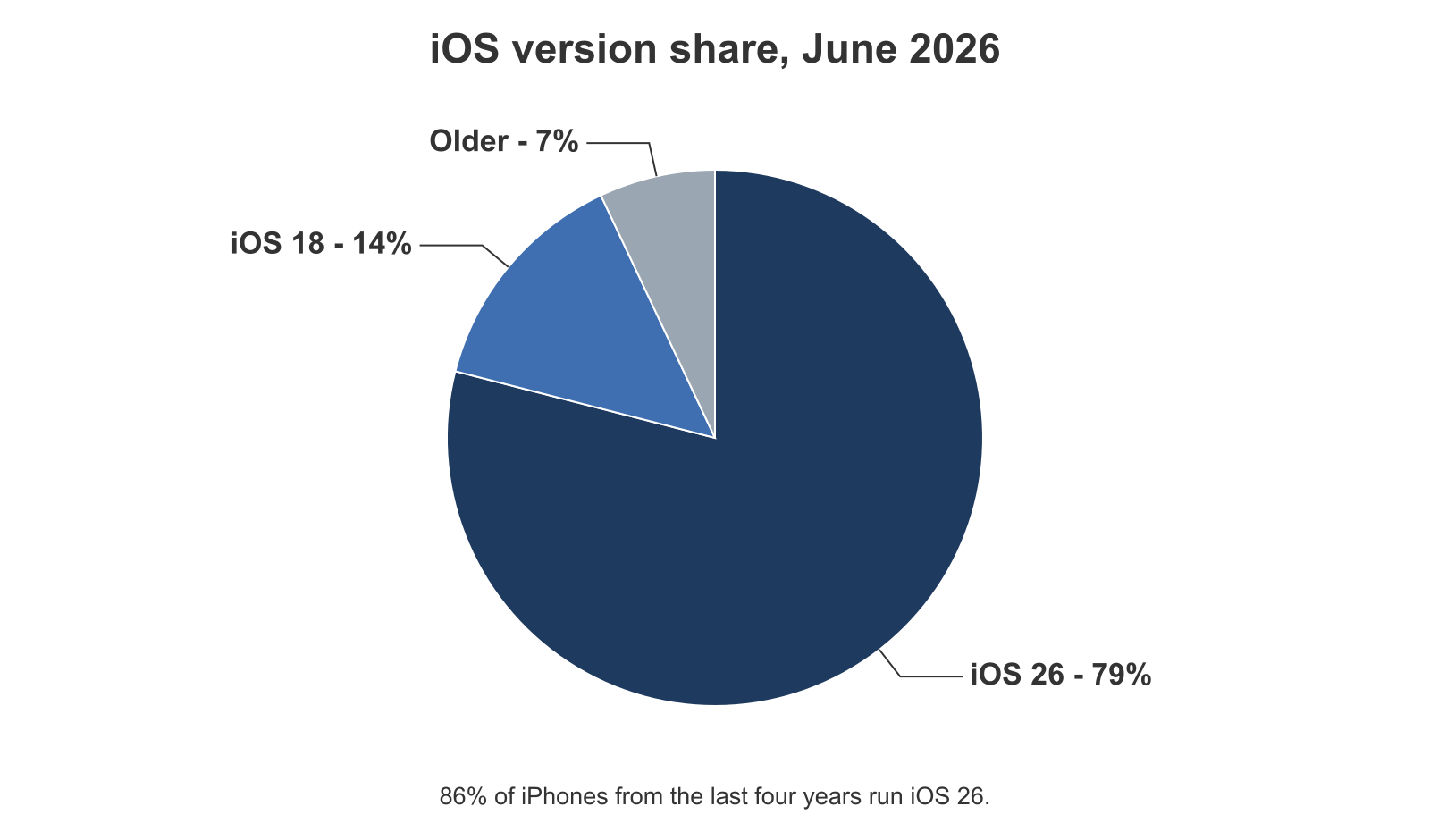
That fast change shows two things. Apple ships updates quickly, and its users trust them. It also pushes developers to keep up with new SDKs and rules. As of April 28, 2026, all new App Store submissions and updates must build with Xcode 26 and the iOS 26 SDK, which turns on Swift 6 concurrency checks by default.
To learn how developers are keeping up, we surveyed 404 iOS developers using Rentamac.io in June 2026. They came from every kind of work: solo indie developers, students, agency teams, and enterprise engineers. All of them use Rentamac.io to build, test, and ship apps from a cloud Mac, without owning the hardware.
Below we share the survey results plus wider market data to show where iOS app development really stands in 2026: tooling trends, how apps make money, platform spread, and how developers feel about Apple.
Developer Overview: Who’s Building iOS Apps in 2026?
The iOS developer base is bigger than ever in 2026. Apple now counts over 60 million registered developers worldwide.
It runs from solo creators making small tools to large agency teams with big client lists. There are many kinds of developers here, so it helps to know who is really building apps.
Rentamac.io ran its own survey of 404 iOS developers in June 2026. The results showed a wide mix of people and goals. One thing they shared: easy cloud Mac access mattered to all of them.
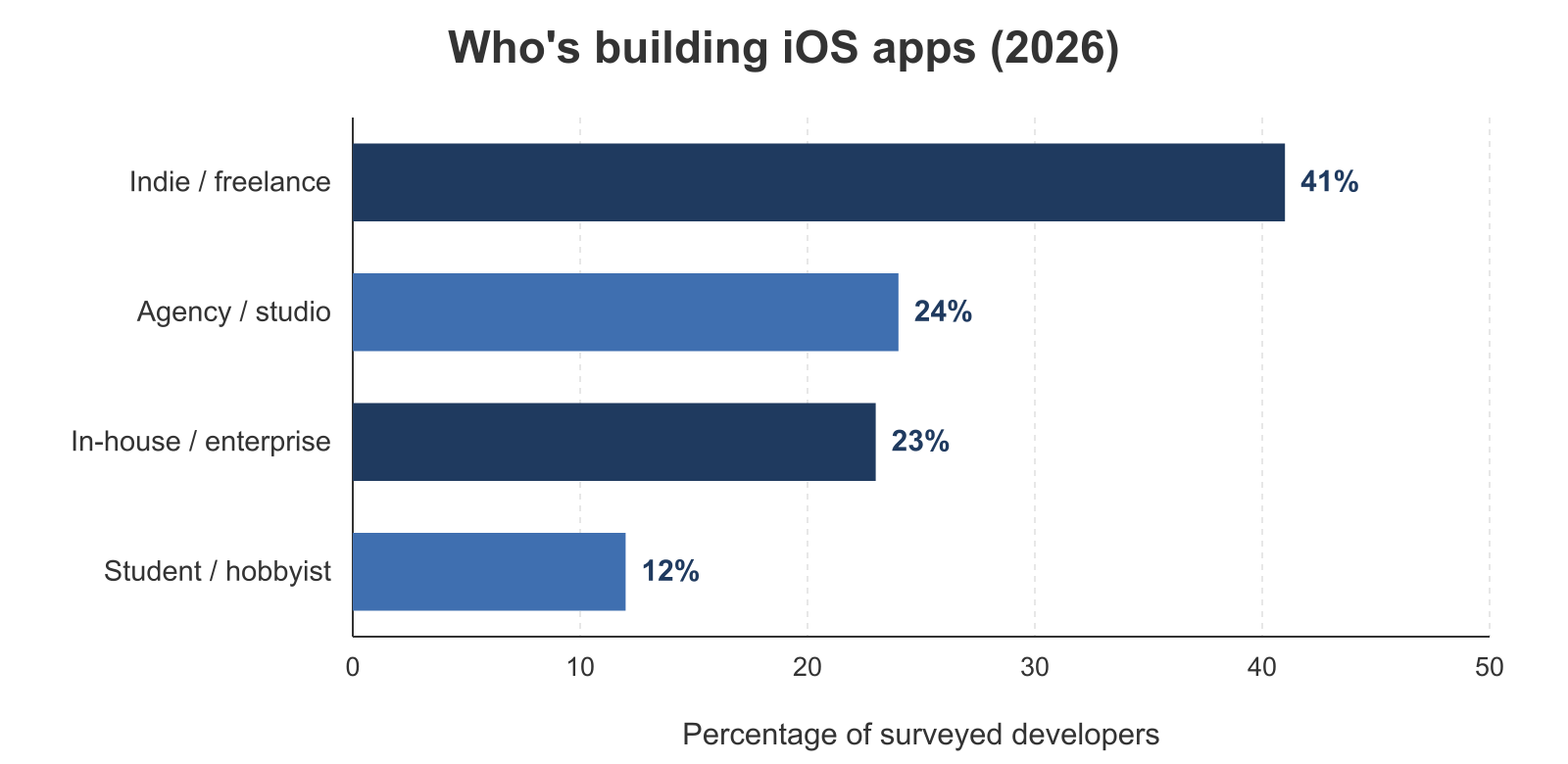
Developer Segmentation by Type
(Source: Rentamac.io iOS Developer Survey, June 2026)
- 41% – Solo indie developers: This group included part-time developers, bootstrapped founders, and freelancers. Many run the whole app on their own, from design to build to launch and marketing.
- 24% – Agency teams: These developers build iOS apps for many clients. Many lean on a rented cloud Mac to test across several projects, without buying a big fleet of physical Macs.
- 23% – Enterprise developers: This group works inside companies and uses a cloud Mac to build apps, ship to the App Store safely, and keep remote teams in sync.
- 12% – Students & hobbyists: We also have a good number of new or learning developers. A rented Mac is a fair way to learn Swift and Xcode without buying new hardware.
One number stands out. Indie and student developers together make up more than half the base. That shows how much easy access to macOS now matters for learning the craft and testing early ideas.
Developer Goals: Learning, Launching, or Delivering
Survey answers showed that goals shift a lot with a developer’s role:
- Solo developers care most about launching their own products,
- Agencies care about multi-device testing and client delivery,
- Enterprises care about security, build rules, and team work,
- Students and hobbyists are mostly there to learn.
That mix explains the usage we see: everything from CI/CD pipelines to throwaway SwiftUI projects can run at the same time on a cloud Mac.
App Publishing Activity: Developer Perspectives
We also asked whether developers had shipped anything to the App Store yet. Almost three in ten had not. 29% of respondents have yet to launch an app, even though they are active developers.
That points to a big group of early-stage builders. Many are still learning the tools, building an MVP, or shaping their first product. It mirrors the wider market too: Apple counts over 60 million registered developers, but only about 1 million have a live app on the store.
Tooling Trends in iOS Development
One thing sets iOS development apart in 2026: the modern, cloud-ready tool stack developers use to build, test, and ship apps. The mix changes with the project. A solo app and an enterprise CI/CD pipeline need different setups. But most developers blend native Apple tools with third-party ones to work faster and ship better apps.
The Rentamac.io survey from June 2026 asked developers about the tools they use day to day. Native Apple tools still anchor most stacks, while a long tail of third-party editors, CI services, and package managers fills in the gaps.
IDEs and Code Editors
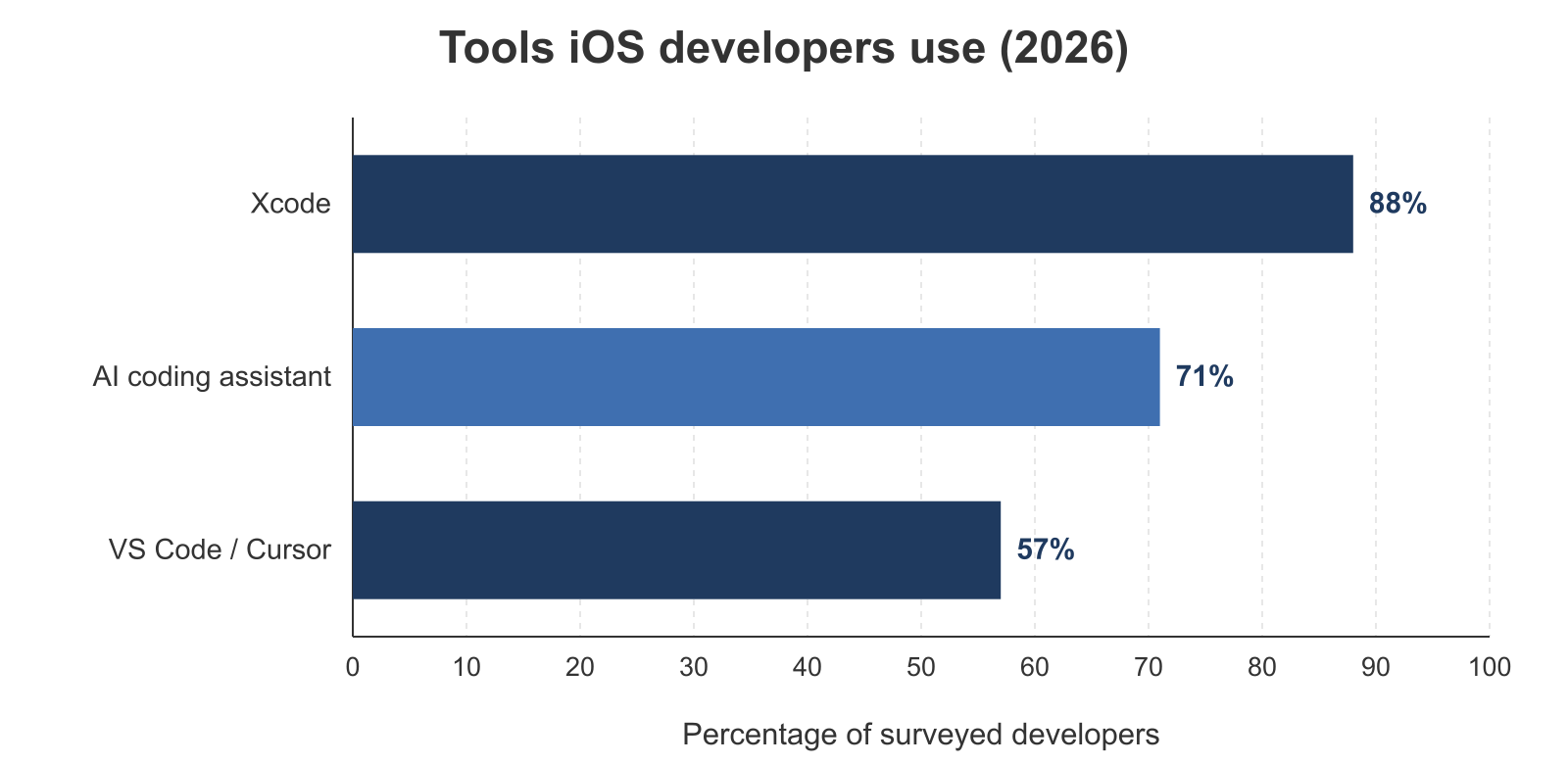
No surprise, Xcode still leads. 88% of surveyed developers name it as their main editor. Apple needs Xcode to build, test, and submit apps, and Xcode 26 is now required for all new submissions. So it is a must for any serious iOS work. If you are on a PC, Swift development off a Mac still routes back to Xcode on macOS in the end.
Even so, developers keep adding other tools on top of Xcode:
- 57% use Visual Studio Code, Cursor, or another editor alongside Xcode, often to draft code with AI help before building.
- 71% use an AI coding assistant somewhere in their iOS workflow.
- 22% have built Apple Intelligence or Foundation Models features into a shipping or in-progress app.
Xcode is a must for serious iOS work, but more and more developers pair it with AI-enabled editors to build mixed workflows, above all when they work across platforms or full-stack.
CI/CD Tools & Trends
Build-and-deploy pipelines are common now, even on small teams. Going by our survey data:
- 64% of developers have a CI/CD pipeline for at least one app
- Of those: 34% use Xcode Cloud, Apple’s own CI service
- 31% use GitHub Actions, a favorite for its flexibility and GitHub ties
- 21% use fastlane to automate signing and deploys, often on top of other CI
- 14% use Bitrise, CircleCI, Jenkins, or another option
Plenty of developers run CI/CD tools, but many still hit snags. The reasons they gave:
- Code signing and managing provisioning profiles
- Pipelines that get hard to wrangle for multi-target or multi-platform apps
- The cost of cloud build services at scale
Testing Environments: Simulators vs Real Devices
How do developers test their iOS apps? By far the most common choice is a mix of both:
- 69% test on simulators and real devices
- 22% test on simulators only (often students or indies with no spare hardware)
- 9% test on real devices only, usually for heavy apps like games or video editors
Simulators are handy because they are quick and easy. But real devices matter for things like animations, Bluetooth, and battery checks.
A mixed setup is easy to run from a cloud Mac, since you get a full macOS build setup without buying a fleet of test machines. If all you have is a PC, you can still test iOS apps without a Mac by running the simulator on a rented machine.
SwiftUI vs UIKit: The UI Framework Switch
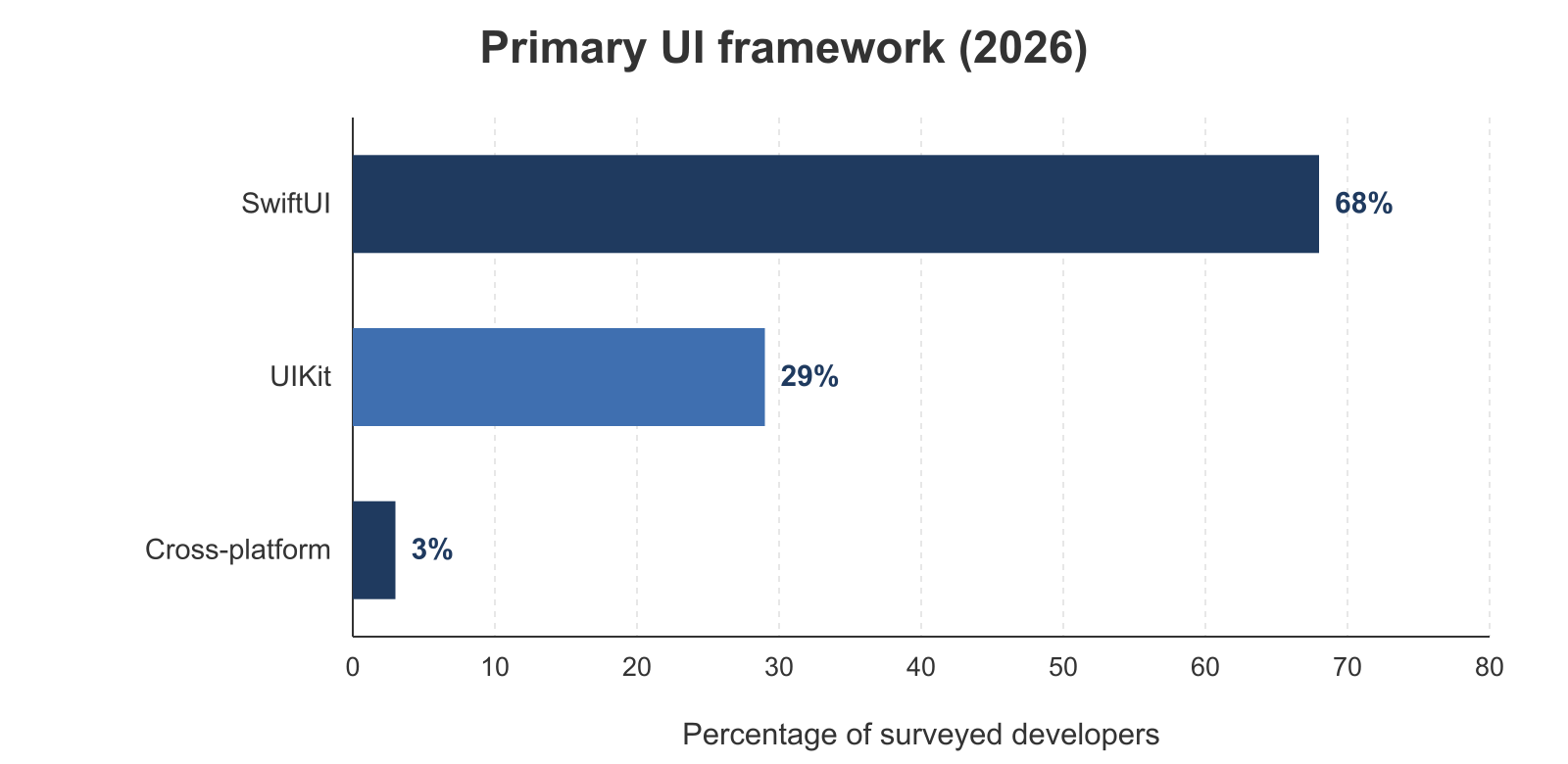
SwiftUI is now the default UI framework for most new iOS apps, but UIKit is still here to stay. In our survey:
- 68% name SwiftUI as their primary UI framework
- 29% still lead with UIKit, often for legacy code or special APIs
- 3% build primarily with a cross-platform tool like Flutter or React Native
On the percentage of iOS apps using Swift, SwiftUI now leads as the main UI layer for new projects, while UIKit hangs on in older and more complex codebases. So Swift and its modern UI layer are the default for fresh work, even though plenty of teams still mix in UIKit.
Git & Dependency Managers
Modern iOS teams lean on Git and package managers every day.
Version control platforms:
- 98% use Git
- GitHub: 73%
- GitLab: 14%
- Bitbucket: 6%
- Other/self-hosted: 7%
Package managers:
- Swift Package Manager (SPM): 68%
- CocoaPods: 47%
- Carthage: 12%
SPM is the new default. CocoaPods still has a foothold, mostly in older projects.
Key Challenges for iOS Developers in 2026
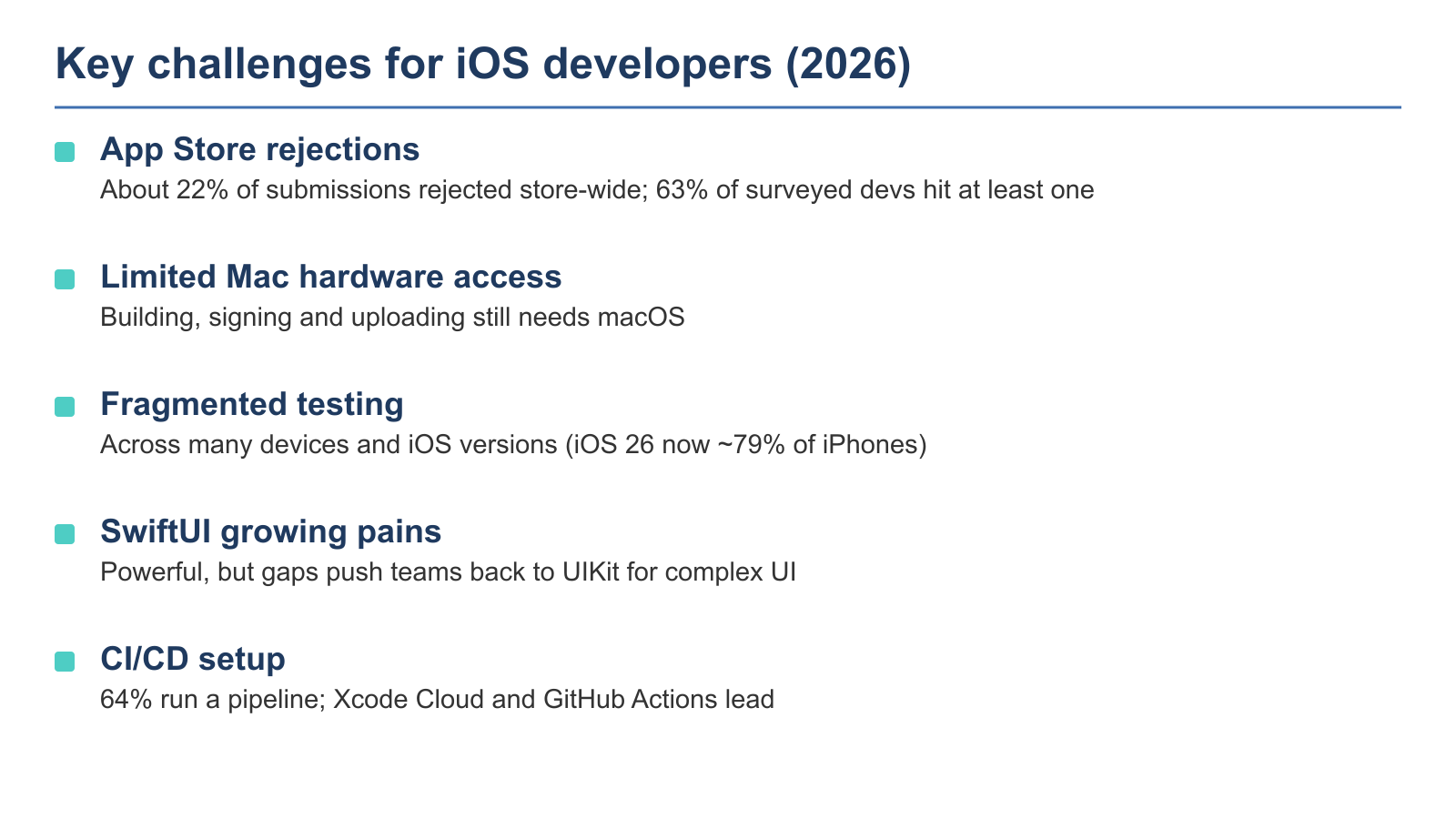
Building iOS apps in 2026 still comes with real friction. The biggest pain points our survey found are App Store rejections, limited access to Mac hardware, testing split across many devices and OS versions, SwiftUI growing pains, and CI/CD setup. About 63% of surveyed developers hit at least one rejection in the past year.
App Store Rejections Are Still a Major Pain Point
In our survey, 63% of iOS developers hit at least one App Store rejection in the past year. The top reasons were app completeness and metadata under Guideline 2.1 (34% of those rejected) and privacy or data issues under Guideline 5.1.1 (21%). The rest, 45%, came from spam, copycat, design, or other causes.
Developers were also annoyed by mixed notes from different reviewers, and by late surprises after long build cycles.
Across the whole App Store, not just our survey, Apple reviewed more than 9.1 million submissions in 2025 and turned down over 2 million of them. That puts the store-wide App Store rejection rate at about 22% of all submissions in 2025, down from about 25% in 2024. First-time submissions still do worse, with 40% or more rejected on the first try.
Those two numbers measure different things, and it helps to see both. The store-wide rate (about 22% overall) tells you how review works at scale.
Our survey number (63% of developers hit at least one rejection in a year) tells you the personal odds over time, since most developers submit more than once. Most rejections still trace back to the same few reasons: app completeness under Guideline 2.1 and privacy rules under Guideline 5.1.1.
The good news is that a first rejection is normal, not a verdict. Most apps get approved once they fix the flagged issue. If you do not own a Mac to test against the current SDK before you submit, you can still build iOS apps without a Mac on a rented cloud machine and catch the obvious issues early.
Note: even well-made apps still get rejected. Many teams add a round of QA just for App Store rules.
Hardware Access Limits Progress
33% of developers ran into problems from old or missing macOS hardware. The squeeze got worse after Apple’s April 28, 2026 change. All new submissions must now build with Xcode 26 and the iOS 26 SDK.
Buying a new Mac every cycle to stay current is a real cost for small teams and students, and many weigh up whether a new MacBook is worth it before they spend. That is one reason some developers install Xcode without a Mac on a cloud machine instead.
Testing is Spread Out Across Devices and OSes
Even though iOS 26 now holds the large majority of active devices, developers still have to test:
- Older iPhones and iPads
- iPadOS-specific layouts
- visionOS (Apple Vision Pro)
- WatchOS companions
Looking at iOS version statistics, iOS 26 runs on 79% of all active iPhones, with about 14% still on iOS 18. So most testing now aims at iOS 26 with a long tail of iOS 18 and older.
This spread is hard on small teams. Supporting many screen sizes, input types, and SDKs takes real time and money.
Big companies can test anywhere. Indie developers have to set up a smarter build process to keep pace.
SwiftUI is Still Growing
SwiftUI use keeps rising, but developers still hit pain points. Bugs tend to show up on much older iOS versions. Some core APIs still trail UIKit on stability and depth. Developers also said SwiftUI’s third-party add-on ecosystem is not yet mature or fully built out.
SwiftUI lets teams move fast. But teams that build complex UIs still reach for UIKit, at least in part.
CI/CD Pipelines are Still a Friction Point
64% of developers have a CI/CD pipeline for at least one app, more than many people think. Yet plenty still struggle to set it up. The complaints we heard:
- Code signing and provisioning
- Settings or certificates that get lost, break, or never worked to begin with
- Pipelines that act differently from one machine to the next
Some respondents said they skip CI for good because “it breaks more than it helps.” A ready-to-go cloud Mac can cut that setup time and the errors that come from mismatched local machines.
Evolving Platforms and Future Directions
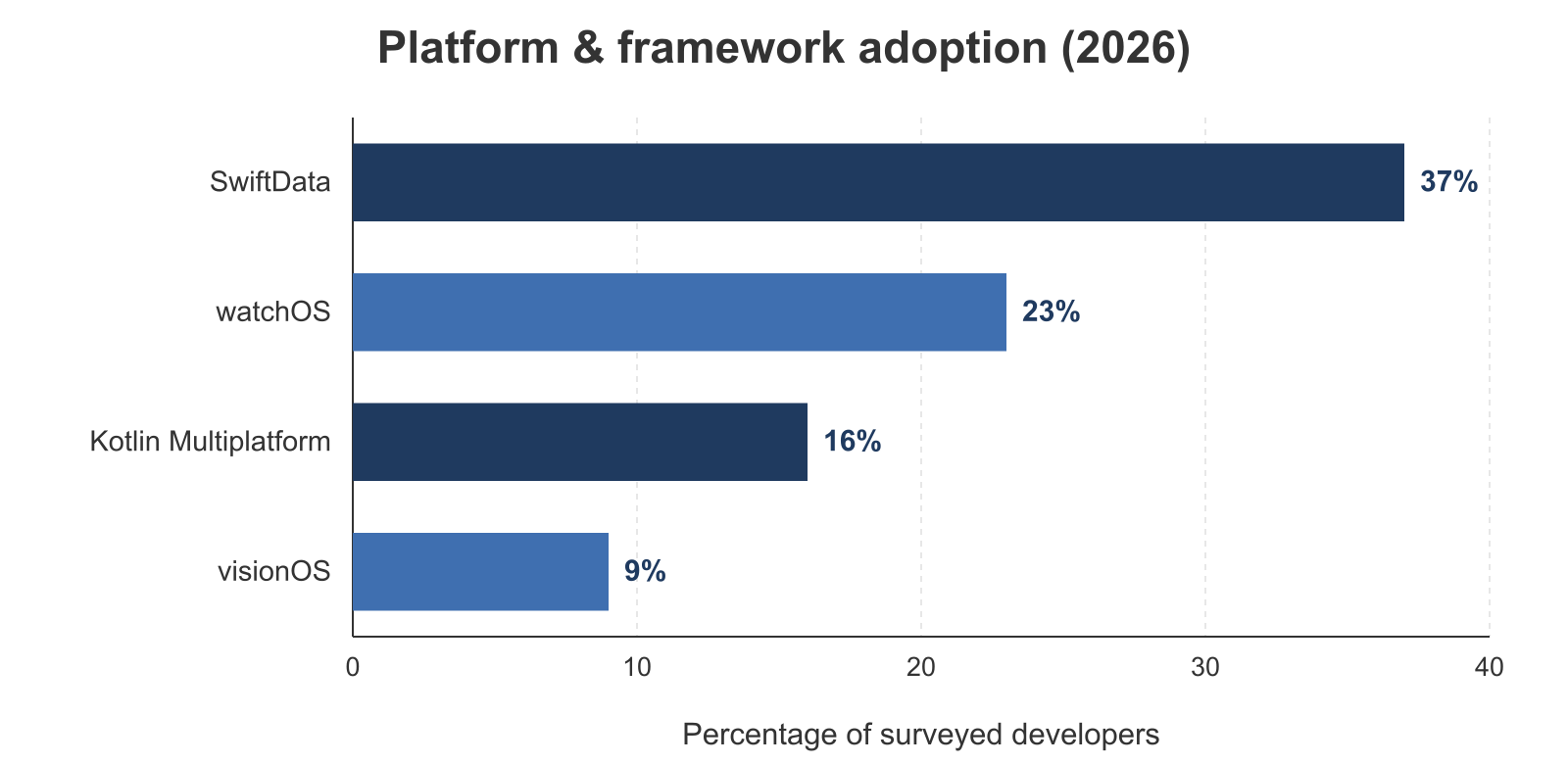
The Apple ecosystem moves fast, and developers are testing the waters. iOS is still the core, but with visionOS, watchOS, and Mac Catalyst, what counts as “mobile” is shifting in 2026. Our survey shows which platforms developers are eyeing but have not built for yet.
visionOS and Apple Vision Pro: A Slow Start with Strong Interest
Apple’s Vision Pro headset and visionOS opened up new ground in spatial computing. But so far, uptake is still early:
- 9% of developers say they are targeting or shipping for visionOS
- Apple’s most recent native count was 2,500+ visionOS apps in August 2024, with no newer figure published
- Many cite the cost of hardware and no clear payoff yet
visionOS is not widespread yet, but it has caught real interest. Some developers use a cloud Mac in these early days to prep test builds, without buying costly Vision Pro hardware.
watchOS and Mac Catalyst: Niche But Useful
Some platform add-ons are turning out more useful than others.
- 23% of developers have built Apple Watch apps, whether as fitness companions or notification tools
- 24% have used Mac Catalyst to port their iPad apps to macOS, often to meet a user request for a desktop version
- Both watchOS and Catalyst let developers reuse their existing app logic and UI, instead of starting over
Catalyst can mean quick wins, above all when you check screen scaling and resolution against a macOS test setup.
SwiftData and Swift 6: Back End Upgrades
Data storage and language features are changing too. Two big trends at the back end:
- 37% of the developers we surveyed have adopted SwiftData, Apple’s modern way to save app data in code, while many keep Core Data in older apps.
- As of April 28, 2026, all new App Store submissions must build with Xcode 26 and the iOS 26 SDK, which turns on Swift 6 concurrency checks by default. (The earlier Xcode 16 / iOS 18 SDK rule began in April 2025 and is now replaced.) Apps built against the iOS 26 SDK also get Apple’s new Liquid Glass look on native UI unless the developer opts out.
In our survey, 94% are already building current submissions on Xcode 26 and the iOS 26 SDK, 61% are keeping the Liquid Glass default, and 38% have moved to Swift 6 language mode, which treats strict-concurrency issues as errors instead of warnings.
Cross-Platform Development: Flutter, React Native & Vapor
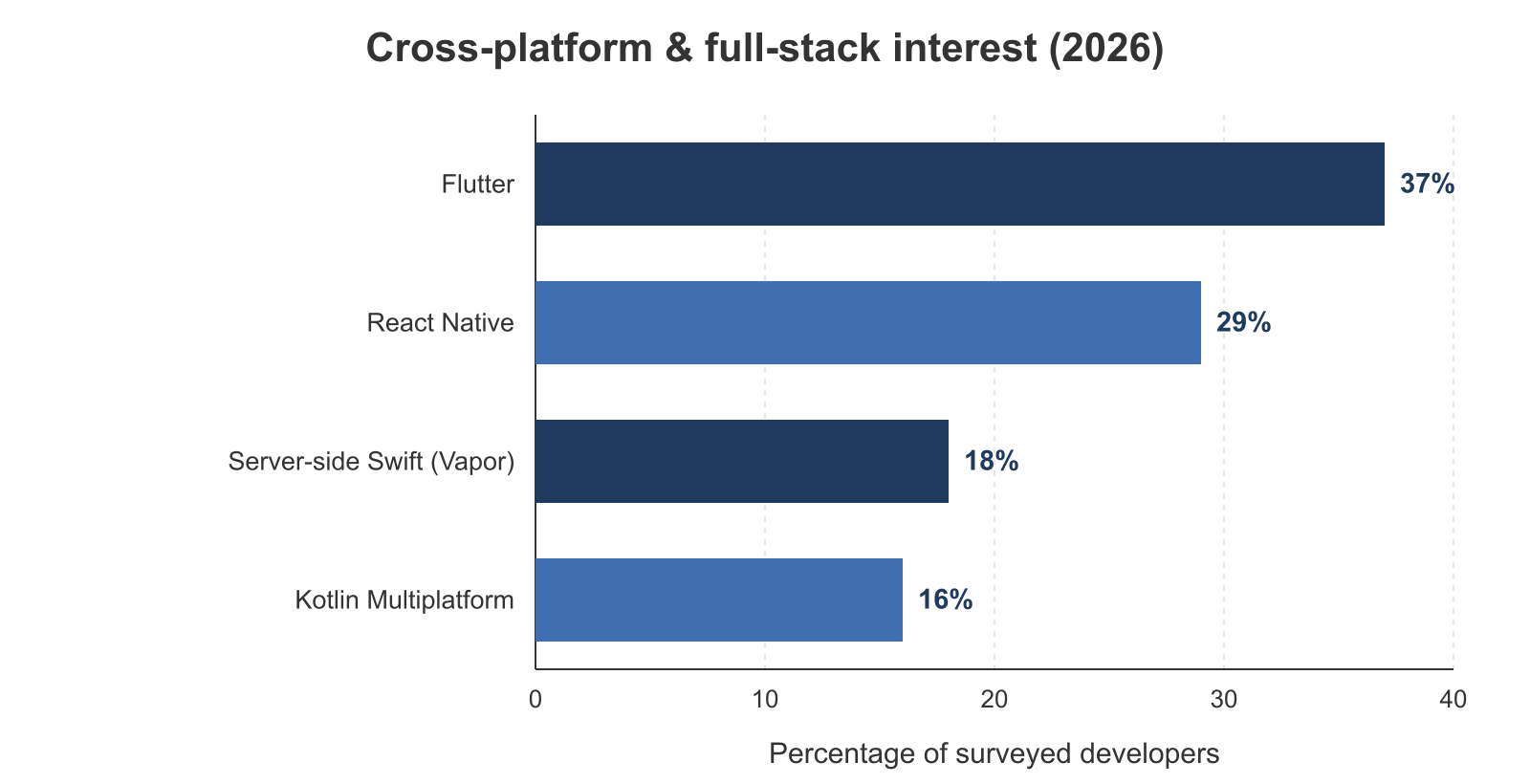
Not every iOS developer builds for Apple platforms alone. In 2026, many reach for cross-platform frameworks to grow their reach, save time, and reuse code. That is true above all for indie developers and agencies shipping to both iOS and Android.
Plenty of them develop iOS apps from a Windows PC and lean on a cloud Mac only for the final build and submission.
Flutter and React Native: Common Code, Greater Presence
Developers are still keen on cross-platform work.
- 37% of developers surveyed try or use Flutter
- 29% use React Native, often on mixed-skill teams
- Both tools promise 60-80% shared code across iOS, Android, and even web
Flutter suits teams that want to script their UI builds, and it ships with a rich set of widgets. React Native is easy to fold into projects for in-house teams that already live in JavaScript, and you can even build with React Native off a PC and route the iOS build back to a cloud Mac.
Cross-platform is no longer a niche path. It is common now. It can stretch the value of your app, above all for startups with few engineers to spare. About 16% of our developers also use or are evaluating Kotlin Multiplatform to share code across platforms.
Server-side Swift and Full-stack development
Some developers are also using Swift on the server side.
- 18% of surveyed developers have built back-end services with Vapor or a similar framework
- Common uses are sign-in, APIs, and admin dashboards
Why use Swift on the server side?
- You can share models and types between the front-end app and the back end.
- Swift makes concurrency easier to handle, so async data is clearer.
- Onboarding is faster for teams that already work in Swift.
Developer Sentiment: How Developers Feel About Apple
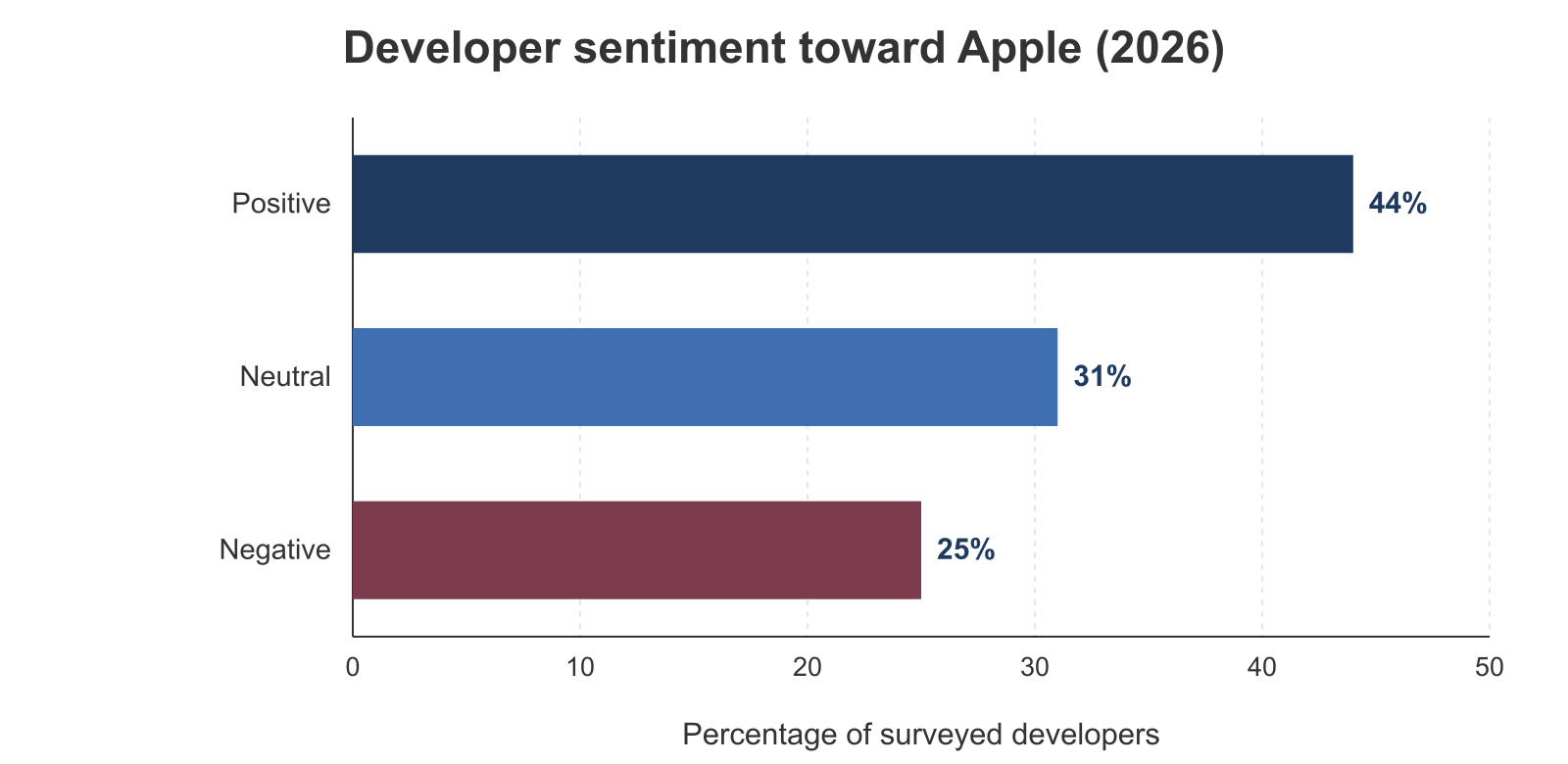
Apple’s developer tools keep changing fast. But how do developers really feel about the platform in 2026? Our survey shows a group that is split, with a positive plurality but real frustration too.
Overall Sentiment: A positive plurality, but split
- 44% of developers had a positive view of the Apple developer ecosystem
- 31% were neutral, saying they’d “take the good and the bad”
- 25% were negative, usually due to:
- App Store rules they could not predict
- APIs that break or regress in new SDKs
Apple gets credit for new ideas, but many developers want more stable app review and better backward support. The rejection rate, commission rules, and the mandatory Xcode 26 deadline all show up in the negative answers.
The Truth About SwiftUI: Powerful, but Not Perfect
SwiftUI sparks a lot of excitement, and a lot of tension.
What developers like:
- Live previews while they design the UI
- Less code than UIKit
- Built-in state handling with Swift concurrency
What developers fight with:
- Speed on older devices
- Gaps versus UIKit in complex cases
- A smaller set of add-ons and plugins
SwiftUI use is rising fast. But many teams still lean on UIKit for advanced layout or features they built before.
Monetization Models and Revenue Sources
How iOS developers make money splits across a few main models. Free apps with ads lead at 33%, subscriptions sit close behind at 27%, one-time in-app purchases reach 21%, and 9% sell a paid app up front. Another 10% do not monetize yet. Most developers mix two or more of these.
Developer Monetization Models
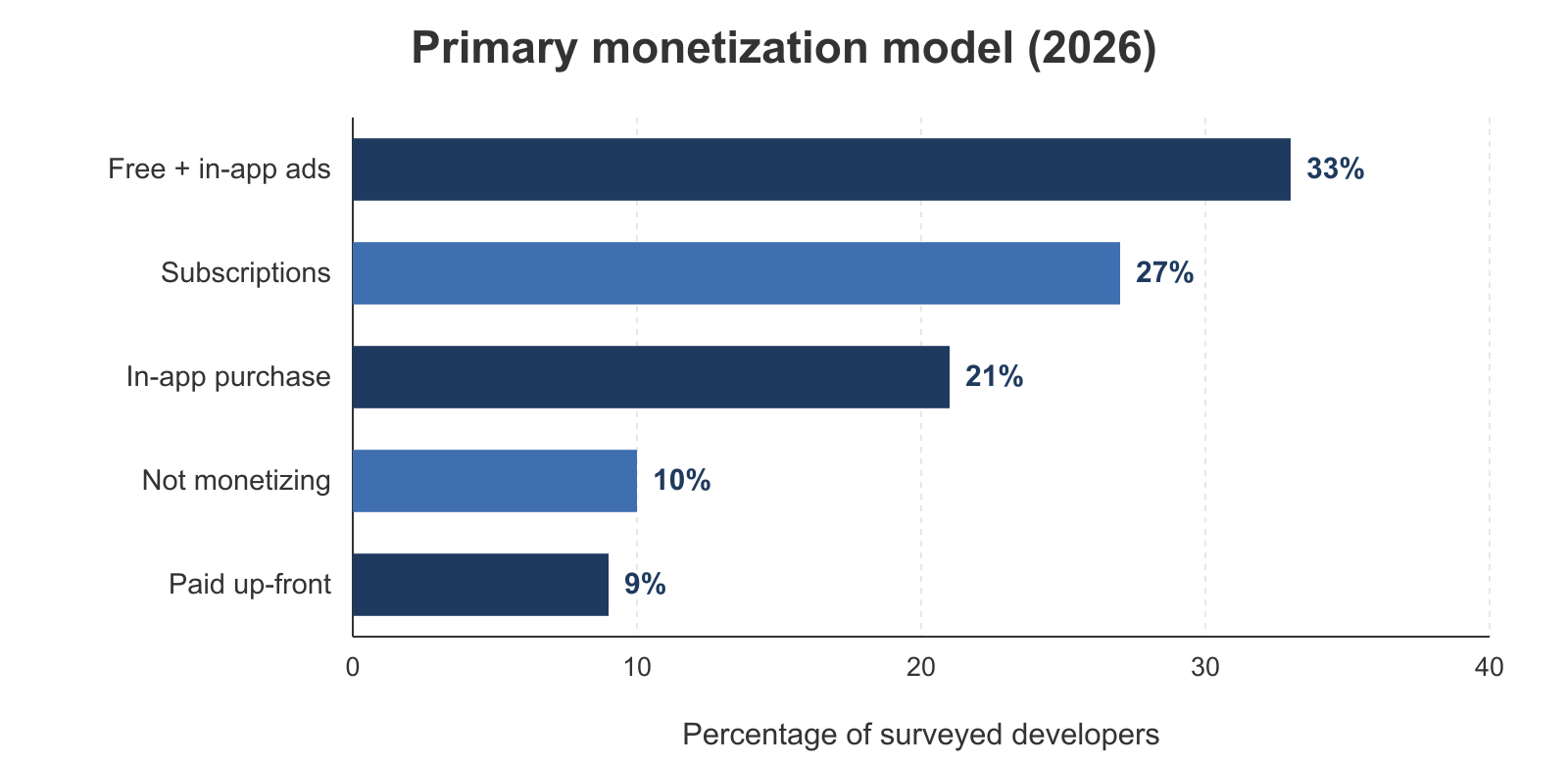
Here is what respondents said about their main revenue source:
- Free with in-app ads: 33%
- Subscriptions: 27%
- One-time in-app purchase (IAP): 21%
- Paid app up front: 9%
- Not monetizing yet: 10%, often a hobby or portfolio app
Many devs mix and match, such as a free app with both ads and a subscription. This fits the wider store, where about 95% of apps are free and earn through ads, subscriptions, or in-app purchases.
Monetization by Type of Developer
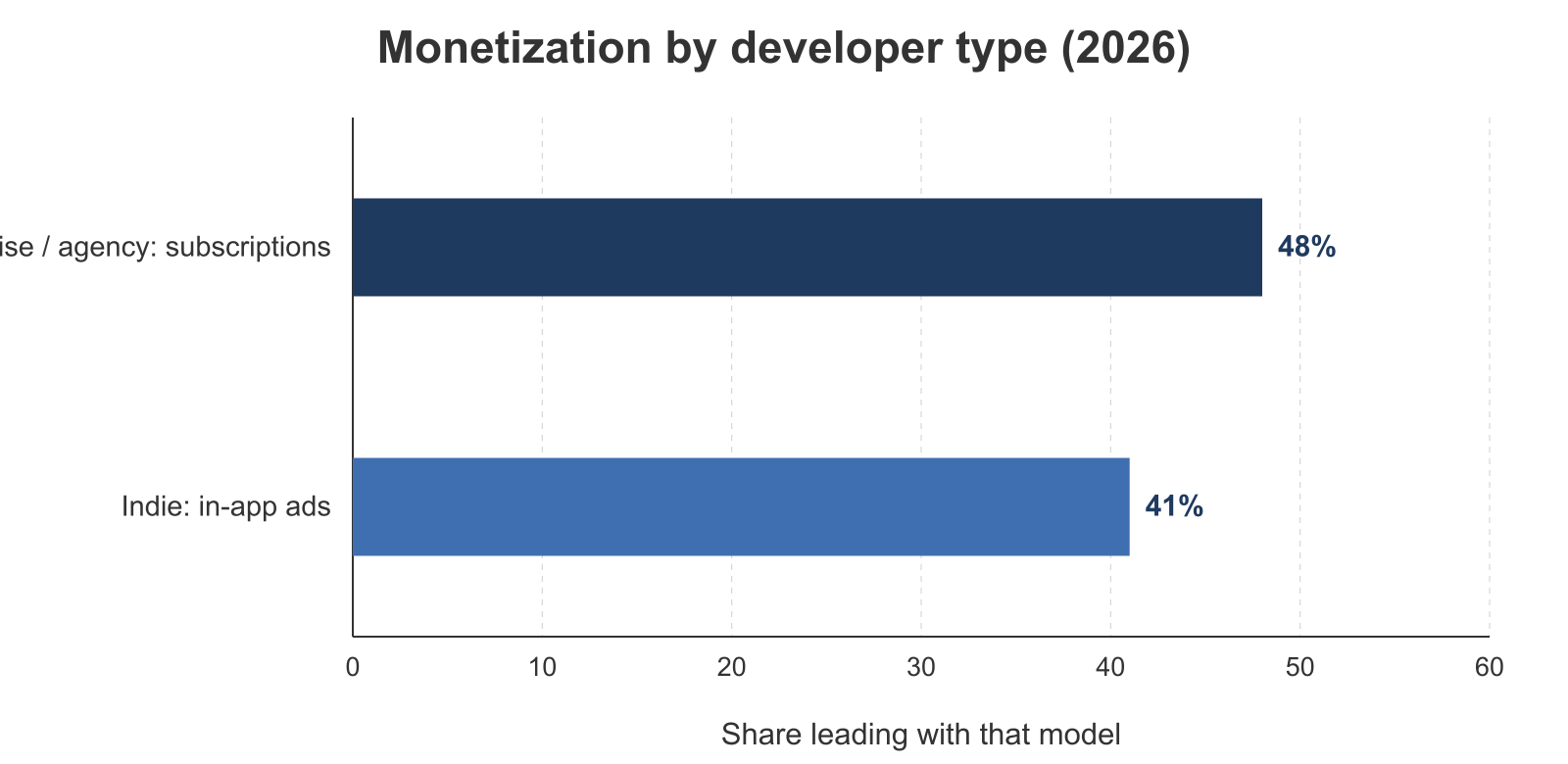
How apps make money shifts with who builds them:
- Indie developers most often lead with ads (41%) on free apps
- Enterprise and agency teams lean on subscriptions or contract work (48% subscription-led)
- Agencies usually build paid apps or subscriptions for clients
Indie developers often chase reach, while enterprise teams focus on keeping users and steady revenue.
Revenue Tiers: The Long Tail of Revenue
Sorted by what developers earn from their apps each year:
- 44% earn under $1,000 a year, or nothing yet
- 31% earn $1,000-$50,000 a year
- 18% earn $50,000-$1M a year
- 7% earn more than $1M a year
Reality check: the curve climbs steeply. A few apps hit big, but most earn modest sums.
Growth Strategies: Organic or paid?
How do developers reach users?
- Apple Search Ads: 31%
- Social media ads (TikTok, Insta): 23%
- ASO (app store optimization): 9%
- Content & community driven growth: 45%, e.g., blog posts, open-source projects, influencer collabs
iOS and the Larger Mobile App Ecosystem
To see iOS development in context, step outside the Apple world for a moment. Look at the wider mobile app market. Android has more volume. But iOS still leads where it counts: revenue and how much people use the apps.
iOS vs Android: A Brief Market Snapshot
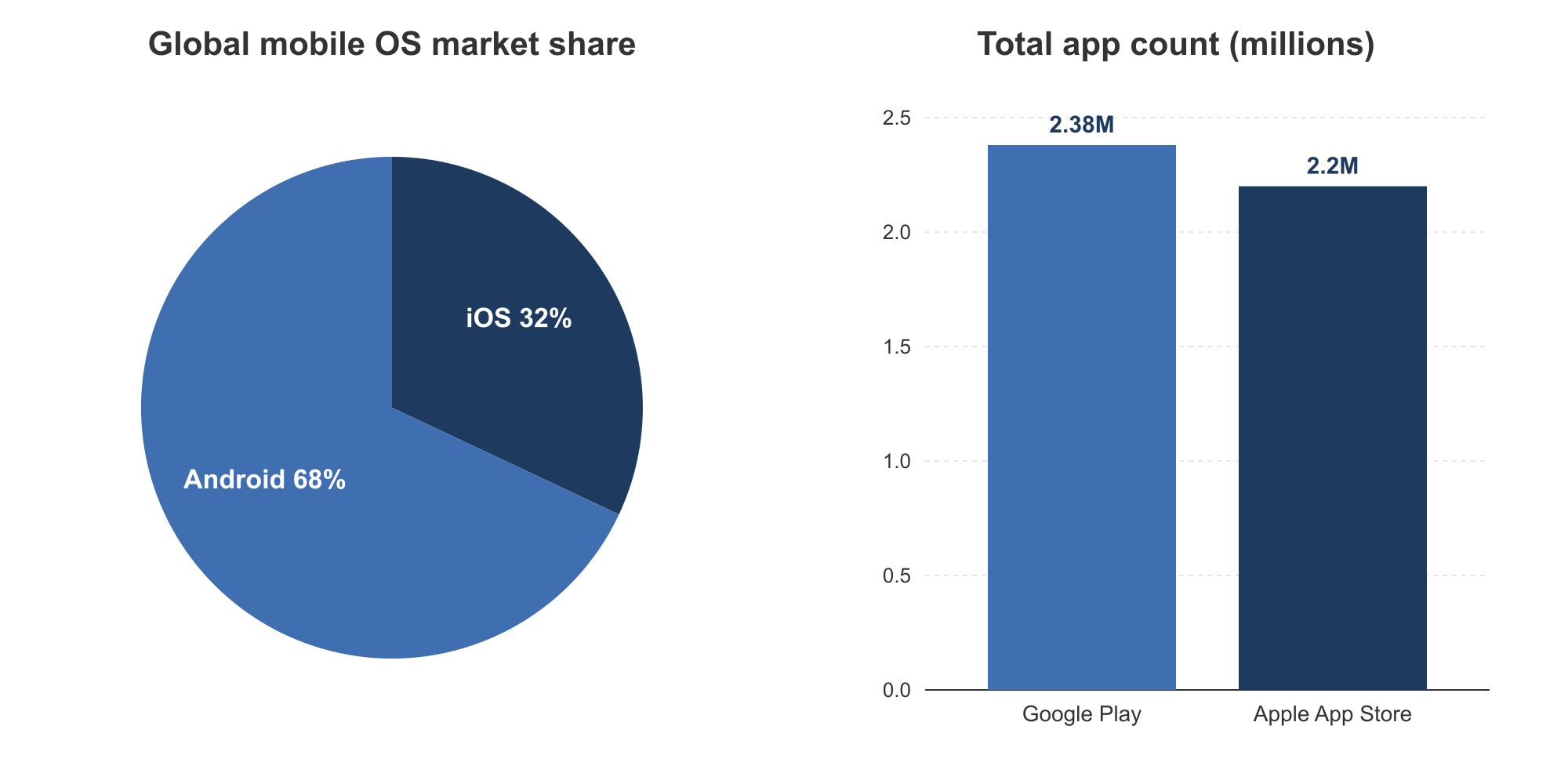
- Android: ~68%
- iOS: ~32%
- Apple App Store – about 2.2 million apps, around 2.4 million by live third-party count
- Google Play – now near parity, also around 2.4 million by the same live count
The number of apps on the Apple App Store sits at about 2.2 million in 2026 (Apple’s own end-2025 count), or around 2.4 million on a live third-party crawl, up from the ~1.6 million quoted a couple of years ago.
Total Revenue:
The App Store has fewer users than Google Play. Yet it still brings in over twice the revenue per platform. In 2025 it made about $90.6 billion against Google Play’s roughly $52.3 billion. That gap comes down to how Apple users buy: they spend more.
On Apple App Store market share, developers, and revenue in 2026: about 32% OS share, over 60 million registered developers, and roughly $90.6 billion in App Store spend in 2025.
Insights on App Engagement and Churn
User habits tell a hard truth about keeping people around. Going by 2025-2026 benchmarks:
- Around 3.6 hours a day spent in mobile apps per user
- Day-1 retention sits at roughly 25%
- Day-30 retention falls to about 4 to 5%
Getting downloaded is easy. Staying on someone’s phone is hard, which is why design, speed, and a smooth first run matter more than ever.
Major Trends Shaping iOS App Development’s Future
The trends shaping iOS development now reach past pure engineering and into a platform that changes fast. AI and Core ML are moving into everyday features, augmented reality is opening new app types on visionOS, and SwiftData is reshaping how apps store data. Cloud-based macOS access ties it together, keeping a build setup current the day a new SDK ships.
Apple keeps building tools that help developers design and ship apps faster. The design tools and workflows are part of that push.
Developer-Friendly Tech trends
A few technologies are changing how iOS apps get designed and built:
- AI and Core ML: Tailored experiences, smarter UX, and voice or image recognition are going mainstream, and on-device Apple Intelligence now runs models right on the iPhone.
- Augmented reality and spatial computing: visionOS gave it a boost, and it is opening up new kinds of apps.
- Motion design, gesture UI, and SwiftData: Users expect smoother, more natural apps, and Apple’s toolkits help developers deliver them.
Apple keeps pushing the limits, and developers have answered by adding richer, smarter features to their apps. The 2026 App Store release surge, with iOS releases up about 80% year over year in early 2026, shows how fast AI tooling is speeding up the work.
Cloud-Based macOS Access Is Now a Competitive Advantage
As Apple’s tools get more demanding, a cloud Mac has gone from a “nice to have” to a real need:
- Scale up without buying hardware, handy for indie teams or agencies
- CI-ready builds with no local machine to set up
- Always-on toolchains that stay current with Xcode and SDK changes
A rented cloud Mac gives a team a fresh build setup the day a new SDK ships. That matters more in a year when the rule moved from Xcode 16 to Xcode 26.