Last updated: July 2026
On this page
TL;DR: To run GLM 5.2 on a Mac you need a 256GB Mac Studio, the only Apple machine that fits the 2-bit quant (about 239GB on disk, 245GB of memory) at roughly 3 to 9 tokens per second. A 16 to 64GB Mac cannot load the full model, but a smaller sibling and a rented-Mac path exist.
GLM 5.2 is a 744B-parameter open-weight model from Z.ai. It activates only about 40B parameters per token because it is a mixture-of-experts design, and it ships under an open license. Full precision is about 1.5TB, so nobody runs it raw.
A free tool called Unsloth publishes compressed builds (GGUF quants) that shrink it. The 2-bit build needs roughly 245GB of memory and the 1-bit build about 223GB. The higher-quality 4-bit build lands between 372 and 475GB, which wants a 512GB Mac Studio that Apple stopped selling in March 2026.
On Apple Silicon, generation speed is capped by memory bandwidth (around 800GB/s), not by how many cores you have. That is why even a 256GB Studio lands at 3 to 9 tokens per second rather than the speeds a data-center GPU hits.
This page walks through the memory math per quant, the llama.cpp setup on a Mac Studio, and the real tokens per second you should expect. Then it covers three honest options if you do not own a 256GB machine, starting with the smaller GLM-4.7-Flash that runs fine on a normal Mac.
Can you run GLM 5.2 on a Mac? The honest answer
Only a 256GB Mac Studio realistically fits GLM 5.2, and only via the 2-bit quant. That build is about 239GB on disk and wants roughly 245GB of memory. A 16 to 64GB MacBook or Mac mini cannot load the full model at all, so the answer for most Macs sitting on most desks is no.
Owning “a Mac Studio” is not enough. It has to be the 256GB configuration. A 64GB Studio, even a fast M1 or M3 one someone bought before local models were a thing, still falls short by a wide margin.
I watched a friend try exactly this: a high-end Studio bought years ago for video work, no chance of loading GLM 5.2, back to a smaller Qwen model within the hour.
That gap between “I own a Mac Studio” and “I own the right Mac Studio” is where people get stuck. If you are still choosing a Mac for heavy compute work, memory is the spec that decides this, not the chip generation. Serious PC rigs come up short too. A common forum report is a 192GB workstation with an RTX 3090 that “almost” runs it and then does not, since MoE offloading still wants around 256GB of system memory.
If you have a 256GB Studio, or you rent a Mac with that much memory, skip ahead to the llama.cpp setup. If you do not, the smaller sibling and the cloud paths near the end are written for you.
I would rather you know which route you are on before you spend two hours downloading 239GB of weights. There is one more catch even when the model fits: speed on a Mac is a bandwidth story, not a core-count story, so even a machine this expensive generates text at about reading speed. More on that number later.
What GLM 5.2 needs: the memory math per quant
Full-precision GLM 5.2 is about 1.5TB, so everyone runs a compressed GGUF quant instead. The memory you need depends on which quant you pick. The 2-bit build wants about 245GB, the 1-bit about 223GB, and the 4-bit build 372 to 475GB. Match your machine to the row, not to your optimism.
This is the full ladder, mapped to the Mac that actually holds each one.
| Quant (Unsloth GGUF) | Total memory needed | Accuracy retained | Which Mac fits |
|---|---|---|---|
| 1-bit (UD-IQ1_S) | ~223GB | ~76% top-1, 86% smaller | 256GB Mac Studio |
| 2-bit (UD-IQ2_M) | ~245GB (239GB disk) | ~82%, 84% smaller | 256GB Mac Studio |
| 4-bit (UD-Q4_K_XL) | ~372-475GB | Near-full | 512GB Studio (discontinued) |
| 8-bit | ~810GB | Near-full | No single Mac |
Which quant fits which Mac
The accuracy numbers deserve a caveat. Unsloth measures retention with KL-divergence, a statistical closeness score, not a test of real work. A heavy local-LLM crowd on the forums pushes back on this hard, and I think they are right.
Low-bit quants tend to degrade on long, real tasks a step or two before the divergence numbers say they should. So “82% at 2-bit” is a fair headline, but if your work is long and precise, plan to feel the compression.
The 256GB ceiling is the wall behind all of this. Apple’s current maximum on a new Mac is 256GB of unified memory. The 512GB M3 Ultra that used to hold the 4-bit build is no longer sold new as of March 2026. So on anything you can buy today, 4-bit and up are off the table, and 2-bit is the best quality that fits.
This is the same story as another big model that needs a lot of Mac memory, or what happens when you put MiniMax on a Mac mini: the model is the easy part, and the memory is the whole game.
The MoE design trips people up, and it caught me at first too. GLM 5.2 is 744B total parameters but only activates about 40B per token, so I assumed a GLM 5.2 Mac Studio setup would only need memory for the active 40B.
It does not. The whole model still has to sit in memory so the router can reach any expert on any token. The 40B figure affects speed, not the amount of RAM you have to buy.
How to run GLM 5.2 on a Mac Studio, step by step
On a 256GB Mac Studio, the working setup is llama.cpp built with Metal, the Unsloth 2-bit GGUF, and a local server you talk to over HTTP. The 2-bit build is about 239GB, so budget a little more than that in free disk (call it 250GB) plus the Xcode command-line tools. Most of the wait is that download.
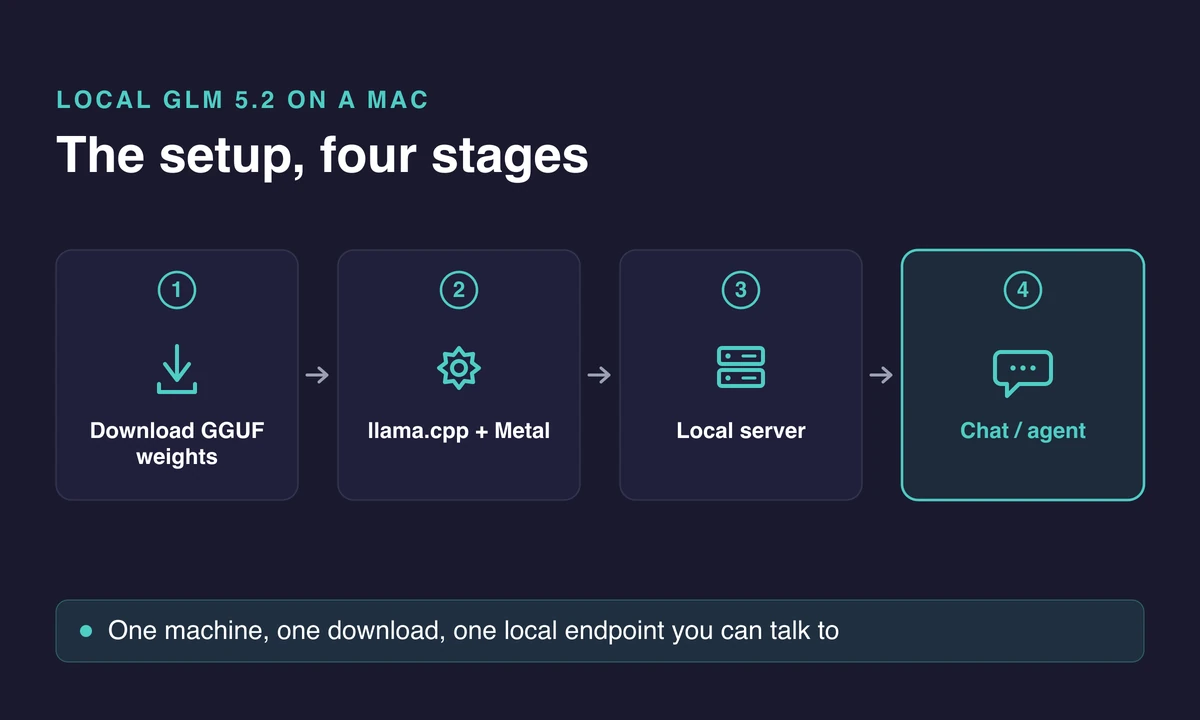
The shape of it: get the tools, get the weights, start the server with sane flags, then send a prompt and watch the load.
The setup, step by step
- Install the Xcode command-line tools, then build llama.cpp with Metal support so it uses the Mac’s GPU. Metal is Apple’s graphics layer, and this is the endorsed runtime on Apple Silicon. A CPU-only build will technically load the model and then crawl, so this step is not optional.
- Download the Unsloth 2-bit dynamic GGUF (the UD-IQ2_M build). It is about 239GB, so start it before you need the machine and let it run. Check your free disk first.
- Start the llama.cpp server with Metal offload turned on, a sensible context length like 16K to 32K rather than the full window, and KV-cache quantization enabled to save memory. The KV cache is the model’s short-term memory of your conversation, and it eats RAM fast at large context sizes.
- Send a first prompt and watch the load. A healthy start loads the weights into memory once (this takes a minute or two at 239GB), then answers. If it never finishes loading, you are out of memory for the quant you chose.
The quickest sanity check is to hit the server’s local endpoint with a one-line request and confirm it responds before you wire up any coding tool. If the first token takes ten or fifteen seconds and then text streams steadily, you are in good shape.
Start with a small context window. Do not run GLM 5.2 at its full 1M-token context on a Mac. The KV cache for a million tokens eats the memory you need for the weights, so keep context to 16K or 32K and turn on KV-cache quantization. Raise it later if you have headroom to spare.
Which tool: llama.cpp, LM Studio, or Ollama
If you would rather click than type, LM Studio is a solid GUI alternative that wraps the same llama.cpp engine, and it handles the download and flags for you.
One tool to skip here is Ollama. It is the easiest start for small models, and I reach for it constantly on modest hardware. But it is not the path for a 744B model on a normal Mac. It cannot make GLM 5.2 fit where the memory simply is not there. Stick with llama.cpp or LM Studio on a machine with 256GB, and be honest with yourself about whether that Mac is worth the money for this one model.
GLM-5.2 runs on my Mac Studio via llama.cpp, and now it has a browser! I built an agent loop around browser-use: I asked it to find a PII model so it searched Hugging Face and found privacy-filter-nemotron. One open model finding another. AI must be owned, not rented.
Real tokens per second on Apple Silicon
Expect roughly 3 to 9 tokens per second for the 2-bit quant on a 256GB Mac Studio, single user. That is the safe planning number. You will see higher figures quoted around the internet, and they are not lies, they just measure different things, so it is worth knowing why the spread exists before you get your hopes up.
| Setup | Quant | Reported tok/s | Source type |
|---|---|---|---|
| 256GB Mac Studio | 2-bit | ~3-9 | Multiple guides |
| M3 Ultra 256GB | Mixed / MoE | ~15-20 | Community estimate |
| Mac Studio M3 Ultra 256GB | 1-bit | ~21.6 | Hands-on report |
| Data-center GPU | Various | Much higher | Not a Mac |
Why the reported speeds vary
The outliers reconcile once you look at what changed. One community estimate puts a 40B-active MoE around 15 to 20 tokens per second on an M3 Ultra, and one hands-on report hit about 21.6 tokens per second on the smaller 1-bit quant.
A smaller quant means fewer bytes to read per token, so more speed and a bit less quality. The high teens are real for lighter quants, but budget 3 to 9 for the 2-bit build most people actually want.
Why is a machine this expensive not faster? Generation on a Mac is memory-bandwidth math. Each token has to read all the active weights, roughly 40B parameters, and the speed is that bandwidth divided by the bytes per token.
Apple’s unified memory runs around 800GB/s, versus 80 to 100GB/s for typical DDR5 desktop RAM. That gap is why a Mac can do this at all when a normal PC with the same RAM total would choke.
Mac vs a multi-GPU rig
A big multi-GPU rig can run the model too, and it beats the Mac on raw speed. The choice comes down to a trade Mac owners tend to accept:
- Quiet unified-memory Mac: slower, but cool, silent, and one box you can buy off the shelf.
- Four-RTX-3090 rig with 192GB RAM: faster, but it draws far more power, runs hot and loud, and costs a lot to assemble.
That same shared-memory design is what makes Apple Silicon good for machine learning on a Mac in general, not just this one model.
In practice, 3 to 9 tokens per second feels about like reading speed. I have sat watching a small model stream at roughly that pace on a rented Mac mini, and it is fine when I am reading every line and maddening when I want a whole file at once. It is fine for careful coding where you read each suggestion anyway, and slow for bulk generation or long drafts where you want a wall of output now.
If that pace sounds painful, take the smaller-model path below instead. It is the same story as running Llama on a Mac: the bottleneck is almost always memory, not the chip.
No 256GB Mac? Your three real options
Most people reading this own a 16 to 36GB Mac, so the full 744B model is out of reach and you need something else instead. You have three honest paths here, and the first one is genuinely useful on hardware you probably already own.
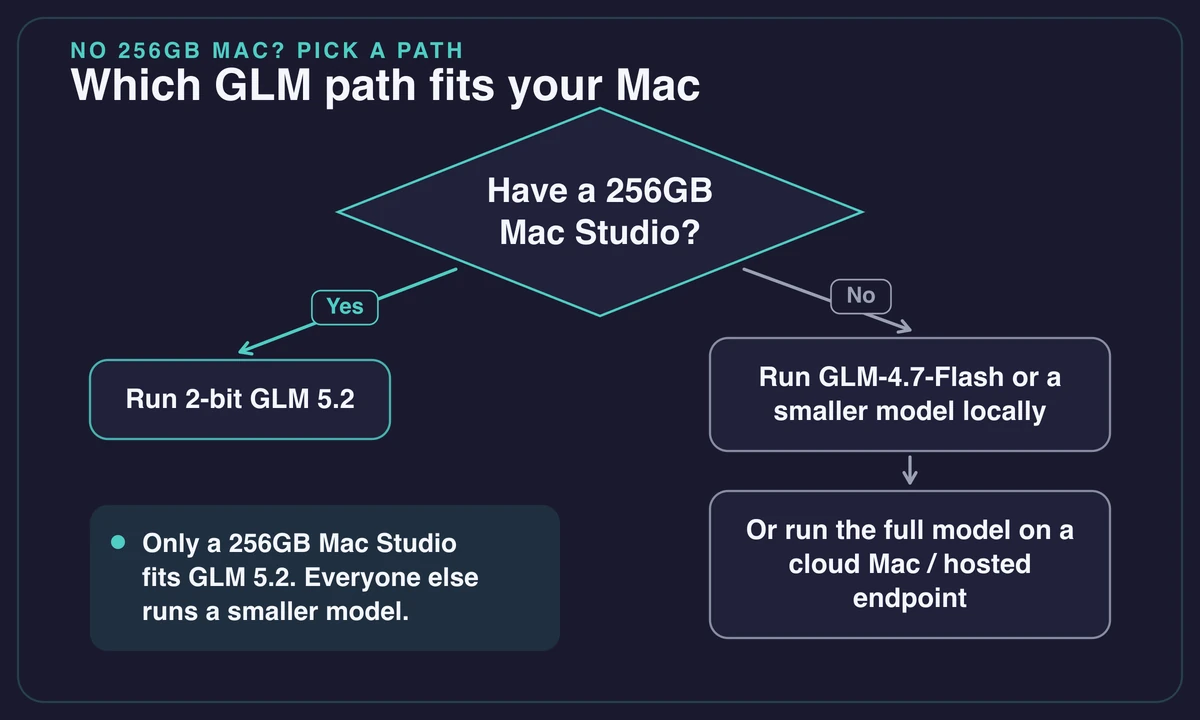
Run the smaller sibling instead
GLM-4.7-Flash is around 10 to 12B parameters, and it runs on a normal Mac at roughly 60 to 85 tokens per second on an M4 with 48GB, using about 5 to 6GB at 4-bit through Ollama. This is the GLM you can actually run locally today, fast and comfortable, and smart enough for real debugging and refactoring against a clean spec.
If you just want a capable GLM without a five-figure hardware bill, start here and lean on the general run a local LLM on a Mac walkthrough to get the runner installed.
Pick a different capable local model
The dominant pattern among people who do this daily is a small, strong model on the Mac for everyday work, reaching for the big one only when a small model clearly is not enough. A smaller model like Qwen at around 27B, carefully quantized, is the community favorite for a modest machine, and it handles a lot more than you would guess. Mistral on a Mac is another light, capable pick if Qwen is not to your taste.
Honestly, for most coding and writing, this is the setup I would actually run, and I say that as someone who likes having the big model around. I spent a week resisting it, sure the big model was the “real” answer, and the small one on a rented mini quietly did nearly everything I threw at it.
Run the full model on a machine with the memory
This is where a cloud Mac fits. You can rent a Mac with the unified memory to try the real 2-bit quant without buying a 256GB Studio, or reach a hosted GLM endpoint for the occasional big job while a small model handles your day-to-day.
I want to be straight about the limits here. Rentamac.io rents dedicated Mac Mini M4 instances with 16GB of memory, which run GLM-4.7-Flash and other small local models comfortably and are a clean way to do real macOS dev work in the cloud.
They do not fit the full 744B GLM 5.2, which needs 256GB, far more than any single Mac Mini M4 you can rent. So the rented Mac is the honest answer for the smaller models, not the full 5.2, and it is a fine box to set up a coding agent around one of them. Do not let anyone (me included) tell you otherwise.
The 256-Mac-mini-cluster post is a joke, not a build. You cannot pool a stack of 16GB Mac Minis into one 256GB memory pool for a single model, because each machine’s memory is its own.
Use one machine with enough unified memory, or run a smaller model. There is no clever way around the wall, and the best local models by RAM tier all assume one box, not a cluster.
Cost is the part people skip. Running the model draws only about 50 cents to 2 dollars an hour in electricity, but the machine to run it on is the expensive part. A 256GB Studio is a serious purchase to justify for 3 to 9 tokens per second.
My current local AI setup: – 2x DGX Spark linked (256gb) > GLM 5.2 @ 2bit, reasoning + agent loops – Mac Studio M3 Ultra 96gb > Wan 2.2, image generation – Mac mini M5 Pro 64gb > Qwen3.6-35B, code + content drafts – MB Air M5 24gb > Qwen3 30B-A3B, bulk processing – iPhone >
Common errors when loading GLM 5.2 on a Mac
Most GLM 5.2 loading failures on a Mac come down to memory or disk, and the fixes are the same handful every time. The model either does not fit, the download runs out of room, or the context window is set so high that the KV cache starves the weights.
| Symptom | Likely cause | Fix |
|---|---|---|
| Model won’t load / out of memory | Not enough memory for the chosen quant | Drop to a smaller quant or a smaller model; check free RAM before loading |
| Painfully slow, swapping | Context window set too high (the 1M KV-cache tax) | Lower context to 16K-32K, enable KV-cache quantization |
| Download dies mid-way | Disk filled before the ~239GB finished | Free the space first, then restart the download |
| Runs but output is weak | Low-bit quant degrading on long context | Step up a quant if you have memory, or keep tasks shorter |
| GPU sits idle, very slow | llama.cpp built without Metal | Rebuild with Metal support so it uses the GPU |
The most common load failures
The disk one gets me every time on big pulls. I have kicked off a 200GB-plus download, walked away, and come back to a failure at 90% after the drive filled with the model plus everything already on it.
Check free space against the download size before you start, not after. A 239GB file needs 239GB free plus a little headroom, and “I have a big SSD” is not the same as “I have 239GB free right now.”
The output-quality one is subtler and worth naming. I spent an afternoon convinced I had misconfigured something before I accepted the model was just compressed hard. If GLM 5.2 loads and runs but feels dumber than the benchmarks promised, that is usually the low-bit quant showing its seams on long context, not a broken install.
The 2-bit build is a real compromise. On a 256GB machine you are already at the best quant that fits, so shortening your tasks is often the only lever you have left.
Frequently asked questions
How much RAM do you need to run GLM 5.2 locally?
About 245GB of memory for the accessible 2-bit quant, which in Mac terms means a 256GB Mac Studio. The 1-bit quant needs roughly 223GB, and the 4-bit build wants 372 to 475GB, which needs a 512GB machine Apple no longer sells new. A 16 to 64GB Mac cannot load the full model at all.
Can GLM 5.2 run on a MacBook Pro?
Not the full model. Even a maxed-out MacBook Pro tops out well below the roughly 245GB the 2-bit quant needs, so it cannot load GLM 5.2. You can run the much smaller GLM-4.7-Flash on a MacBook (about 5 to 6GB at 4-bit), or another light model such as gpt-oss on a Mac, or run the full 5.2 on a 256GB Mac Studio or a cloud Mac that has the memory.
How many tokens per second does GLM 5.2 get on a Mac Studio?
Roughly 3 to 9 tokens per second for the 2-bit quant on a 256GB Mac Studio, single user. A 1-bit quant can reach the high teens, with one hands-on report around 21.6 tokens per second. Speed is capped by unified-memory bandwidth (around 800GB/s), not core count, which is why it lands in this range rather than being GPU-fast.
What is the smallest GLM 5.2 quantization?
The 1-bit dynamic GGUF (UD-IQ1_S), around 223GB total, which keeps roughly 76% top-1 accuracy while being about 86% smaller than full precision. It is the smallest that fits on a 256GB Mac, but low-bit quants degrade more on long-context work, so 2-bit is the usual pick if you have the memory to spare.
Is it cheaper to run GLM 5.2 locally or use a hosted API?
For most people, a hosted endpoint or a rented machine wins. A 256GB Mac Studio is a large one-time cost for 3 to 9 tokens per second.
Even people who run local models daily tend to reach a hosted GLM endpoint or a bigger remote machine for the rare big job, and keep a smaller model local for everyday work. Buying a 256GB Studio purely for GLM 5.2 is hard to justify unless you need it constantly and offline.