On this page
MacBooks are worth it – for the right user. If you value a premium design, fast performance, long battery life, and if you need a seamless experience with other Apple devices, then a MacBook is one of the best laptops you can buy in 2026.
Conversely, if you use any Windows-specific software, are into gaming, or need lots of customization, then a MacBook may probably not be the best option for you.
So, who should buy a MacBook?
- Students and professionals who need reliable, long-lasting laptops,
- Designers, developers, and content creators who make use of the power of Apple Silicon,
- Anyone already invested in the Apple ecosystem.
Despite the ever-increasing prices, MacBooks are still incredibly popular on university campuses, in startup offices, and at creative agencies, which leaves one to wonder if it’s just an overpriced accessory or an elite necessity.
We will explicitly highlight MacBook pros and cons, compare macOS vs Windows laptops, and ultimately help you decide if getting a MacBook would be a wise choice.
macOS vs Windows Laptops: A Never-Ending Battle
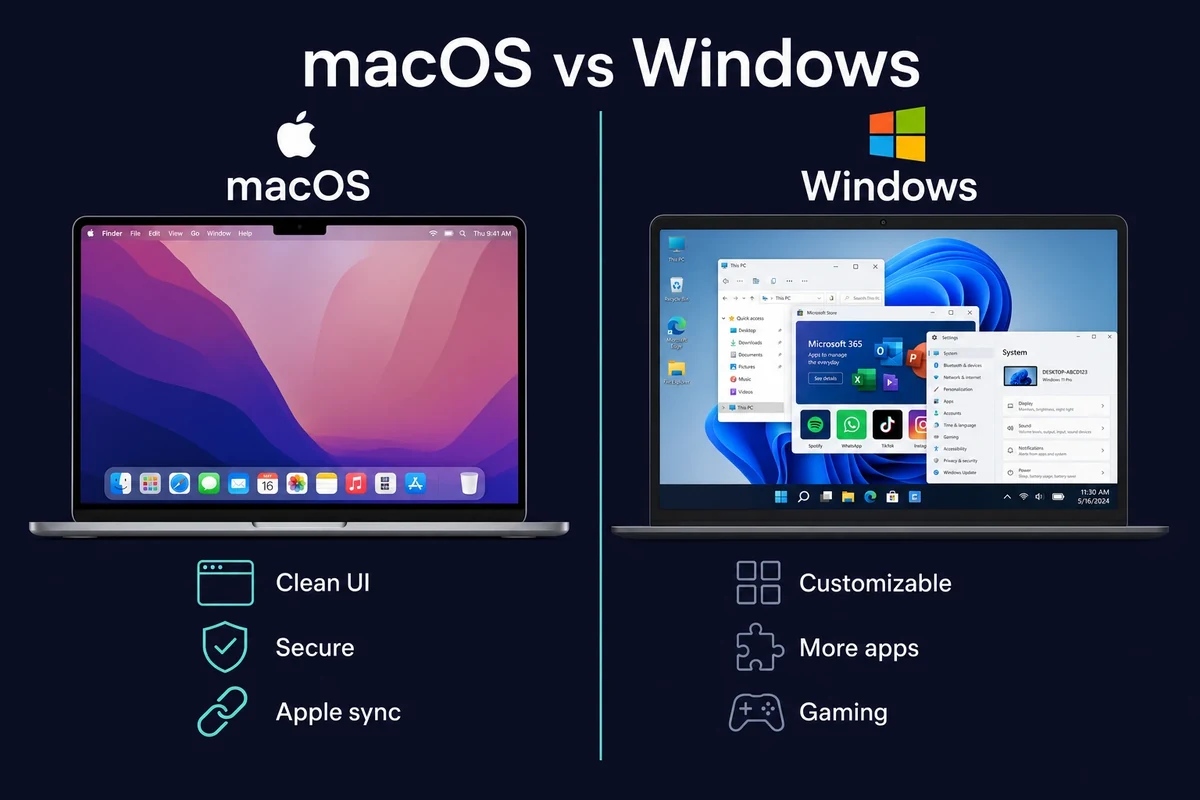
The moment you think about getting a new laptop, the first question you might ask yourself is whether to choose a relatively pricier MacBook or a more budget-friendly counterpart – a Windows laptop.
Ultimately, your decision will hinge upon your workflow, preferences, and the software necessary for your work. We’ve prepared a quick review of their key differences:
1. UI and UX
- macOS: Clean, minimalist interface with an intuitive dock, gestures, and system-wide consistency.
- Windows: Very customizable and easy to use, but may feel cluttered with third-party bloatware.
macOS is simpler and more polished immediately; Windows is more flexible.
2. App Compatibility
- macOS: Better with productivity, design, and development apps, but limited with gaming and specific niche enterprise software.
- Windows: Compatible with a lot of apps, including specialized software (enterprise ERPS, some finance platforms).
3. Security
- macOS: More secure by design, fewer viruses, control for the hardware and software integration.
- Windows: Improved security with Windows 11, but still has many security flaws due to the open ecosystem.
4. Hardware Integration
- macOS: Seamless integration with iPhone, iPad, Apple Watch – Airdrop, Handoff, FaceTime, iCloud, Universal Clipboard.
- Windows: Less smooth unless using Microsoft services.
If you use other Apple devices, macOS creates a robust, time-saving ecosystem that is hard to compete with.
5. Customization
- macOS: Limited upgradability (mostly RAM and storage are soldered); Limited ports on the majority of devices
- Windows: More room for upgrading parts, using an external GPU, and connecting accessories without an adapter
6. Gaming Support
- macOS: Limited, though improving with Metal 3 and Apple Silicon.
- Windows: Still the gold standard for PC gaming, supporting AAA titles, emulators, and mods.
Pros of MacBooks
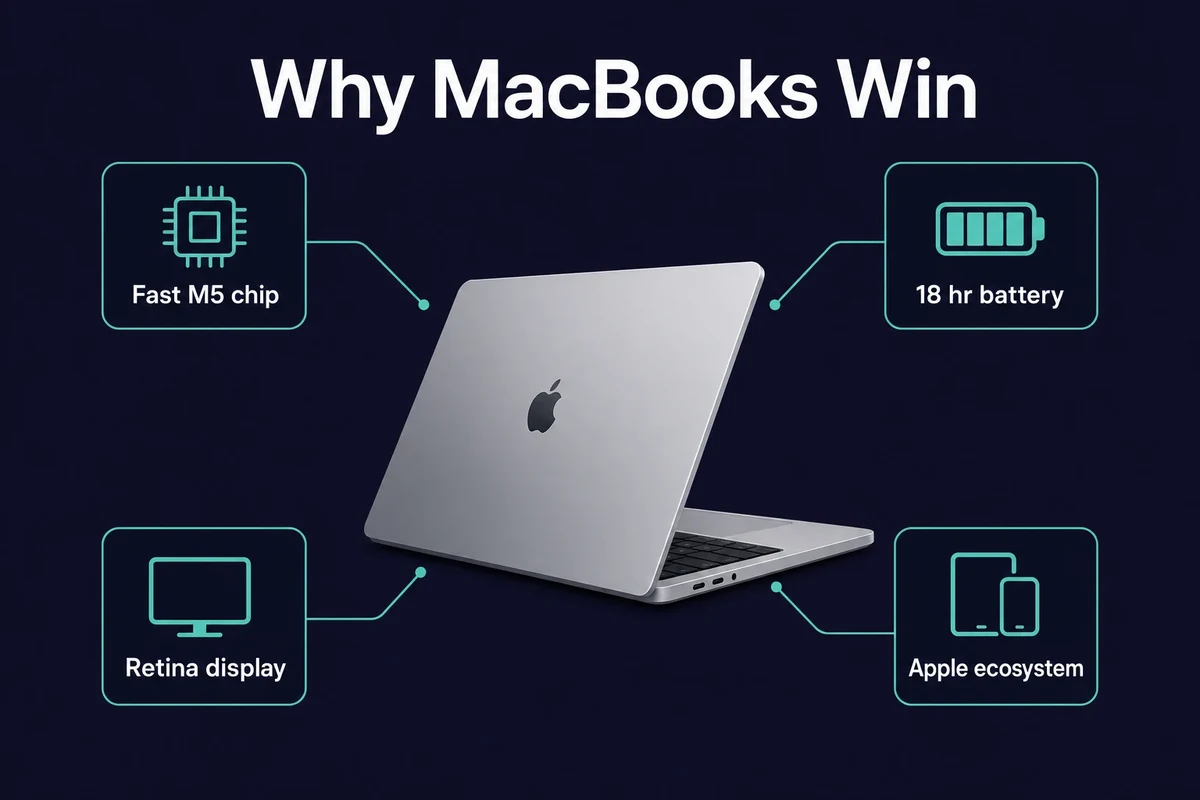
So are MacBooks good laptops in 2026? For most buyers, yes, and here is exactly why. If you’re hesitating – should you buy a MacBook or not, consider the reasons Apple laptops always land as best-sellers. Below are the MacBook pros and cons that actually shape a 2026 buying decision.
1. Strong Apple Silicon Performance
Apple’s transition to its in-house silicon (M1, M2, M3, M4, and now M5) has completely changed MacBook performance. These chips are:
- Fast, with the M4 about 30% quicker than the M3 (around 3,750 single-core in Geekbench 6),
- Energy efficient with low heat output,
- Optimized for macOS and native apps.
The M5 adds about +14% single-core and +22% multi-core on top of that. Even the entry-level M1 MacBook Air still outpaces many mid-range Windows laptops. The newer chips also bring AI features and support for extra external displays.
2. Lasting Battery Life
Battery life is one of the strongest reasons to buy. Thanks to the M-series architecture,
- The M4/M5 MacBook Air gets up to 18 hours of video streaming and around 15 hours of wireless web browsing (Apple’s figures), with roughly 10 hours of real-world mixed use,
- 99% of the time, you won’t have to carry your charger,
- Magsafe charging adds convenience (at least no more ripped off cords!).
One more quiet upgrade: 16GB of unified memory (the RAM the chip and graphics share) is now the standard base on the Air, up from the old 8GB. That alone makes the entry model far more comfortable for everyday multitasking.
3. Premium Design
Let’s agree on this one – you’re paying for more than just performance. You’re also paying for:
- A beautiful, minimalist aesthetic with strong all-aluminum construction,
- Lightweight and easy to travel with across all models (even the larger 16″ Pro),
- Best-in-class keyboards, trackpads, and speakers.
If aesthetics, feel, and engineering matter to you, then MacBooks offer something you can’t find anywhere else.
4. Best Display and Audio
MacBook displays and sound, especially the Pro line, are next level, with features like:
- Retina and liquid retina XDR displays with high brightness, deep contrast, and true colors,
- MacBook Pro’s 120Hz ProMotion refresh rate,
- 6-speaker systems with spatial audio (15″ Air, 14″/16″ Pro)
Perfect for graphic designers, video editors, and movie binge-watchers.
5. Integration into the Apple Ecosystem
If you have an iPhone, Apple Watch, or an iPad, a MacBook will integrate seamlessly with them:
- Airdrop files to and from other devices instantly,
- The handoff feature allows you to switch tasks mid-use across platforms,
- Use your iPad as a second display that mirrors your Mac desktop,
- Sync messages, photos, and Safari tabs through iCloud.
Cons of MacBooks
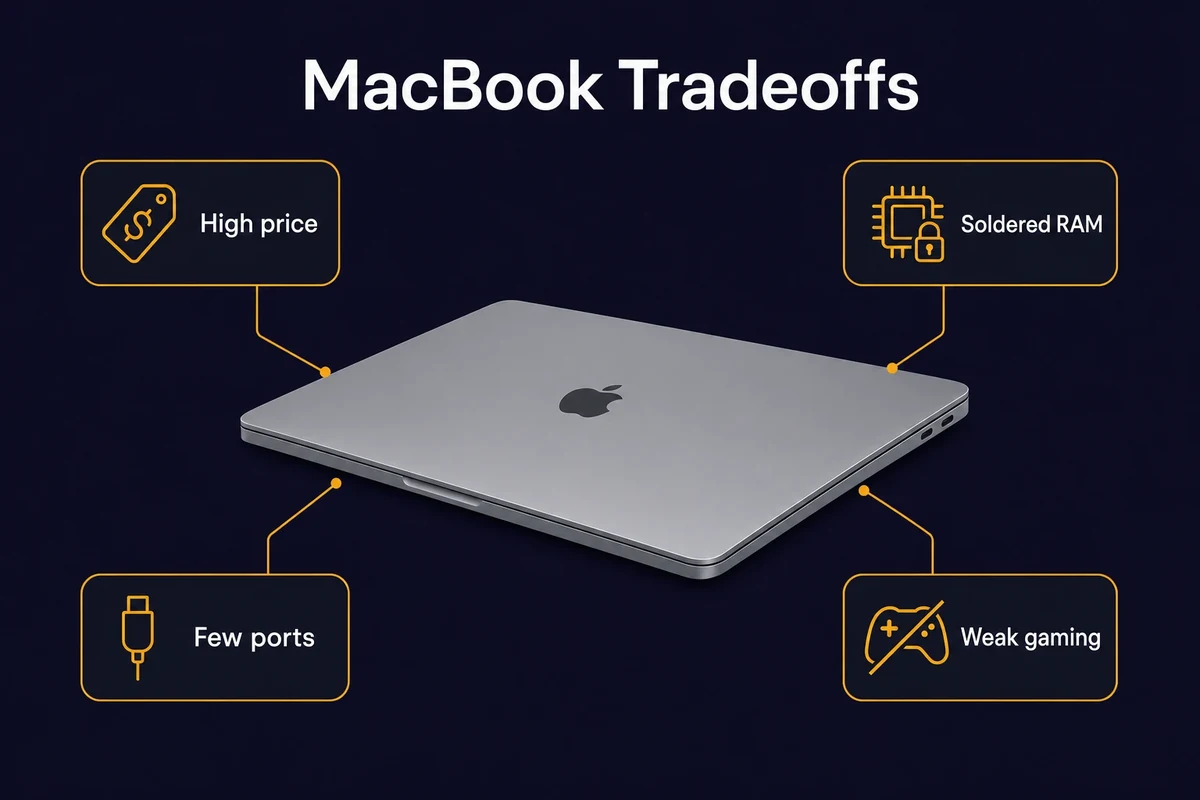
MacBooks come with a lot of great features, but they aren’t without drawbacks. Here are a couple of limitations:
1. Relatively Pricier
Let’s address the elephant in the room. Are MacBooks too expensive? Not exactly, but they are pricey.
Apple raised prices in March 2026. The base MacBook Air M5 now starts at about $1,099 (13″) and $1,299 (15″). At the top, the 16″ MacBook Pro with M5 Max reaches roughly $3,899.
Wondering why MacBooks are so expensive? You are paying for build, chip efficiency, and resale value. You can still find good value in the discounted M4 Air or older models where stock remains.
2. Limited Hardware Upgrades
- Most MacBooks only have 2-3 USB-C (Thunderbolt) ports.
- MacBook RAM and SSDs are soldered, meaning storage upgrades and memory upgrades are not possible after purchase.
- No native USB-A, HDMI (all models other than the pros), or SD card reader unless you purchase dongles.
This can limit flexibility and can be frustrating for anyone who prefers modularity.
3. Software Limitations
- macOS has fewer compatible applications, especially when considering enterprise, financial, or technical ones.
- Gaming is a weakness – while performance is better than before, macOS is still missing a lot of AAA title support.
This lack of native support has led many developers to explore hybrid setups, including running iOS apps on Windows via simulated environments or cloud-hosted Macs.
4. Costly Storage Upgrades
Apple likes to charge a premium for storage:
- A 1TB SSD upgrade could cost you from $200 to $400.
- An external drive becomes a must if you are a content creator or use large files.
Overview of the MacBook Lineup: M1 to M5 MacBook Performance in 2026
Apple’s current MacBook lineup serves many use cases, from lightweight student devices to full-on workstation beasts. As of 2026, the models are powered by M-series chips (now up to M5), providing significant improvements in speed, battery life, and overall efficiency compared to older Intel-based Macs, continuing a long MacBook history of innovation.
MacBook Neo (NEW entry tier)
- Best for: Budget buyers, students, and anyone who wants the cheapest way into macOS.
- Why it’s popular: Launched in March 2026 at $599 ($499 for education), it is Apple’s cheapest laptop and the first Mac on an A-series chip (the A18 Pro). It has a 13-inch Liquid Retina display, 8GB unified memory, a 256GB SSD, and around 16 hours of battery.
- 2026 note: It sits below the Air. If price is the deciding factor, this is now the entry point, though 8GB of memory suits light work, not heavy multitasking.
MacBook Air (M1, M2, M3, M4, M5)
- Best for: Students, general users, and business professionals.
- Why it’s popular: Lightweight, excellent battery life (up to 18 hours of video playback), fanless design, and a lower cost compared to Pro models.
- 2026 update: The M5 MacBook Air starts at $1,099 (13″) / $1,299 (15″) with 512GB storage and 16GB memory. The older M4 Air lives on as the discounted value pick where stock remains, and it supports up to two external monitors, a real step up from the M1/M2 chips.
P.S. The M1 MacBook Air (2020) is still a usable budget option for light users, often found used for around $200 to $230, and it still receives macOS updates.
MacBook Pro (M5, M5 Pro, M5 Max)
- Best for: Developers, designers, video creators, and power users. Power users who rely on Xcode for iOS development might especially benefit from the 14″ or 16″ Pro models. If you’re on Windows, you can still perform Swift development using a cloud-hosted Mac setup.
- Why it’s popular: Higher core count, active cooling, brighter displays with ProMotion (120Hz), and better I/O (HDMI, SD card slot, MagSafe)
- 2026 update: The 14″ Pro starts at $1,599 with the base M5, the M5 Pro lands around $2,199, and the 16″ M5 Max reaches roughly $3,899, built for 4K editing, 3D, and machine learning.
Here’s a quick comparison table for you to navigate these differences easily:
| Model | Best For | Key Specs | Price |
|---|---|---|---|
| MacBook Neo | Budget, Students | A18 Pro, 8GB RAM, 256GB | Starting at around USD $599 |
| MacBook Air M4 | Value Pick (Discounted) | 10-Core CPU, 16GB RAM | Discounted below the M5 where stock remains |
| MacBook Air M5 | Businesses, Creators | 10-Core CPU, 16GB RAM, 512GB | Starting at around USD $1,099 |
| MacBook Pro 14” M5 | Creators, Developers | M5, 16GB+ RAM | Starting at around USD $1,599 |
| MacBook Pro 16” M5 Max | Video and 3D Workloads | M5 Max, 32GB+ RAM | Starting at around USD $3,899 |
What’s Changed from M1 to M5?
With every new generation, we witness:
- Faster performance (particularly with GPU-intensive tasks)
- Better AI/ML capabilities (especially on M3/M4/M5, including running LLMs on Mac)
- Better efficiency – cooler operation and longer battery life
- More unified memory options
- Better external monitor support
The M5 is the latest step: about +14% single-core and +22% multi-core over the M4, GPU peak capability over 4x higher, AI processing up to 4x faster, and SSD read/write roughly twice as quick. That said, the gains are now incremental. The big Apple Silicon leap already happened back at M1, so an M4 (often discounted) remains a smart buy rather than an automatic upgrade.
In fact, the rise of M-series chips is directly tied to the increasing adoption of AI workflows, like machine learning on Mac, which benefit from Apple’s unified memory and GPU architecture.
Is the MacBook Pro worth the extra cost over the Air?
The Pro is worth the extra over the Air only if you push it hard. Think sustained 4K exports, long renders, color-critical work, or all-day external-display setups. The roughly $500 step up buys a brighter display, 120Hz motion, more ports, and active cooling. For everyday work, the Air is enough.
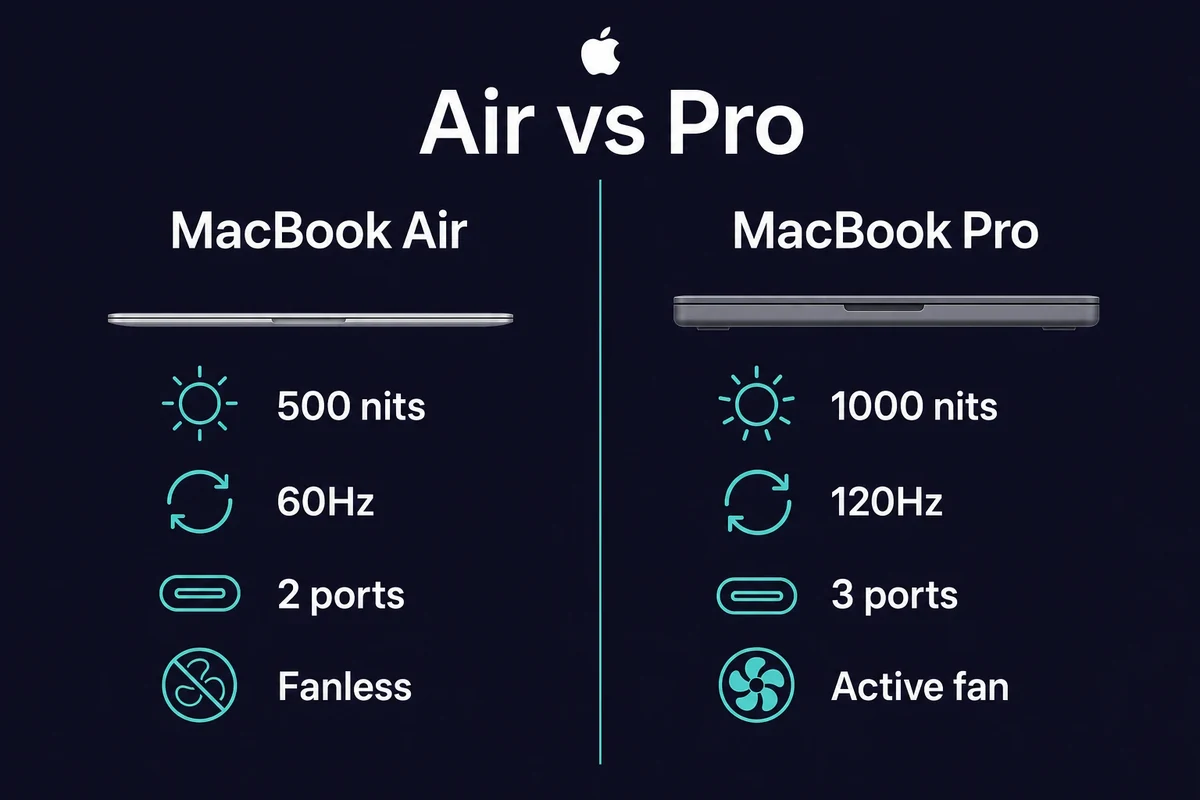
Here is what that upcharge actually buys you:
- Brighter screen: the Pro runs at 1,000 nits sustained (1,600 peak for HDR). The Air tops out at 500 nits.
- Smoother motion: the Pro adds 120Hz ProMotion. The Air stays at 60Hz.
- More ports: the Pro gives you three Thunderbolt 4 ports, plus HDMI and an SD slot. The Air gives you two ports.
- Active cooling: the Pro has a fan, so it holds its speed under long workloads. The fanless Air throttles instead.
For most buyers, the Air is plenty. Writing, browsing, code, light photo and video, school work, travel: none of that needs the extra power. The silent fanless design and all-day battery matter more day to day than peak speed.
The Pro earns its price when you keep it busy. Long 4K exports and 3D or machine learning renders need the thermal headroom. The brighter panel helps with color work. The extra ports matter on a desk setup. If your routine is genuinely heavy compute work, the Pro pays for itself.
One honest caveat. Many buyers feel a similarly specced Windows rival costs around $1,000 less. And the M4-to-M5 jump is only about 15 to 20%. So the upcharge is not automatic. If you are not pushing the machine, you are paying for headroom you may never use.
Is now a good time to buy a MacBook in 2026?
Mid-2026 is a reasonable time to buy. The M5 line landed in March 2026. No new Air is expected until 2027, so you are buying near the front of a cycle. Component costs keep nudging prices up, so waiting mostly risks paying more. Buy now unless you specifically need an unreleased feature.
So if you are asking should I buy a MacBook this year, the timing answer is mostly yes. Which model fits which person comes down to how hard you work the machine:
- Students and general users: the M5 Air 13″, or the MacBook Neo at $599 ($499 with education pricing) if budget is tight.
- Creators and developers: the 14″ Pro for the cooling and the brighter screen.
- Value hunters: the discounted M4 Air, the sweet spot wherever stock remains.
Older machines still hold up too. A used M1 Air runs around $200 to $230. It gives roughly 10 hours of real battery and still gets macOS updates in 2026. For light-to-moderate work it is fine. The first Apple Silicon chip really does age well, much like the Mac mini’s track record across Apple’s M-series.
A quick word on memory. 16GB is the new base and suits most people. Step up to 24GB only if you plan to keep the Mac five or more years, or you edit video regularly.
Should You Buy a MacBook?
MacBooks are a worthwhile investment if you value performance, battery life, and a seamless macOS workflow, particularly for developers, designers, and remote teams.
With its latest M-series chips (M1 – M5), Apple offers astonishing speed and energy efficiency, meaning even its base MacBook Air can handle demanding tasks (e.g., coding, video editing, or design work).
Along with Apple’s security, premium hardware, and integrated ecosystem, you can’t go wrong with a MacBook.
Lifespan backs that up. A MacBook Pro tends to last 7 to 10 years and a MacBook Air around 5 to 7. The M1 Air from 2020 still receives macOS updates six years on.
So is a MacBook worth it? Are Apple laptops worth it? For the right buyer, yes. For the wrong one, it is overpriced.
However, not everyone needs to buy a new MacBook to garner the same benefits. Even if you don’t want to own one, you can still develop iOS apps without a Mac using cloud-based solutions.
If you need a Mac for short-term testing, iOS development, or creative work, Rentamac.io provides full access to a high-performance Mac in the cloud, with no strange virtual machines and no awkward setup. You get full admin privileges for a day, a week, or months.
FAQs
Are MacBooks overpriced?
MacBooks are expensive, but that does not necessarily mean they are overpriced. When you buy a MacBook, you’re paying for fast performance, quality, long battery life, and the seamless macOS experience.
Developers, designers, creators, freelancers, and other professionals who strongly rely on stability and speed often find the expense to be worth it after using the computer for several years.
What are the main disadvantages of owning a MacBook?
MacBooks are powerful, but not without limitations. Price is steep, with base models now starting around $1,099 after the 2026 increase and higher-end Pros past $2,500. Hardware upgrades are limited too: RAM and storage are soldered, and most models drop USB-A, HDMI, and the SD card slot. You also get fewer enterprise apps, weaker gaming, and a premium charge for extra storage.
Can MacBooks run Windows apps?
Yes, but with limits. Performance varies on M-series chips, and native Windows via Boot Camp only runs on older Intel-based Macs. To test a Windows-dependent tool on macOS, you can rent a Mac in the cloud from Rentamac.io. You get full admin access to install the software and run compatibility tests without buying hardware.