On this page
Cloud application development offers considerably higher scalability, flexibility, and updatability than other app development methods. For example, Uber couldn’t scale its app until it migrated to the cloud.
Since cloud application development offers numerous benefits for businesses of different sizes, it is a topic worth attention.
Let’s review it closer!
In short
- Cloud application development means building apps that run in the cloud, not on a local server.
- It relies on DevOps and continuous deployment, so teams ship small updates fast.
- The cloud market hit about USD 752 billion in 2024 and should pass USD 1.19 trillion in 2026.
- Apps come in public, private, hybrid, and community cloud models.
What is cloud application development?
Cloud application development is the process of developing applications that run in a cloud environment and are not hosted on a local server.
The first big difference with the cloud is the ability to build and ship software in small pieces. Teams call this DevOps (development plus operations). You build and update a product in small parts, so the whole job is easier to handle.

For example, when Uber pushed its app to the cloud, it broke the code into different blocks. Each block was for a separate feature: client interface, admin interface, driver interface, payment, etc.
This made continuous deployment possible. The teams did not have to wait until the whole product was done to ship their features. They could make small, quick fixes without touching the rest of the product.
The Amazon website took a similar path when it could not keep up with rising traffic. Its move to the cloud worked so well that the company began selling cloud services to others, and the market grew fast.
The global cloud computing market was worth about USD 752 billion in 2024. It is on track to reach roughly USD 1.19 trillion in 2026, heading toward USD 2.39 trillion by 2030 at around 20.4% annual growth.
Benefits of cloud computing
The cloud setup brings many benefits for app development. You get better scaling and more flexibility, stronger security, faster team work, and better performance.

Scalability: Automated deployment
When you build apps in the cloud, you can get more computing power the moment demand spikes. There is no need to buy physical hardware.
Some cloud models make this even easier and handle the scaling for you. Serverless computing, for example, adds and frees resources on its own, with no work from the developer.
Flexibility: Faster response to market change
The cloud handles uneven workloads and seasonal traffic spikes well: you add capacity for a spike, then drop it when traffic falls. You can also ship in small batches, several times a day, which helps mobile developers who develop iOS apps without a Mac by using cloud-based tools.
Because you add or drop capacity per service, a traffic spike does not mean buying a whole new server. That is what keeps a cloud team lean and quick to react to what customers need.
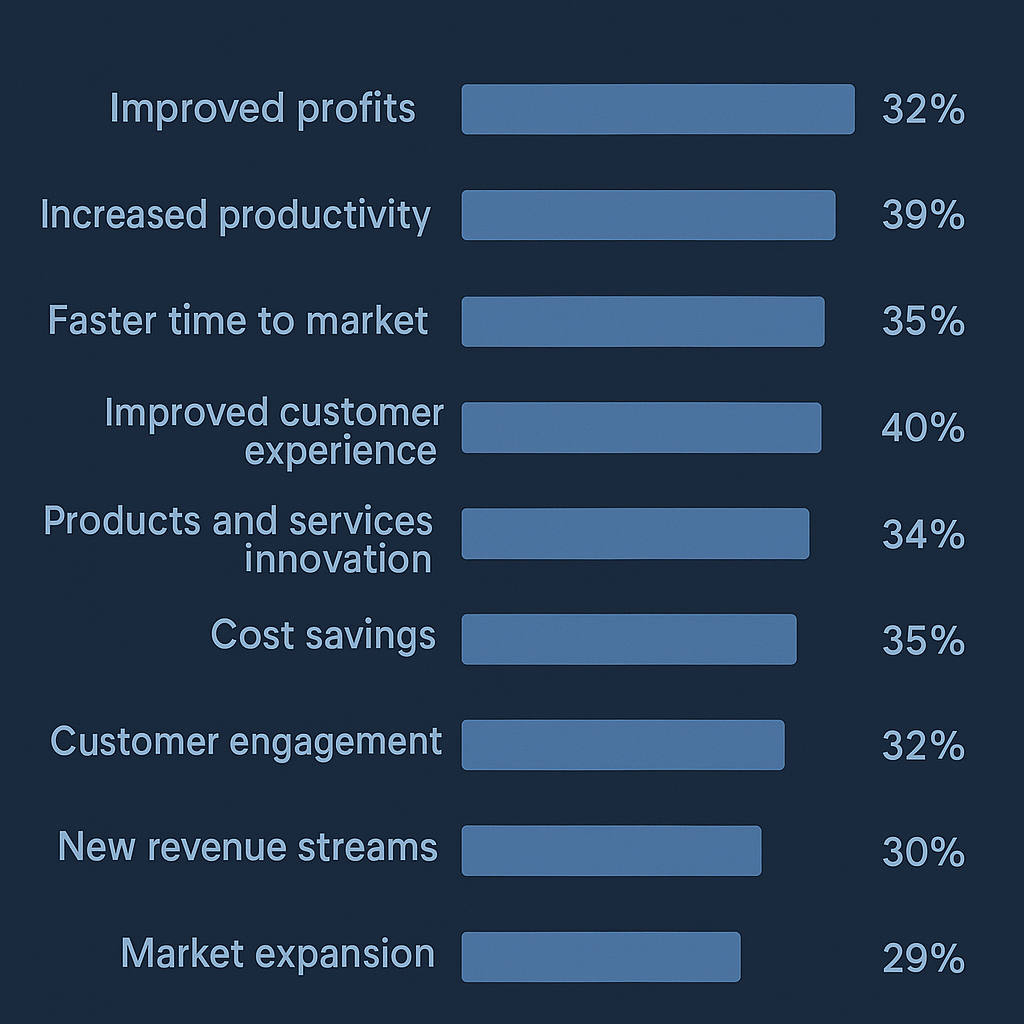
Companies that moved to the cloud ship new features 35% faster, based on recent PwC research.
Security: Relying on Cloud Provider
Cloud services use the latest security tools to stand up to cyber threats.
Top cloud providers work hard to keep their security strong. They lead on encryption, logins, and access control. They also meet the latest industry rules.
Here is an interesting fact: 70% of businesses that moved to the cloud went on to host their security there too (PwC).
Agility: Increased DevOps efficiency
The cloud lets different teams work on a product at the same time. It makes it easier to talk through the design, build, and release stages. That is what DevOps is meant to be: a real tool for steady, ongoing work. Developers can also work across operating systems, with some choosing Swift development from Windows environments using cloud-hosted Macs.
When teams talk well, they get more done. 72% of early cloud users and 39% of other businesses that moved to the cloud say they are more productive (PwC).
This shared setup also handles heavy jobs like machine learning adoption in cloud environments.
Performance: App stability and high availability
Apps run on your own servers can go down. The cloud app is almost always live.
A cloud app is built from small parts, called microservices, and that helps here too. The app can stay online even if one part fails. Many teams also run LLMs or ML workloads on cloud-hosted Macs to keep apps stable and online while leaning less on local machines.
Cost efficiency: Lower your hardware costs
You do not need to buy physical hardware or run your own servers to build cloud apps. You only pay for what you use, either monthly or as you go. Companies that move to the cloud save 35% on costs, and up to 65% when the whole company moves over (PwC).
Cloud applications compared to traditional enterprise apps
Traditional app building was all about a strict order. Developers had to finish one big batch of code, with all the features inside, before it went to testing and release.
Changes or fixes took too long. Updates and scaling were hard, sometimes near to impossible.
Cloud app building is all about working together. A cloud app is made of many small services. They run as one, but you can change each one on its own. Developers can work on different features at the same time. The result is an app where you can scale one service up in minutes and ship updates without taking the app offline.
Cloud applications also come in a few deployment models. The model you pick changes the cost, how much control you keep, and who runs the hardware.
Types of cloud applications
The main types of cloud applications map to four deployment models: public, private, hybrid, and community cloud. Each one trades cost for control. The table shows who runs the hardware and where each fits best.
| Deployment model | Who manages it | Best for |
|---|---|---|
| Public cloud | The provider | Startups and apps with spiky, unpredictable traffic |
| Private cloud | Your own company | Strict security or compliance needs |
| Hybrid cloud | Shared | Keeping some data in-house while scaling the rest |
| Community cloud | A few companies together | Shared compliance or industry needs |
You may also see service models written as SaaS, PaaS, and IaaS. In plain terms, that is ready-to-use software, a platform to build on, and bare hardware you run yourself. Each one tells you how much of the work the provider handles.
A cloud app is also not quite the same as a web app. Every cloud app runs over the internet. But not every web app is “cloud.” A web app tied to one fixed server cannot grow on demand. A cloud app scales up and down. It also keeps your data on managed hardware spread across more than one machine.
The features of the cloud application development
Cloud application development rests on four features. Continuous integration merges small code changes into shared code and checks them for you. Continuous delivery keeps those changes ready to ship. DevOps puts the build team and the operations team on the same product. Serverless computing sets up and frees the hardware for you, so you pay only for what you use.
Continuous integration (CI)
Continuous integration means making small, frequent changes. Developers merge their changes into shared code as soon as each one is ready. CI tools then check the code quality on their own, so teams can ship with more confidence.
Continuous delivery (CD)
Paired with continuous integration, continuous delivery keeps your small services ready to ship at any time. Automated tools lower the risk of each change.
DevOps
DevOps is a way of working where the build team and the operations team work on the product together, not one after the other. This lets you make quick fixes or add new features as soon as customers ask for them.
Serverless computing
With serverless computing, the cloud service sets up the hardware you need on its own. Developers do not have to ask for extra space. You pay only for what you use. Once you no longer need the resources, the service frees them on its own.
These methods clearly work. More teams now build cloud-first, so this way of working has become the default in IT.
How to build a cloud application
Building a cloud application follows a clear, repeatable path: set the scope and who it serves, pick a cloud provider and tech stack, plan how the app fits together, build and connect the parts with continuous delivery, then test and ship in small batches.
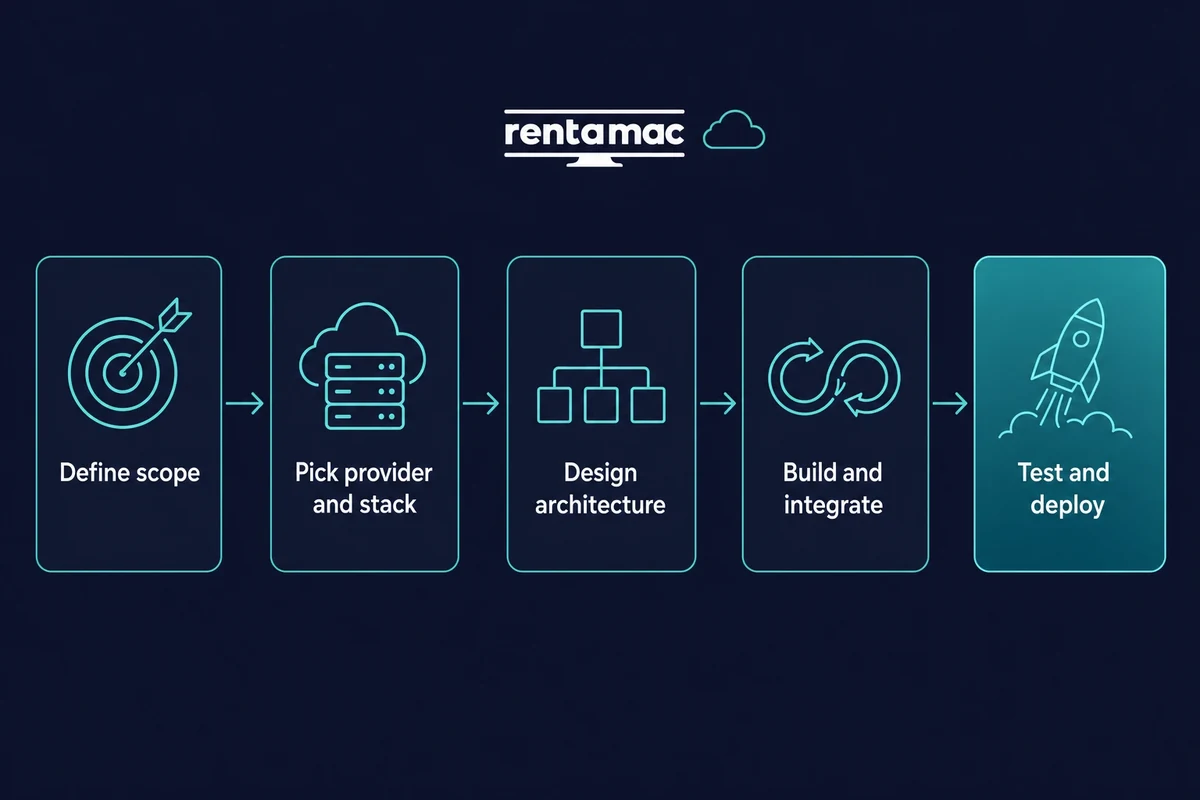
Here is the order most teams follow:
1. Set the scope and needs. Write down what the app does, who uses it, and how much load you expect. This shapes every choice that comes next.
2. Pick a cloud provider and tech stack. Choose one of the major public clouds. Then settle on a language, framework, and database your team already knows.
3. Plan how the app fits together. Splitting the app into small services helps once it gets large and many teams touch it. For a small product, one simpler app is the better and cheaper way to start. In practice, I would start with one modular app and split it into services only when a team actually outgrows it.
4. Build, connect, and set up CI/CD. Wire up the parts and add continuous integration and delivery. That way changes ship in small batches, not in one risky release.
5. Test, ship, then watch and scale. Release often, watch how the app holds up under real traffic, and add resources only where you truly need them.
You do not need to own any of this hardware to follow the steps. A cloud dev setup gives you the machine and tools on demand. A serverless setup can then handle the scaling for you once the app is live.