On this page
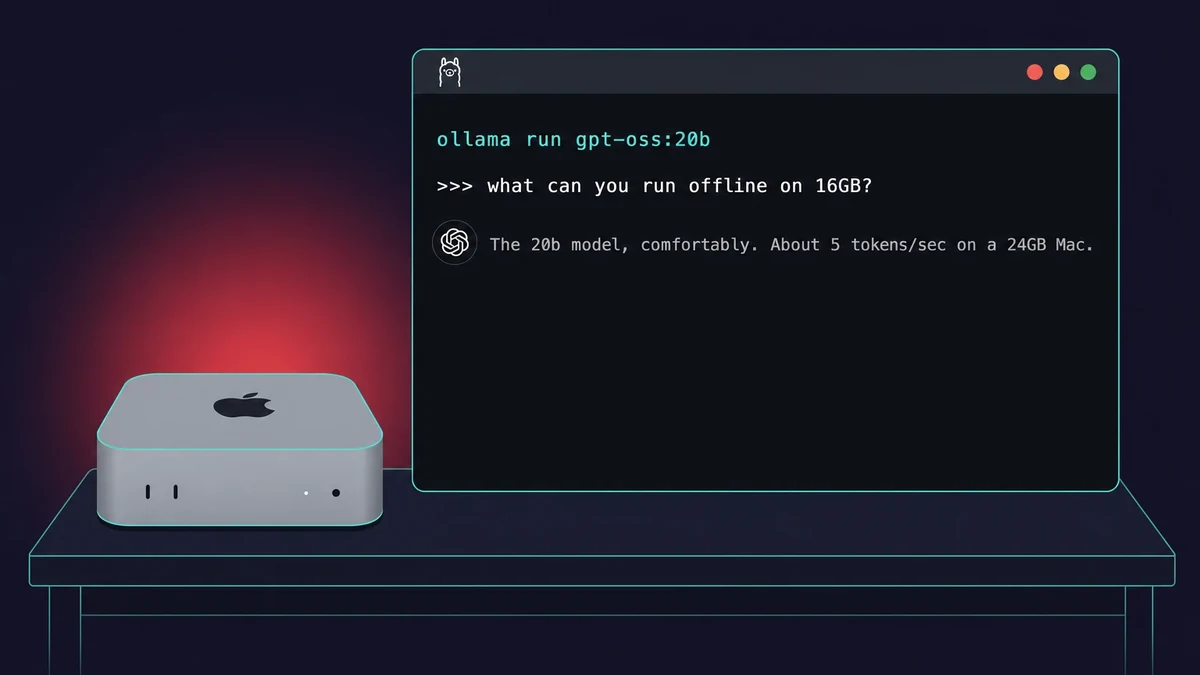
TL;DR: To run gpt-oss on a Mac, install Ollama and run ollama run gpt-oss:20b, or use LM Studio if you want a window instead of the Terminal. You need an Apple Silicon Mac (M2 or later) with 16GB of RAM and about 13GB of free disk. The 20b model runs fine; the 120b needs a 64GB-plus machine.
gpt-oss is OpenAI’s open-weight model, free under Apache-2.0, and it runs fully offline once you have downloaded it. As of 2026, two Mac apps run it: Ollama and LM Studio.
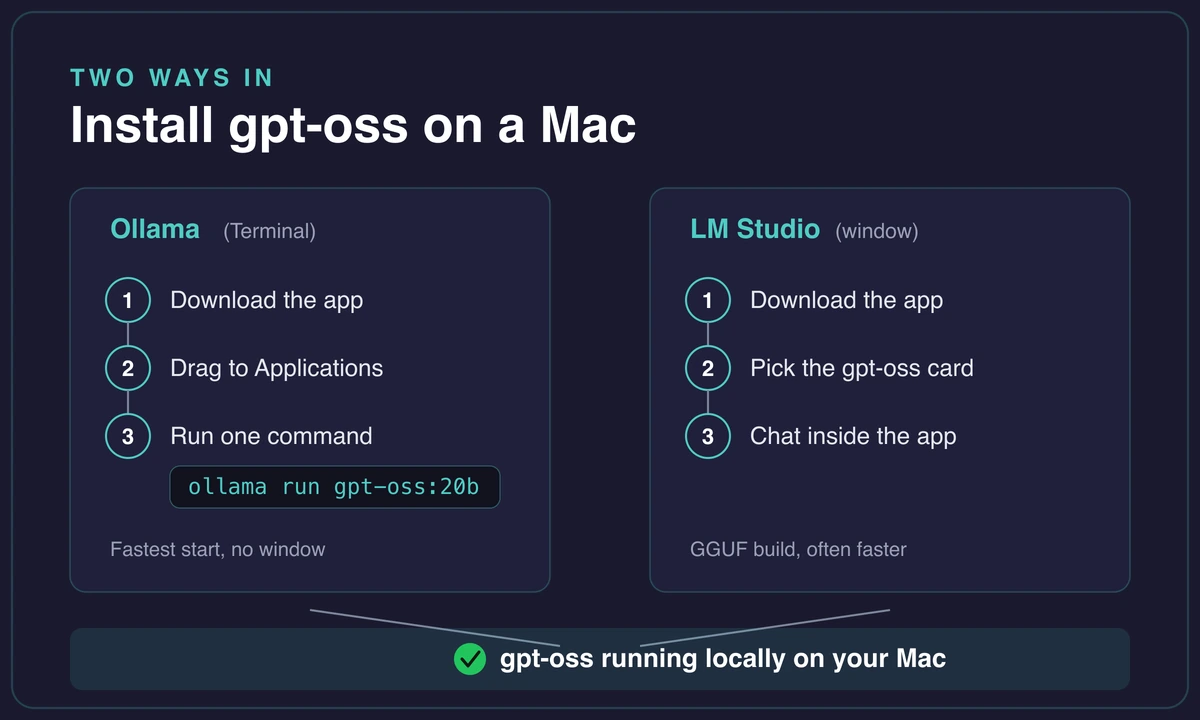
With Ollama, you install the Ollama app, then run ollama run gpt-oss:20b, which pulls the roughly 13GB model and starts a chat. With LM Studio, you install the LM Studio app, pick gpt-oss on the home screen, click download, and chat in the window.
Speed depends on your Mac. On a 16GB machine the 20b works but can feel slow, because the model nearly fills memory. A MacBook Air with 24GB gets around 5 tokens per second, and a high-end 128GB M5 hits about 79 tokens per second on the bigger 120b. That 120b is realistically a 64GB-plus story, so most people run the 20b.
If yours stalls, LM Studio’s GGUF build is often much faster than Ollama’s default, and a couple of Ollama settings can cut a 100-second reply down to 11. If you want a sibling model to try next, the same path works to run Llama on a Mac.
Run gpt-oss on a Mac with Ollama
Ollama is the fastest way in. Install it, run one command, and it pulls the model and starts a chat. You need macOS 12 or later. Once it is running, a small icon sits in your menu bar.
Here is the whole sequence:
- Download Ollama for macOS from its site and drag it into Applications.
- Launch it, and check the menu-bar icon is showing.
- Open Terminal and run
ollama run gpt-oss:20b. - Wait for the first pull (about 13GB, a few minutes on a normal connection).
- Start chatting at the prompt. Later runs skip the download and open almost instantly.
One honest note on the command. gpt-oss:20b is the model that fits a normal Mac. There is a gpt-oss:120b you can type instead, but it needs a 64GB-plus machine and will not load on a mainstream laptop. I burned a good ten minutes the first time waiting on a 120b pull before I clocked that my 16GB machine was never going to hold it.
Start with the 20b. No account, no rate limits, and it works with your wifi off. It is free under Apache-2.0, so no subscription and no per-message cost.
Prefer a window? Run gpt-oss with LM Studio
LM Studio is the no-Terminal option. It gives you a normal app window, and gpt-oss shows up as a ready-to-download card on the home screen. The install is just as short:
- Download LM Studio for Mac (it needs an M-series chip) and drag it into Applications.
- Launch it and open the model search on the home screen.
- Pick the gpt-oss card and click download.
- Chat inside the app once the download finishes.
There is a real reason to reach for LM Studio beyond the window. On Apple Silicon it runs a GGUF build of the model, and that build is often noticeably faster than Ollama’s default. On an M2 Pro with 32GB, the GGUF version hits around 24 tokens per second where the default path can crawl.
So if speed is your problem, this is the first thing I would try. It can also expose a local API that other apps detect, handy if you want to wire the model into an editor. The general run an LLM on a Mac with LM Studio guide covers that GUI path in more depth.
A free menu-bar app called Stats lets you watch RAM and GPU load in real time. It is the easiest way to see whether the model is fitting in memory or spilling over on a 16GB Mac. The same tools run other small models, so you can also run Qwen on a Mac the same way.
How much RAM you need, and which model fits
16GB is the real floor for the 20b, alongside an Apple Silicon Mac (M2 or later, per OpenAI) and about 13GB of free disk. That is the minimum, not the comfortable spot: the model nearly fills memory, so 24GB or more feels a lot better. How much RAM you need really comes down to which model. At the extreme end that scaling never stops, and running Kimi K2.6 locally needs a 240-600GB Mac before it loads.
The 20b runs well because it is a mixture-of-experts model. It has about 21 billion parameters total, but only around 3.6 billion are active for any given token, so your Mac does far less work per word than the raw count suggests. Another small model that fits the same 16GB envelope is Gemma on a Mac.
The 120b is a different animal. It carries about 117 billion parameters with roughly 5.1 billion active per token, and needs around 66GB of unified memory. That is a 64GB-plus or 128GB Mac. On a normal laptop it will not load. The memory math for running MiMo-V2.5 on a Mac lands in the same 128GB territory.
| Model | Params (total / active) | Memory needed | Which Mac |
|---|---|---|---|
| gpt-oss-20b | ~21B / ~3.6B | 16GB (24GB+ comfortable) | Any M2-or-later Mac |
| gpt-oss-120b | ~117B / ~5.1B | ~66GB unified memory | 64GB-plus or 128GB Mac |
If you are still deciding which model to keep long term, the best local LLMs rundown maps models to RAM tiers, the same call you are making here.
How fast gpt-oss actually runs on a Mac
Real numbers matter more than “it works.” For gpt-oss tokens per second, here are two honest anchors. The 20b runs at roughly 5 tokens per second on a MacBook Air with 24GB of RAM through Ollama. Usable, not instant.
At the top end, the 120b hits about 79 tokens per second on a 128GB M5 MacBook Pro. Treat that high number as a ceiling for the big model on high-end hardware, not what a normal Mac gets.
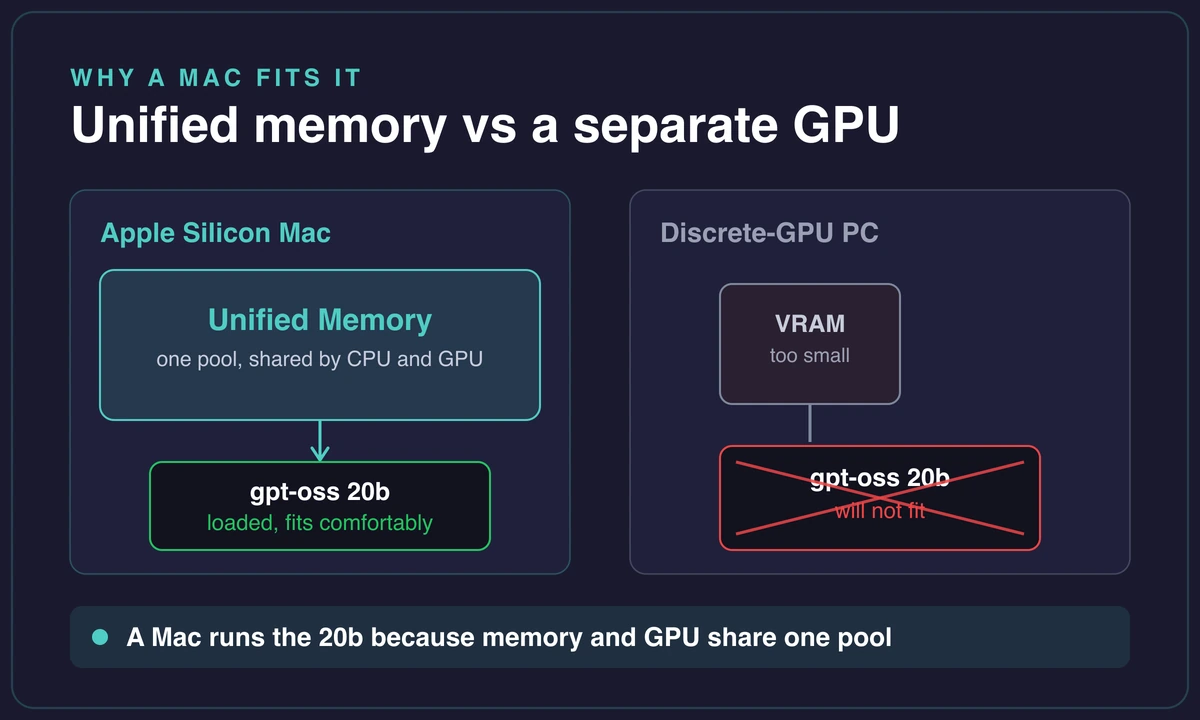
Why do Macs do so well here? Unified memory. On Apple Silicon the same memory pool feeds the model directly, so a Mac runs the 20b where a gaming PC with a discrete GPU and too little VRAM cannot fit it at all.
I watched a friend’s 3080 rig choke on the exact model my Mac was happily chatting with. The card had the compute but not the memory.
Set your expectations honestly, though. This is a smaller open-weight model, not GPT-4o or Claude-grade. It is genuinely good for offline chat, summarizing, and simple agent tasks, and weaker on heavy coding and large-context work. If you want an even leaner mixture-of-experts option, Liquid’s LFM2.5 on a Mac runs in around 5GB.
On a 16GB Mac the 20b nearly fills memory, which is why it can crawl before you tune it. Tuning helps a lot, which is the next section. The machine learning on a Mac explainer covers why unified memory changes the math.
Make a slow 16GB Mac keep up
If your 16GB Mac “thinks forever,” you are not imagining it. The 20b nearly fills memory and the default context length is large, so the machine is stretched before it writes a word. On top of that, Ollama’s default MXFP4 build can drop to under 1 token per second on Apple Silicon.
The fastest win is switching builds. Use LM Studio’s GGUF version instead of Ollama’s default MXFP4 path. On comparable hardware that is the difference between roughly 24 tokens per second and a crawl. That single swap fixes it for a lot of people, and it is why MXFP4 gets blamed for “gpt-oss being slow” when the model is fine.
If you want to stay in Ollama, tune it. In the parameter editor:
- Lower
num_gpu(the GPU layers) to about 25. - Shrink
num_ctx(the context size) to 512. - Cap the prediction length so replies stop sooner.
- Run
/saveto store the tuned version as a new model.
I did exactly this after a plain “hello” took about 100 seconds to come back. Embarrassing to admit I sat there sure it had frozen. After the changes, the same “hello” returned in about 11 seconds.
The one-minute fix for a 16GB Mac that stalls
On a 16GB Mac the 20b can take about 100 seconds to answer out of the box. Lower num_gpu to 25, drop num_ctx to 512, cap the prediction length, then /save a new model, and the same reply comes back in about 11 seconds. Switching to LM Studio’s GGUF build is often faster still.
Tuning has a limit, though. A 16GB Mac is not viable for heavy coding, large retrieval jobs, or serious tool use, no matter how you set the knobs. When you hit that wall, the answer is more memory, not more settings.
When your Mac cannot keep up
There is an honest ceiling here. The 20b on 16GB tops out for real work, and the 120b will not fit at all. At that point you either buy a 64GB-plus Mac or run the model somewhere with more unified memory. Fighting a machine that is out of headroom is a losing game, and you feel it every time the model swaps to disk. A far bigger model like MiniMax makes the wall obvious, since MiniMax will not fit a Mac mini and needs 100GB-plus of memory.
One clean option is a dedicated cloud Mac. Rentamac.io rents a Mac mini M4 with 16GB of RAM and full admin access, so you get a separate macOS box to run the 20b on without touching your daily laptop.
I will be straight about the limits: 16GB is still the 20b’s floor there too, so this buys you a clean, dedicated machine, not a bigger one. Another small model like Mistral on a Mac fits the same 16GB envelope if you want to compare.
For the 120b, be realistic. You want far more memory than any 16GB box gives you, local or rented, so plan for a 64GB-plus Mac.
Frequently asked questions
How much RAM do you need to run gpt-oss on a Mac?
16GB is the floor for the 20b model, OpenAI’s stated minimum with MXFP4 quantization. It is bare-minimum, though: the model nearly fills memory, so 24GB or more feels much better. The 120b needs around 66GB, so a 64GB-plus Mac. You also need about 13GB of free disk.
Can you run gpt-oss-120b on a Mac?
Yes, but only on a high-memory Mac. The 120b needs roughly 66GB of unified memory, so realistically a 64GB or 128GB machine. On a 128GB M5 MacBook Pro it runs at about 79 tokens per second. On a normal 16GB Mac it will not load at all, which is why most people run the 20b instead.
Is gpt-oss free?
Yes. gpt-oss is released under the Apache-2.0 license, so it is free to download and use, including commercially. Running it locally means no subscription and no rate limits. You pay only in disk space and a bit of electricity.
Is gpt-oss better with Ollama or LM Studio?
Both run it well. Ollama is faster to start with one command; LM Studio gives you a window. On Apple Silicon, LM Studio’s GGUF build is often much faster than Ollama’s default MXFP4 build, hitting around 24 tokens per second on an M2 Pro. If speed is your problem, try LM Studio.
Why is gpt-oss so slow on Apple Silicon?
Usually it is the MXFP4 build. Transformers does not support MXFP4 on Apple Silicon (it errors asking for a GPU), and Ollama’s default MXFP4 path can crawl to under 1 token per second. Switch to a GGUF build in LM Studio, or lower the context size and GPU layers in Ollama, and it speeds up a lot.
Is gpt-oss-20b good enough to be useful?
For offline chat, summarizing, and simple agent tasks, yes. It is not GPT-4o or Claude-grade, so it struggles with heavy coding and large-context work. Treat it as a free, private helper for the smaller jobs, and it earns its place.