On this page
TL;DR: Only one version of DeepSeek V4 runs on a Mac, and it needs a serious one. You want a Mac with 128GB of memory, a free tool called ds4, and a compressed build of the model that fits in about 81GB. On a high-end M5 Max that gets you roughly 27 to 34 tokens a second. The giant Pro version stays in the cloud.
To run DeepSeek V4 on a Mac, you need two things: the Flash variant of the model and 128GB of unified memory.
There are two versions of V4. The big one, Pro, has 1.6 trillion parameters and only runs in the cloud. The smaller one, Flash, has 284 billion parameters and is the one you can run on a Mac, though even it is about 568GB at full size, far more than any laptop holds. The same Pro-versus-runnable split shows up when you weigh MiMo-V2.5 on a Mac.
That is where ds4 comes in. It runs a compressed version of Flash that shrinks the download to about 81GB, small enough to fit inside a 128GB Mac with room to spare.
So 128GB is the real gate. A 128GB M3 Max generates around 27 tokens per second, a 128GB M5 Max around 34, and a 512GB Mac Studio M3 Ultra around 37. Below 128GB you can stream experts from SSD starting near 96GB, but the speed drops off a cliff.
If your Mac has less memory than that, V4 Flash is simply not your model:
- 16GB, 32GB, or 64GB Mac: run an R1 distill (7B or 14B) instead.
- No big Mac at all: call the hosted V4 Flash API at $0.14 in and $0.28 out per million tokens.
The first time I loaded the IQ2 build, RAM jumped from 22% to 91% in a few seconds and then just sat there. No swap. That is the whole trick on a Mac: keep the model resident in unified memory and let the GPU do the work.
Which Macs can actually run DeepSeek V4
DeepSeek V4 Flash runs on a Mac with 128GB of unified memory or more, and nothing smaller. The 2-bit IQ2 quant is about 81GB, and a long context adds roughly 26GB of KV cache on top, so a 128GB machine is the practical floor. V4 Pro, at 1.6 trillion parameters, will not fit on any Mac you can buy. The 744B GLM 5.2 sits right at that edge, and GLM 5.2 does squeeze onto a 256GB Studio at 2-bit.
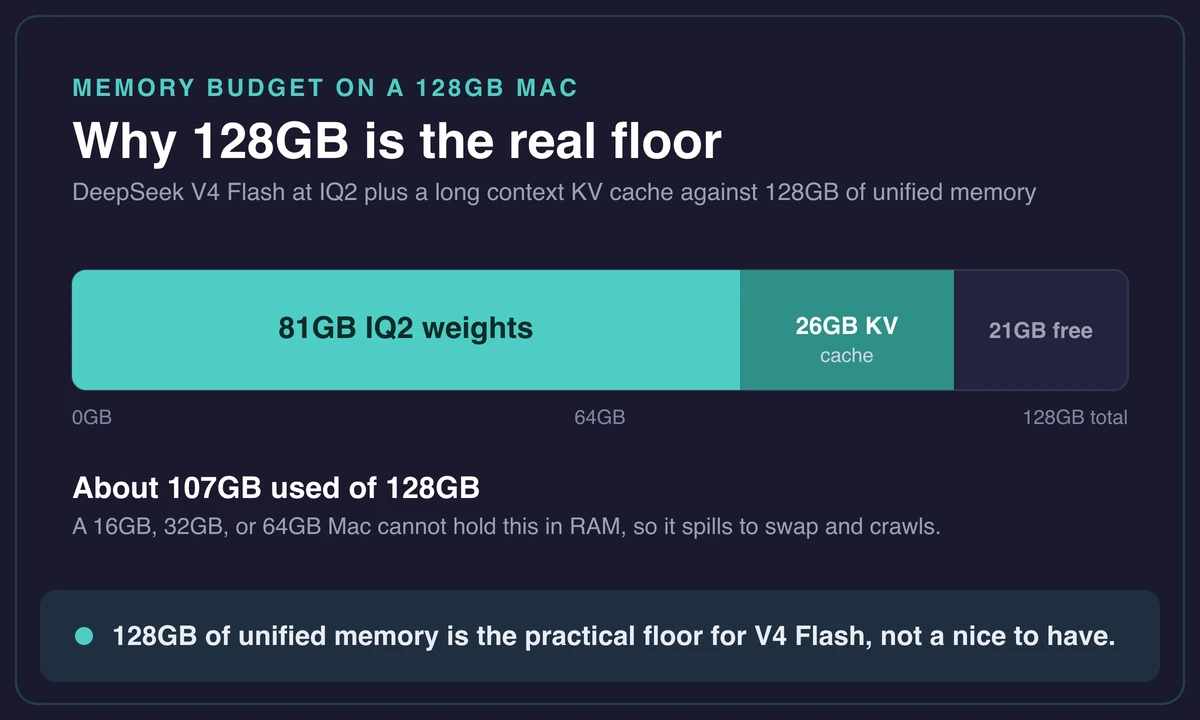
That 128GB number trips people up, so let me be blunt. A 16GB MacBook Air cannot hold an 81GB model. Neither can a 36GB or 64GB MacBook Pro.
The weights have to live in RAM for inference to stay fast. Once you exceed physical memory the Mac starts swapping to disk and generation slows to a crawl. There is no clever flag that makes 81GB of weights fit in 64GB of RAM at full speed.
Why 128GB is the real floor
The IQ2 weights are about 81GB and a long context adds roughly 26GB of KV cache. A 16GB, 32GB, or 64GB Mac cannot hold that in RAM, and the moment it spills to swap, generation slows to a crawl.
The qualifying tier is the M-Max or M-Ultra chips with 128GB or more. That means a MacBook Pro with an M3, M4, or M5 Max configured to 128GB, or a Mac Studio with an M3 Ultra and 512GB. Nobody walks out of the store with that config by default. You order 128GB on purpose.
Here is the split in one view.
| Model | Total / active params | Full size (FP16) | Runs on a Mac? |
|---|---|---|---|
| V4 Flash | 284B / 13B active | ~568GB | Yes, on 128GB+ with IQ2 (~81GB) |
| V4 Pro | 1.6T / 49B active | far larger | No, cloud only |
Below the 128GB line you are not stuck, just on a different road. You can stream experts from SSD on a 96GB (or smaller) machine, which I cover below, or call the hosted API. For most everyday work, the honest answer is to skip V4 Flash and run DeepSeek on a Mac using a smaller distill instead.
Set up DeepSeek V4 Flash with ds4, from clone to first reply
The only engine that runs the full V4 Flash on Apple’s Metal GPU is ds4, an inference engine built for DeepSeek V4. Ollama and LM Studio handle the smaller R1 distills at 7B and 14B, but they do not run V4 Flash itself.
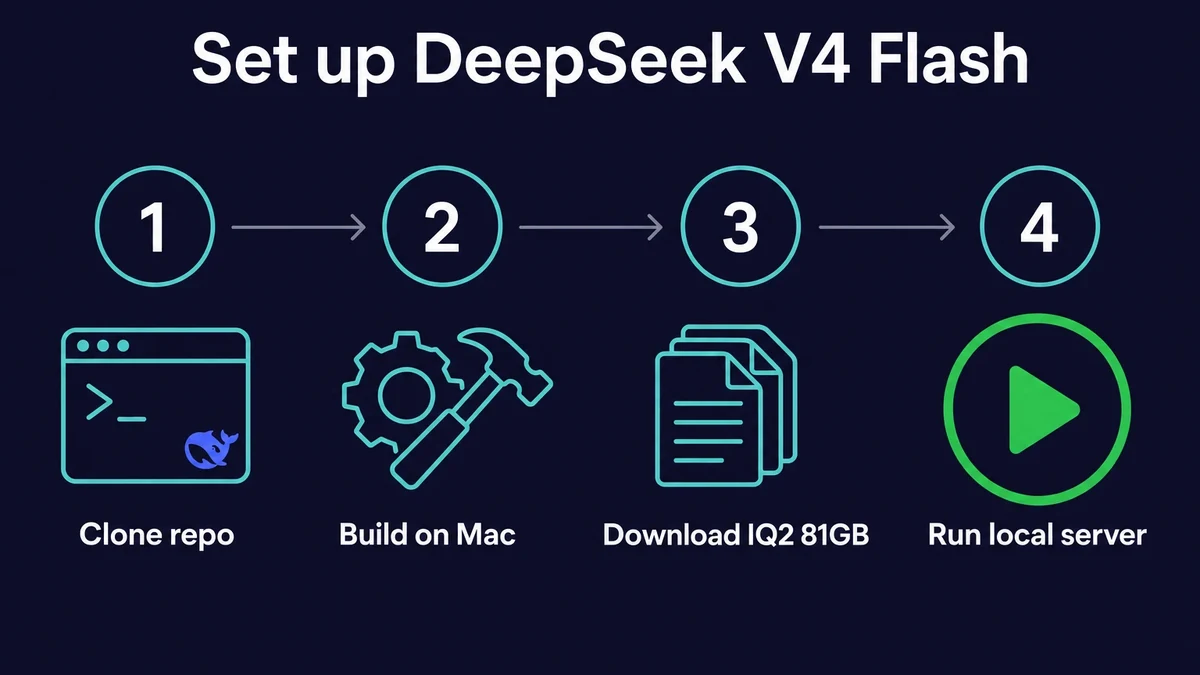
The shape is short: clone the repo, build it on your Mac, download the ~81GB IQ2 weights, then point the engine at the model and start the server.
ds4 is not a thin wrapper around a general runner. It is a V4-specific engine written to squeeze the most out of Apple’s Metal stack, which is why it keeps the GPU pinned. There is also an older llama.cpp fork that handles the same IQ2 GGUF weights. That toolchain works too, just expect it to be a bit slower than the purpose-built path.
Build and download (the slow part is the 81GB, not the build)
The build itself is quick. You clone the ds4 repo, run the build command, and on Apple Silicon it finishes in a couple of minutes with a working binary.
The download is the part that takes patience. The Flash weights ship as roughly 46 files of about 4GB each, around 200GB raw before quantization. You only need the IQ2 GGUF set, which lands at about 81GB, but that is still a long pull on most home connections. Start it, walk away, come back.
I kicked mine off before dinner and it was done by the time I sat back down.
- Clone the ds4 repository to your Mac.
- Run the build command. On Apple Silicon it finishes in a couple of minutes.
- Download the IQ2 GGUF weights, about 81GB across the model files.
- Point the engine at the downloaded model and launch the local server.
Run the local server and send your first prompt
Once the server is up, you load the model and send a prompt like you would with any local runner. The first thing to watch is memory. On my run, RAM spiked from about 22% to 91% the moment the model loaded, and then held there.
llama.cpp reported only around 7GB resident, and I spent a good ten minutes convinced the load had failed before it clicked that Flash is a mixture-of-experts model and does not page everything in at once. It is the same trick that lets gpt-oss run on a modest Mac despite its size.
The signal you want is no swap. If the Mac stays out of swap, the model is living entirely in unified memory and inference stays fast. The GPU pins near 99% on Metal during generation, and the CPU barely moves.
I sent “why is the sky blue” as my throwaway first prompt and watched the tokens stream back at a steady clip.
Watch for swap, not just RAM
If loading V4 Flash pushes your Mac into swap, generation crawls and no amount of patience fixes it. A healthy run looks like RAM filling to roughly 90% and staying there, the GPU near 99% on Metal, and the swap counter untouched. If you see swap climbing, your context is too long or your Mac is too small for the full model.
One honest caveat on quality. IQ2 is aggressive 2-bit quantization, so you trade some precision to fit 568GB of model into 81GB. In practice the answers stay reasonable and the thinking traces are coherent.
For a model running on a laptop, getting coherent answers at all is the surprising part. But if you need the model’s full quality, the hosted API runs the unquantized weights.
Tokens per second by Mac: the speed you’ll actually get
On a 128GB MacBook Pro, DeepSeek V4 Flash at IQ2 generates between 27 and 34 tokens per second depending on the chip. A 512GB Mac Studio M3 Ultra pushes a little higher, near 37. The M4-class Dwarf Star figures land in the single digits at longer context, so check your own tier before you commit to the 81GB download.
Here is the per-Mac picture, pulled from sourced benchmarks.
| Mac config | Memory | Generation t/s | Prefill t/s |
|---|---|---|---|
| MacBook Pro M3 Max | 128GB | ~27 | ~59 |
| MacBook Pro M5 Max | 128GB | ~34 | ~87 |
| Mac Studio M3 Ultra | 512GB | ~37 | ~84 |
| MacBook Pro M4 Max (Dwarf Star) | 128GB | 3 to 6 (4K context) | lower |
| MacBook M4 Ultra (Dwarf Star) | 192GB | 6 to 10 (8K context) | lower |
Why does the same model land at such different speeds? Three things move the needle:
- The chip generation and its memory bandwidth.
- The context length you run at.
- Which engine you use.
A 128GB M5 Max with short context on ds4 is a best case. The M4-class Dwarf Star figures sit lower partly because they were measured at 4K and 8K context, where the KV cache and the math both grow.
The first time I watched llama-bench run on a 128GB M5 Max, prefill came in around 436 tokens per second at a 512-token prompt, dropping to about 280 at 2,000 tokens and 231 at 8,000. Text generation held steadier, sliding only from about 23 to 22 tokens per second. That stability under load is the part that surprised me most.
One footnote worth knowing: these numbers are a floor, not a ceiling. On Apple Silicon, the same model can run 20 to 40% faster under MLX than under a llama.cpp build, so if an MLX 2-bit quant of Flash exists for your setup, it is worth trying.
The ds4 engine is purpose-built for V4 Flash and posts the 27 to 34 t/s in the table above, but the framework you pick still moves the result.
Running on less than 128GB: the SSD-streaming path
If your Mac has less than 128GB, ds4 can still load V4 Flash by streaming experts from SSD instead of holding them all in RAM, and that path starts from around 96GB (sometimes less). On a cache miss the engine reads the needed expert off disk, keeping the model usable on a machine that could never hold all 81GB at once.
The catch is speed. Every SSD read on a miss stalls generation while the data comes off disk, so a streaming run is far slower than an all-in-RAM 128GB run. It works, and it is genuinely clever, but I would not plan a daily workflow around it. Think of it as “yes, technically” rather than “yes, comfortably.”
So what should you do on a 64GB or smaller Mac? Run a smaller model. The R1 distills at 7B, 14B, or 32B fit on far more modest hardware and handle most day-to-day tasks without any of the 128GB drama. It is the same trade I hit trying a giant model on a Mac mini, where the small local models were the only realistic path.
A few realistic local models for the rest of us:
- Run an LLM on a Mac with LM Studio, point-and-click.
- Llama locally from the command line.
- Gemma.
- a small Mistral model.
- Qwen offline.
If you do not own a Mac and want to run a distill locally, Rentamac.io gives you a dedicated Mac Mini M4 with 16GB of RAM, plenty for a 7B or 14B distill.
To be clear: a 16GB Mac mini will not run V4 Flash, since no rented machine in that class can hold the 81GB quant. But for the distills most people should actually be running, a dedicated cloud Mac is a real option. V4 Flash itself wants a Mac Studio-class machine, a different purchase entirely.
When the API beats local, and what V4 actually costs
For most workloads, the API beats buying a 128GB Mac. The hosted DeepSeek V4 Flash API runs at $0.14 per million input tokens and $0.28 per million output, while a 128GB-plus Mac costs thousands of dollars and is scarce on the used market. Unless you have a specific reason to keep inference on your own machine, the math favors the API.
So when does local still win? Three reasons:
- Privacy. Run V4 Flash with ds4 on your own Mac and your prompts never leave the machine. No API logging your data, no token meter ticking.
- Offline and air-gapped work. A model on disk keeps running with the network unplugged.
- Reproducibility. The local weights do not change underneath you the way a hosted endpoint can.
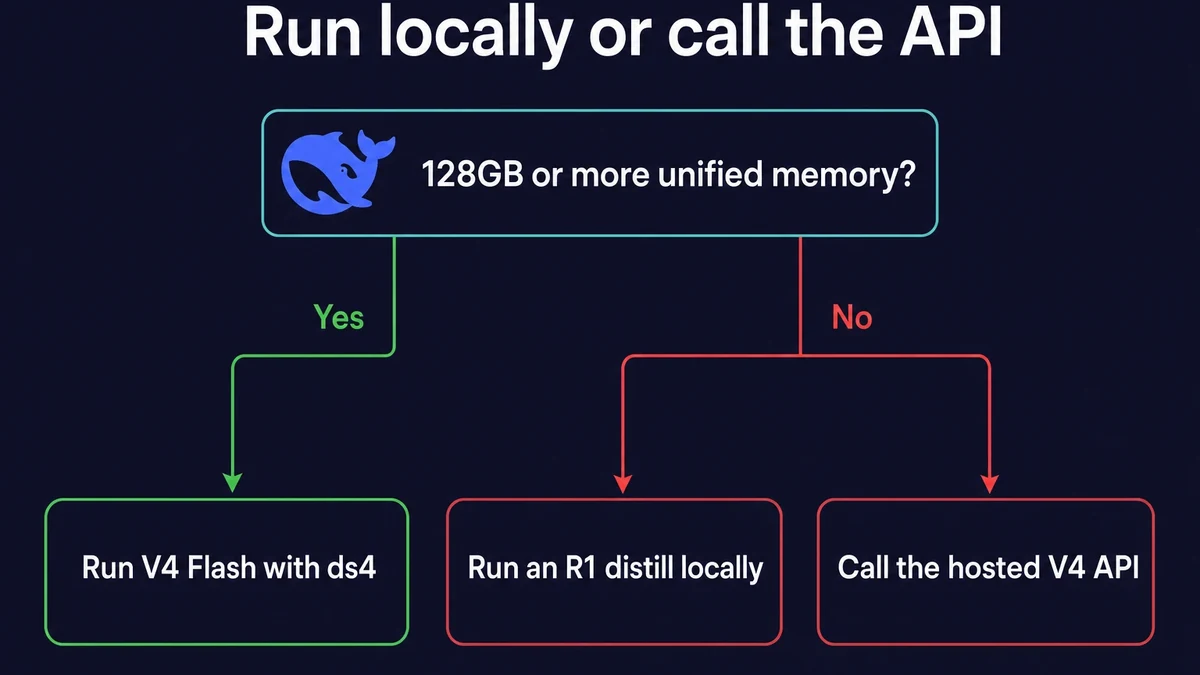
The clean rule I land on is this. If you own a 128GB-plus Mac and care about privacy or offline access, run V4 Flash locally with ds4. If you do not, run a distill locally for light tasks and reach for the hosted API when you need frontier-quality answers.
That covers nearly everyone. If you are weighing whether the hardware is worth it for broader work like machine learning on a Mac, the same calculus applies: rent or use the cloud for the heavy lifting, keep the small stuff local.
Frequently asked questions
How much RAM does DeepSeek V4 need on a Mac?
V4 Flash at IQ2 (2-bit) is about 81GB, and a long context can add roughly 26GB of KV cache, so 128GB of unified memory is the practical floor. V4 Pro, at 1.6 trillion parameters, will not fit on any consumer Mac. Below 128GB you either stream experts from SSD, which is slow, or you run a smaller R1 distill instead.
Can I run DeepSeek V4 Flash on a standard MacBook Pro?
Only if it is configured with 128GB of unified memory, which means an M-Max or M-Ultra chip, not a base or M-Pro model. A standard 16GB or 36GB MacBook Pro cannot hold the 81GB quant in RAM, so it cannot run Flash at usable speed. If that is your machine, run an R1 distill locally or use the hosted API.
Can I run ds4 on a 64GB Mac?
Partly. ds4 supports SSD streaming starting from around 96GB or less, so a 64GB Mac can technically load V4 Flash by streaming experts from disk. The catch is that every cache miss stalls generation, so the speed sits far below an all-in-RAM 128GB run. For real day-to-day use on 64GB, a distill is the better choice.
Is running DeepSeek V4 locally actually private?
Yes. When you run V4 Flash with ds4 on your own Mac, your prompts and responses never leave the machine, there is no API call and no token meter. That privacy, plus the ability to work offline, is the main reason to take on the 128GB requirement instead of calling the hosted API.
Should I run V4 Flash locally or just use the DeepSeek API?
If you own a 128GB-plus Mac and care about privacy or offline access, running it locally with ds4 is worth it. Otherwise the hosted V4 Flash API at $0.14 input and $0.28 output per million tokens is usually cheaper and far less hassle than buying a Mac Studio. For most people in 2026, the API or a local distill covers the job.