On this page
- ›What MacBook Specs Matter for Data Science?
- ›Fanless versus Fan: How Heat Affects Performance
- ›More Than Just Specs: Screen, Ports, and Easy Carrying
- ›Cost-Benefit Analysis: Where Your Budget Should Go
- ›Which MacBook should you buy for data science?
- ›Want to Check Out the MacBook Before Buying? Here’s How to Do It the Smart Way
- ›Conclusion
- ›FAQ
MacBooks with Apple’s M-series chips are surprisingly good at data science. Things that used to need a huge computer setup, like working with tons of data or training models, now work great on these sleek laptops.
Since macOS is built on Unix, programs like Python, R, and Jupyter work right on it. Plus, the “M” series chips deliver impressive CPU and GPU efficiency. Modern MacBooks can easily handle anything from Pandas stuff to training models.
So, let’s find the right MacBook for your data projects, figure out what works price-wise, how much power you require, and how easy it is to carry around.
MacBook Air versus MacBook Pro for Data Science: A Quick Look
Before we get into the nitty-gritty of benchmarks, here’s a simple look at how Apple’s current MacBook lineup compares for data science:
| Model | Chip | CPU Cores | GPU Cores | RAM | Good For |
|---|---|---|---|---|---|
| MacBook Air (M5) | M5 | 10 | 8 or 10 | 16-32 GB | Basic data tasks when you’re on the go |
| MacBook Pro 14 (M5) | M5 | 10 | up to 10 | 16-32 GB | Light pro work with a brighter screen and a fan |
| MacBook Pro 14 (M5 Pro) | M5 Pro | 15 or 18 | 16 or 20 | 24-64 GB | Doing lots at once, huge data sets |
| MacBook Pro 14/16 (M5 Max) | M5 Max | 18 | 32 or 40 | 36-128 GB | Serious deep learning, video, and data work |
- The Air is great if you’re an analyst or student who spends time tidying up data, making charts, or running smaller models.
- The Pro (M5 Pro) is a good choice if you often deal with big data or do several things at once.
- The Max is for people who need the best GPU for deep learning or working with heavy video/data workflows.
Apple’s whole current MacBook line runs on the M5 family now. The M4 Air and the M4 MacBook Pro are discontinued, so the picks below all use chips you can buy new today, with a short note later on where a used M4 still makes sense.
The short answer
- MacBook Air M5, 16GB ($1,099): best for most analysts and students (Pandas, notebooks, charts, small models).
- MacBook Pro 14 M5 Pro, 24GB ($2,199): daily machine learning, bigger datasets, sustained jobs.
- MacBook Pro M5 Max, 36GB ($3,599 14″ / $3,899 16″): only for serious local deep learning or large models.
- Rule: pick by RAM first (it sets the biggest model you can hold), then cooling, then chip tier.
What MacBook Specs Matter for Data Science?
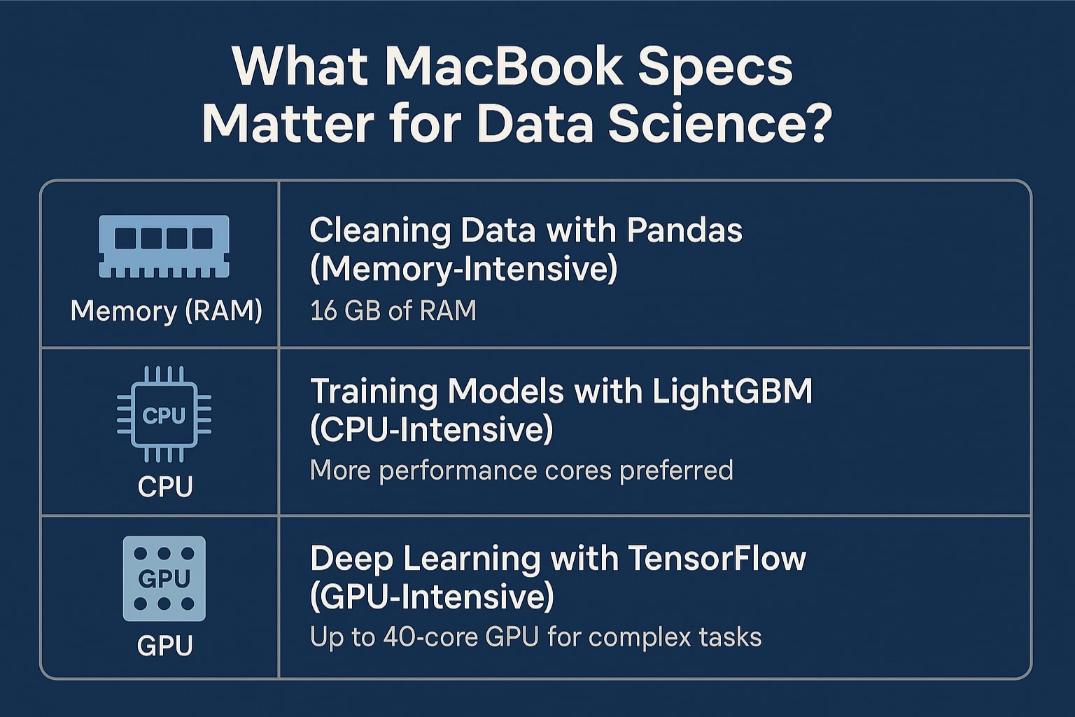
If you’re trying to pick the right MacBook for data work, it helps to know how they handle different tasks. Deciding which MacBook for machine learning comes down to the same handful of specs as general data work does. Here’s a quick look at what matters most: memory (RAM), the CPU, and the GPU.
a. Cleaning Data with Pandas (Memory-Intensive)
When wrestling with big datasets in Pandas, RAM is super important. If you’re merging huge tables or doing pivot tables, the amount of RAM you have will decide how well everything runs.
Tests show that a MacBook Air with 16 GB of RAM is almost as quick as the base M5 Pro MacBook Pro regarding RAM-heavy operations. So, the amount of RAM is more important than the actual chip.
On a new Air that 16 GB is now the starting point. It’s one of the best specs you can have if you’re an analyst or use Python a lot.
In 2026 your RAM does more than speed up Pandas. It also sets the biggest local model you can run. On a Mac the memory is unified, which means it is shared between the CPU and the GPU, so the same number gates both your datasets and any AI model you load.
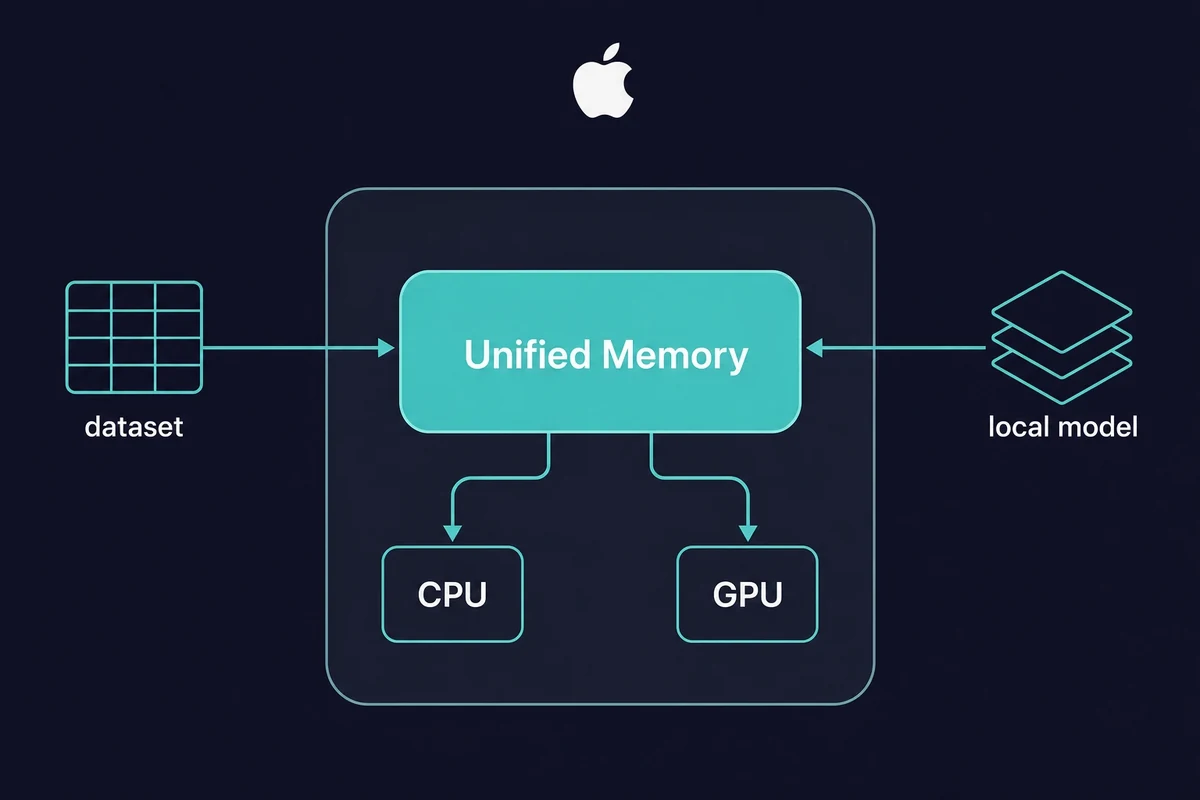
Here is the rough rule of thumb, using 4-bit models:
| Unified memory | Largest local model it runs (4-bit) |
|---|---|
| 16 GB | 7-8B |
| 24 GB | 14B |
| 48 GB | 32B |
| 64 GB | 70B |
This matters for data science because a large dataframe and a local model both pull from the same memory pool. If you want to load a big table and run a local LLM on a Mac at the same time, headroom is what keeps both happy. Pick your RAM for the bigger of the two jobs.
b. Training Models with LightGBM (CPU-Intensive)
LightGBM pushes your CPU to its limit. This is why the CPU setup starts to be important.
- The M5 Air splits its work across performance and efficiency cores.
- The M5 Pro has more performance cores. Its CPU is up to 15% faster than the M4, which speeds up CPU-bound training.
For things like gradient boosting or anything that uses the CPU a lot, the Pro’s extra cores will make training go more smoothly, especially if you’re multitasking with notebooks, IDEs, or other stuff running in the background.
A MacBook Pro for machine learning earns its price right here. The extra performance cores and active cooling hold training speed on long CPU-bound jobs.
c. The GPU for Deep Learning
For neural networks, the GPU is the big thing. Both main frameworks now run on the Apple Silicon GPU: PyTorch through its MPS (Metal Performance Shaders) backend on macOS 12.3 or newer, and TensorFlow through Metal. Even the entry-level chips do pretty well.
- The M5 Air’s GPU can handle simple CNNs and image stuff just fine.
- The M5 Pro’s larger GPU trains more complex models a good deal faster, and its 307 GB/s of unified-memory bandwidth keeps big batches moving.
- The M5 Max, with up to 40 GPU cores and up to 614 GB/s of bandwidth, is almost as good as a desktop for deep learning, but be warned, it’s expensive.
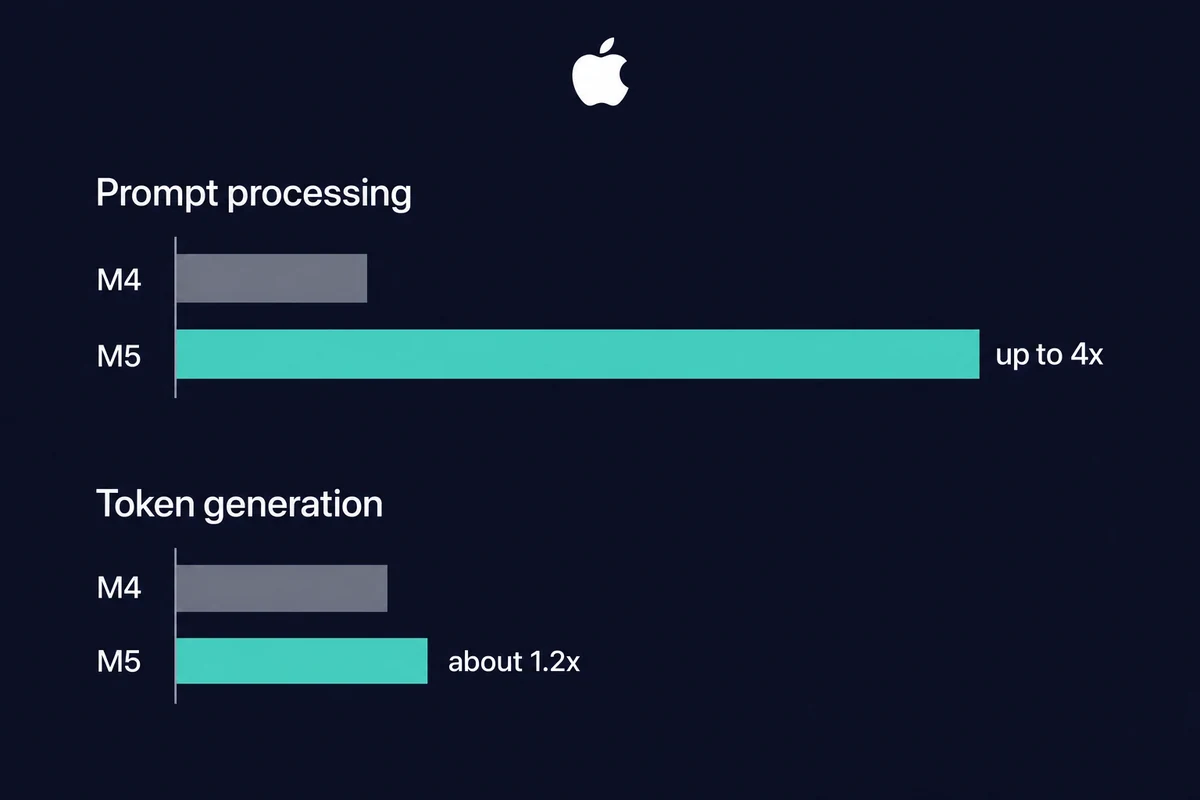
The big change with the M5 is the GPU. Each GPU core now has a built-in Neural Accelerator, which gives the M5 over 4x the peak AI GPU compute of the M4 and up to 30% faster general graphics. The base M5 chip also lifts memory bandwidth to 153 GB/s, up about 28% from the M4’s 120 GB/s.
That speed shows up in one phase more than the other. In Apple’s own tests, the M5 processes a prompt 3.3 to 4.1 times faster than the M4 (this is the time to first token).
But once the model starts writing, local token generation is only about 1.2 times faster, because that part is limited by memory bandwidth, not compute. So the M5 feels much snappier starting a job, and only a little quicker finishing one.
The honest tradeoff is that a job like ResNet-50 runs roughly 3x slower on Apple Silicon than on an NVIDIA RTX 4090, though it does so at over 80% less energy.
So a MacBook is a fine place to build, test, and run smaller models. The heaviest training still belongs on an NVIDIA card. For the detail on how machine learning works on Mac, both PyTorch and TensorFlow now reach the M-series GPU.
Fanless versus Fan: How Heat Affects Performance
The MacBook Air doesn’t have a fan, which is both good and bad. It’s super quiet and light. But if you’re doing something intensively for a while, like training a big model, it might get too hot and slow down to keep from overheating.
On the other hand, the MacBook Pro has a fan, so it can keep working at its best speed for longer, especially when you’re doing stuff that uses a lot of CPU or GPU power, like LightGBM training or TensorFlow tasks.
For quick tasks, the Air is fine. But if you’re doing things that take hours or need constant speed when things get tough, the Pro’s cooling system really helps.
More Than Just Specs: Screen, Ports, and Easy Carrying
Data science isn’t all about raw performance – daily usability matters, too.
- Screen – The MacBook Pro’s Liquid Retina XDR screen is brighter, has better contrast, and has sharper images. It’s great if you’re making dashboards, checking out visuals, or just want a nicer screen to look at when coding for hours. The Air’s Retina display is sharp but not as bright.
- Ports – The MacBook Pro has HDMI, MagSafe, a spot for SD cards, and three Thunderbolt ports. The Air only has two Thunderbolt ports, which is okay for most people, but not so good if you use a lot of stuff at once or have more than one monitor.
- External Displays – The Air can only handle one external monitor, but the Pro can hold two or more, depending on the chip inside.
- Weight and Battery – The Air is lighter (2.7 lbs), and the battery lasts longer. That makes it great if you’re always out and about. The Pro is heavier (around 3.5 lbs) but can work harder for longer.
The Pro is the better choice if you care about having many options and an excellent screen for extended work periods or showing off your work. But if you need something easy to carry above all else, the Air is a great pick.
Cost-Benefit Analysis: Where Your Budget Should Go
MacBooks cost a lot, so you want to know which upgrades are worth it.
- RAM is Key – A new M5 Air already ships with 16GB and a 512GB SSD as its base, so the old “jump from 8GB to 16GB” question is gone. The choice now is whether to step up to 24GB or 32GB, which is worth it if you run local models or juggle multiple tabs and big tables.
- GPUs – Unless you train complex AI models constantly, don’t sweat the extra GPU cores. The base M5 or the M5 Pro is typically good enough.
- Storage – The M5 Air starts at 512GB, which is fine for most work unless you handle huge files regularly. You can always use cloud storage or external drives.
Instead of loading up a MacBook, think about this:
- Rent a more powerful Mac when you need one.
- Spend your money on cloud GPU time (like AWS or Paperspace).
- Invest in tools or courses to make your workflow faster.
Which MacBook should you buy for data science?
If you are asking which MacBook is best for data science, the short answer for most people is the MacBook Air M5 with 16GB unified memory, at $1,099. It handles Pandas, charts, notebooks, and small models with room to spare.
Step up to the MacBook Pro 14 M5 Pro with 24GB ($2,199) only if you train models or juggle large datasets every day. The M5 Max is for deep learning alone.
Here are the three picks, ranked by who they suit:
| Pick | RAM | Approx. price | Best for |
|---|---|---|---|
| MacBook Air M5 | 16GB | $1,099 (13″), $1,299 (15″) | Most analysts and students: Pandas, notebooks, charts, small models |
| MacBook Pro 14 M5 Pro | 24GB | $2,199 (14″), $2,699 (16″) | Bigger datasets and multitasking; holds a 30B 4-bit model; active cooling for long jobs |
| MacBook Pro M5 Max | 36GB | $3,599 (14″), $3,899 (16″) | Deep learning and large local models, only if you train locally a lot; configurable up to 128GB |
One thing worth knowing before you spend up: every M5 chip shares the same 16-core Neural Engine. The Max mainly adds CPU and GPU cores and bandwidth, so for running models rather than training them, you do not need to pay for the Max.
The decision rule is simple. Pick by RAM first, since that sets the model size and dataset you can hold in memory and it cannot be upgraded later. A 24GB Mac, for example, holds an 8B model at full precision or a 30B model at 4-bit. Then look at cooling for long jobs, then the chip tier.
Still on the fence about the spend? Our take on whether a MacBook is worth it walks through the same math.
What changed from the M4 to the M5?
The M5 generation replaced the M4 across the whole MacBook line in March 2026, and the gains land mostly on AI and GPU work rather than everyday number-crunching. Prompt processing is much faster, but local token generation barely moved, so the upgrade matters most if you lean on local models or GPU training.
Here is the per-tier picture, using the verified numbers:
| Tier | M4 (previous) | M5 (current) | What it means for data science |
|---|---|---|---|
| Air | M4 Air, 16GB, $999 (now discontinued) | M5 Air, 16GB, $1,099, 153 GB/s | Same base RAM, faster GPU, +$100; better for small local models |
| Pro mid | M4 Pro, 24GB, 273 GB/s, ~$1,999 | M5 Pro, 24GB, 307 GB/s, $2,199 | More bandwidth and up to 4x faster prompt processing for bigger ML |
| Pro top | M4 Max, up to 546 GB/s | M5 Max, up to 614 GB/s, up to 128GB | More headroom for the largest local models and heavy training |
The honest catch is the split between starting a job and finishing one. In Apple’s tests the M5 hit time to first token 3.3 to 4.1 times faster, but token generation gained only about 1.2 times. So pay for the M5 mainly if prompt processing, GPU training, or the larger RAM ceiling helps your work.
Is a used M4 MacBook still worth buying?
A discontinued M4 MacBook can be a smart budget pick, but only refurbished or used, and mainly for CPU-bound data work like Pandas and scikit-learn. Apple stopped selling the M4 Air and the M4 MacBook Pro new in March 2026, so any “new” M4 you find is refurbished or third-party stock.
The reason it still holds up: the headline M5 gains help AI and GPU prompt-processing far more than they help dataframe work. The M5 CPU is only up to 15% faster than the M4 in multithreaded tasks, and local token generation is barely quicker.
So if you mostly clean data, run pivot tables, and train small CPU models, a well-priced refurbished M4 with 16GB does the job for less.
If your work leans on local models or GPU training, the M5’s faster prompt processing and extra bandwidth are worth the new-model price.
Want to Check Out the MacBook Before Buying? Here’s How to Do It the Smart Way
If you’re unsure which MacBook suits you, test it out first!
- You can save money on refurbished Macs (especially M1 and M2 versions) from Apple or sellers you trust.
- New MacBooks have the latest chips, but they’re pricier and might be more than you need.
A smarter middle ground? Try Rentamac.io. You can rent Mac Minis with the latest M4 chip and test them with your workflow from wherever you are. It’s a reliable, quick, and easy way to see how they run before spending large amounts of money.
Whether it’s RAM or the graphics card you want to check, renting saves you time and cash before you commit.
Conclusion
- If you’re after something light, with enough power for daily tasks and a reasonable price, the MacBook Air M5 is a solid bet.
- For bigger datasets, training models, or running a bunch of programs at once, get the MacBook Pro with the M5 Pro.
- Choose the M5 Max if you rely on serious GPU workflows, like deep learning or large local models. Otherwise, it’s probably overkill.
And remember: you don’t need to buy blind. Check out Rentamac.io to try out different MacBooks remotely. A student, a freelancer, or someone building ML systems can all find a Mac that fits, and you don’t have to spend a fortune finding it.
FAQ
Is the MacBook Air good for data science?
Yes, for most smaller tasks like cleaning data, making charts, and simple machine learning, the MacBook Air is excellent, especially now that the M5 model ships with 16 GB of RAM as standard.
Where it stops being enough is long sustained jobs: the Air has no fan, so it can thermal throttle and slow down to stay cool. If you train models for hours at a time, step up to a MacBook Pro for the active cooling.
How much RAM do I need for data science on a Mac?
16GB is a good start, and it’s now the base on a new M5 Air. It comfortably runs a 7-8B model at 4-bit. Step up to 24GB, which holds an 8B model at full precision or a 30B mixture-of-experts model at 4-bit, or 32GB if you plan to run bigger local models.
Can I do deep learning on a MacBook?
Yes. Both PyTorch (through its MPS backend) and TensorFlow (through Metal) train on the Apple Silicon GPU. Heavy training is still faster on an NVIDIA GPU, so for bigger jobs think about a cloud GPU or renting a higher-RAM Mac from Rentamac.io.