Everyone’s running OpenClaw with local models now. Or trying to. Most guides make it sound easy: install Ollama, pull a model, done. They skip the part where half these models can’t actually do what OpenClaw needs them to do.
One model that looked great on benchmarks looped endlessly on a basic tool-calling chain. Another, half its size, ran an agent for two weeks without a single failure. More on both later.
In the OpenClaw vs Claude article, I said combining OpenClaw + Claude via OAuth was the best setup. That’s still true for complex reasoning. But for the routine 80%, email triage, scheduling, file management, messaging? The right local model on the right hardware handles it without touching the cloud.
OpenClaw itself barely touches your RAM. The model you feed it? That’s where the gigabytes go. And the minimum bar for “actually works as an agent” is higher than most people think.
Where the RAM actually goes
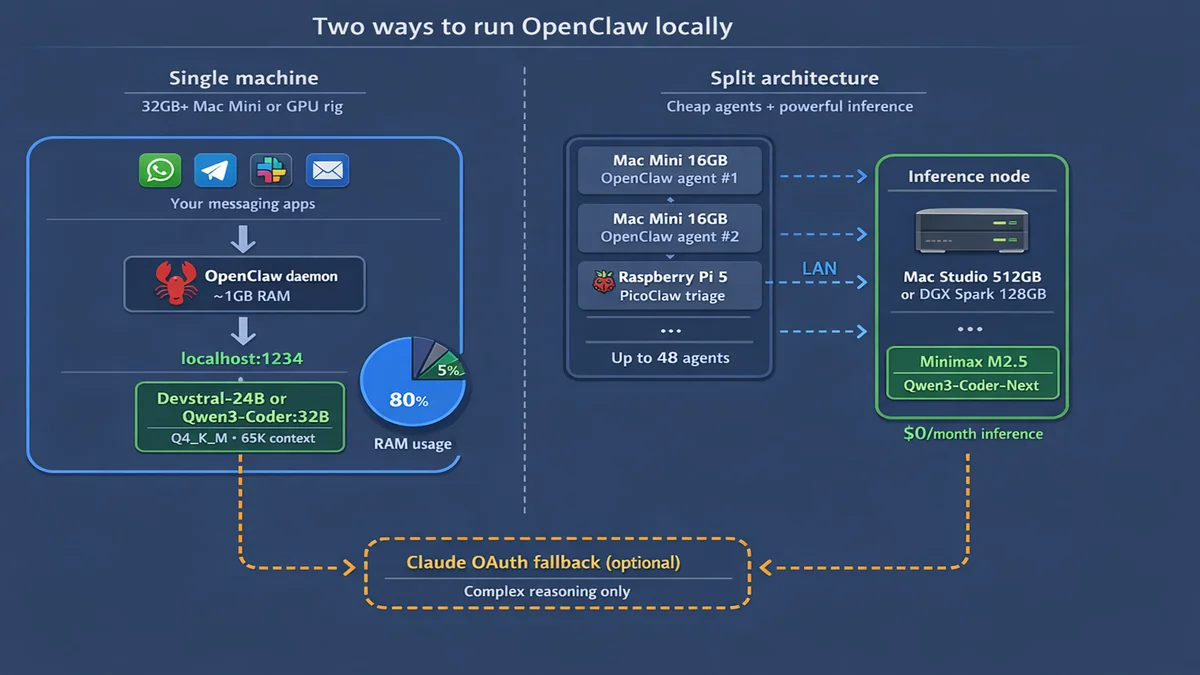
OpenClaw’s daemon uses 300-500 MB of RAM. Add about 100 MB per messaging channel and maybe 1 GB for sandbox containers. Total overhead in production: 1-2 GB. That’s it.
But here’s what nobody tells you upfront. OpenClaw’s system prompt alone is 17,000 tokens. Add sub-agent context, tool definitions, and conversation history, and you need 32K context minimum. 65K+ for production with sub-agents.
That context eats RAM through the KV cache, on top of the model weights.
Any machine can run OpenClaw. The real question: can it run a 24-32B model with 65K context alongside it?
Small models fail this test. 7-8B models hallucinate tool calls and produce format errors. 14B is marginal. And MoE (mixture-of-experts) models at higher parameter counts can look great on paper but loop on tool-calling chains in practice.
Models that actually work
Everything below comes from real-world production setups, not benchmark scores. Two people in particular helped shape this section: Ian Paterson, who runs OpenClaw on a 32GB Mac Studio, and Alican Kiraz, who runs a 48-agent OpenClaw cluster.
Top picks for 32GB+
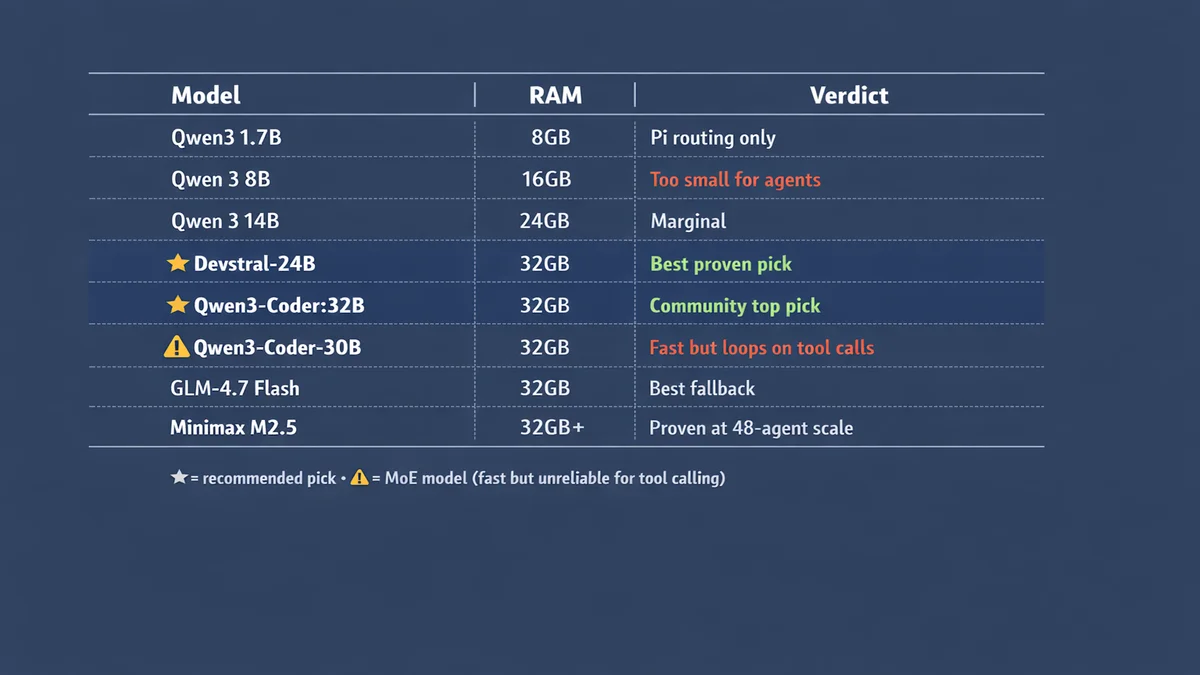
Devstral-Small-2-24B. Ian Paterson’s production model on a 32GB Mac Studio M1 Max. About 14GB on disk at Q4_K_M. Stable tool calling at 13.2 tok/s. Slow enough that you notice. Reliable enough that you stop caring. Two weeks in production without a single failure.
Qwen3-Coder:32B. Community consensus pick. Extremely stable tool calling. Needs about 20GB at Q4_K_M plus 4-6GB for KV cache at 65K context. Requires 32GB+ hardware.
GLM-4.7 Flash. Best fallback model. Pairs well with either of the above for dual-model rotation — OpenClaw switches between them automatically. Recommended combo: Devstral-24B or Qwen3-Coder:32B as primary, GLM-4.7 Flash as fallback.
Minimax M2.5 and Qwen3-Coder-Next. What Alican Kiraz runs across his 48-agent cluster. Proven at scale. Qwen3-Coder-Next has native tool calling support.
The MoE trap
Mixture-of-experts models like Qwen3-Coder-30B look great on paper. 49 tok/s on Apple Silicon — almost 4x faster than Devstral. Ian Paterson tried it first. It looped endlessly on tool-calling chains. The slower dense model won on reliability.
Speed means nothing if your agent gets stuck in a loop. Stick to dense models for agent work.
14B: marginal
Qwen 3 14B and DeepSeek-R1-Distill-14B both fit on 24GB hardware. Qwen is more coherent. DeepSeek has chain-of-thought reasoning from the full R1 model. Neither is reliable enough for production agent tasks that need consistent tool calling.
If you’re on this tier, run the local model for simple tasks and lean on Claude OAuth for anything with more than two steps.
8B and below: skip for agents
7-8B models (Qwen 3 8B, Mistral 7B, Llama 3.2 8B) produce tool call format errors constantly. Fine for answering one-off questions. Useless for agent work.
1-2B models are routing only. PicoClaw on a Raspberry Pi handles basic triage and smart home triggers. One user got a Telegram agent running on a Pi 400 with ZeroClaw, but hit context and timeout walls doing anything more complex.
The runtime matters more than you think
Both real-world power users I talked to chose LM Studio or vLLM over Ollama for production. There’s a reason.
The Ollama streaming gotcha. OpenClaw sends stream: true by default. Ollama’s streaming doesn’t emit tool_calls delta chunks properly.
The model decides to call a tool, but the response comes back empty. Silent failure.
Your agent just stops mid-task and you have no idea why.
Fixes: set stream: false in model config (kills streaming performance), use Ollama’s native /api/chat endpoint instead of the OpenAI-compatible one, or skip Ollama entirely.
LM Studio is what Ian Paterson uses for production. GUI for testing models, API at localhost:1234 for production. Better tool call handling than Ollama in streaming mode.
vLLM is what Alican Kiraz runs on his NVIDIA DGX Spark nodes via Docker. Best option for dedicated GPU inference servers.
If you’re hitting weird silent failures where the agent stops mid-task, try switching the runtime before blaming the model.
How much RAM you actually need
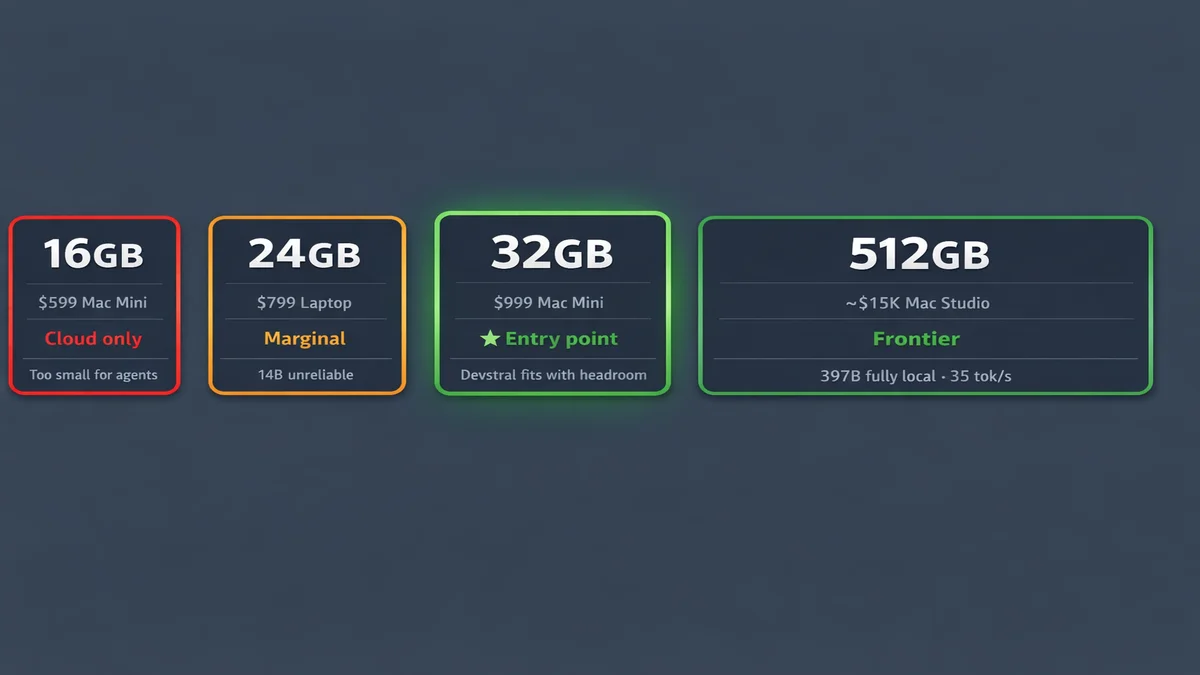
Under 16GB: cloud only
OpenClaw runs fine. No room for a useful model. Best play: OpenClaw + Claude or GPT via OAuth. Still a 24/7 agent, the LLM just lives in the cloud.
A Raspberry Pi with PicoClaw fits here for basic triage only.
16-24GB: too small for agent-grade models
Could fit a 7-8B or 14B model, but both are marginal for real agent tasks. Alican Kiraz runs 16GB Mac Minis in his cluster, but they only run OpenClaw agents. Inference happens on separate hardware. That’s the split architecture approach, which I’ll cover below.
Single machine at this tier? Run OpenClaw with OAuth.
32GB: the entry point
This is where local-first actually starts working.
OpenClaw (~1GB) + Devstral-24B at Q4_K_M (~14GB) + KV cache at 65K (~4-6GB) + OS (~3GB) = about 24GB total. Fits with headroom. Or: Qwen3-Coder:32B (~20GB) + KV cache + OS = about 30GB. Tight but it works.
Ian Paterson’s production config: 32GB Mac Studio M1 Max + Devstral-24B + LM Studio. Two weeks stable.
Pro tip from his setup: sudo sysctl iogpu.wired_limit_mb=24576 raises macOS GPU memory cap. Critical on 32GB machines. KV cache Q8_0 quantization nearly doubles usable context on Apple Silicon.
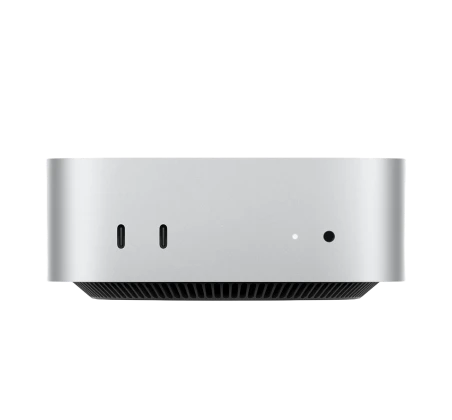
32GB Mac Mini M4 at $1,199. This is the real starting line.
48-64GB: comfortable
32B model with real headroom. Can run dual models simultaneously. 70B models start fitting at 64GB but give diminishing returns for most agent tasks.
48GB Mac Mini M4 Pro at $1,799. 64GB Mac Mini M4 Pro at $1,999+. This is where “local-first” stops feeling like a fight.
192-512GB: running the big models locally
This is where 397B-parameter MoE models like Qwen3.5-397B fit at full 262K context. Clément Pillette benchmarked a 512GB Mac Studio M3 Ultra against a custom workstation with 4× RTX PRO 6000 (384GB VRAM). The Mac Studio hit 35 tok/s. The workstation hit 46.9 tok/s.
The workstation cost ~$47,000 and draws 1,100W at 51 dBA. The Mac Studio cost ~$15,000, draws 120W, and you can barely hear it at ~15 dBA. That’s 6.7× more energy-efficient per token. Over three years, the TCO gap is nearly $42K.
His conclusion: the Mac Studio is the most attractive hardware for running local AI agents. And he says he’s never been a Mac guy.
Most OpenClaw users won’t need this tier. A 32B model handles the routine agent work fine. But if you’re running complex multi-agent workflows or want frontier-class models fully local, the 192GB Mac Studio M4 Ultra starts at $7,999 and the 512GB version exists for people who refuse to touch a cloud API.
Split architecture: any budget
Alican Kiraz’s approach separates agent nodes from inference nodes. Cheap hardware (16GB Mac Mini, Raspberry Pi) runs OpenClaw. Expensive hardware (512GB Mac Studio, NVIDIA DGX Spark) runs the models. Connected via local network.
Agent nodes don’t need GPU memory. They just need network access to the inference server. Scales to 48+ agents on a single inference node.
Overkill for most users. But if you’re running multiple OpenClaw instances, this is how the serious setups work.
What it actually feels like
Set expectations. People compare local inference to ChatGPT speed and get disappointed.
Ian Paterson’s honest take: saying “hello” takes about 3 minutes. Compound tasks, 8-10 minutes. That’s Devstral-24B at 13.2 tok/s on a 2022 Mac Studio.
Another user on X reported Opus 4.6 burning 22K tokens for a simple question. Even on an M3 Ultra with 512GB at 20-30 tok/s, that’s roughly 5 minutes before you get an answer.
The mental model is “delegating to a junior team member.” You hand off a task and check back later. Come back in 10 minutes.
M4 hardware is faster than M1 or M3. Expect roughly 2x the tok/s on equivalent RAM. But even at double speed, you’re still waiting minutes per task. This is a background worker, something you fire off before making coffee.
For a 24/7 worker doing email triage, scheduling, and file management? Speed doesn’t matter much. It runs while you sleep.
OpenClaw config for local models
Context length. 65K minimum. Hard requirement. OpenClaw’s system prompt alone is 17K tokens. This adds 4-8GB to memory via KV cache.
KV cache quantization. Q8_0 on K and V nearly doubles usable context on Apple Silicon. Huge for 32GB machines where every gigabyte counts. Ian Paterson’s finding.
Model quantization. Q4_K_M is the standard. Q5_K_M if you have headroom. Don’t go lower than Q4 unless you’re on a Pi.
Temperature. 0 to 0.2 for agent tasks. Higher values mean more hallucinated tool calls. Correctness matters more than creativity here.
Streaming. Use stream: false if tool calls silently fail, or switch to LM Studio or vLLM.
Auth profiles. Local model first, Claude OAuth fallback for complex tasks. OpenClaw handles the switching automatically.
When local isn’t enough
Complex reasoning: Opus 4.6 vs Qwen3-Coder:32B on SWE-bench isn’t close. Cloud still wins on hard problems.
Context length: local models max out around 128K tokens. Cloud models handle 1M+. If you’re analyzing a full codebase or a 200-page contract, you need a cloud model.
The hybrid setup from the Claude article is still the smartest play. Local for 80% of tasks, route the hard stuff to Claude via OAuth. Your OpenClaw auth profiles handle the switching automatically.
The pick
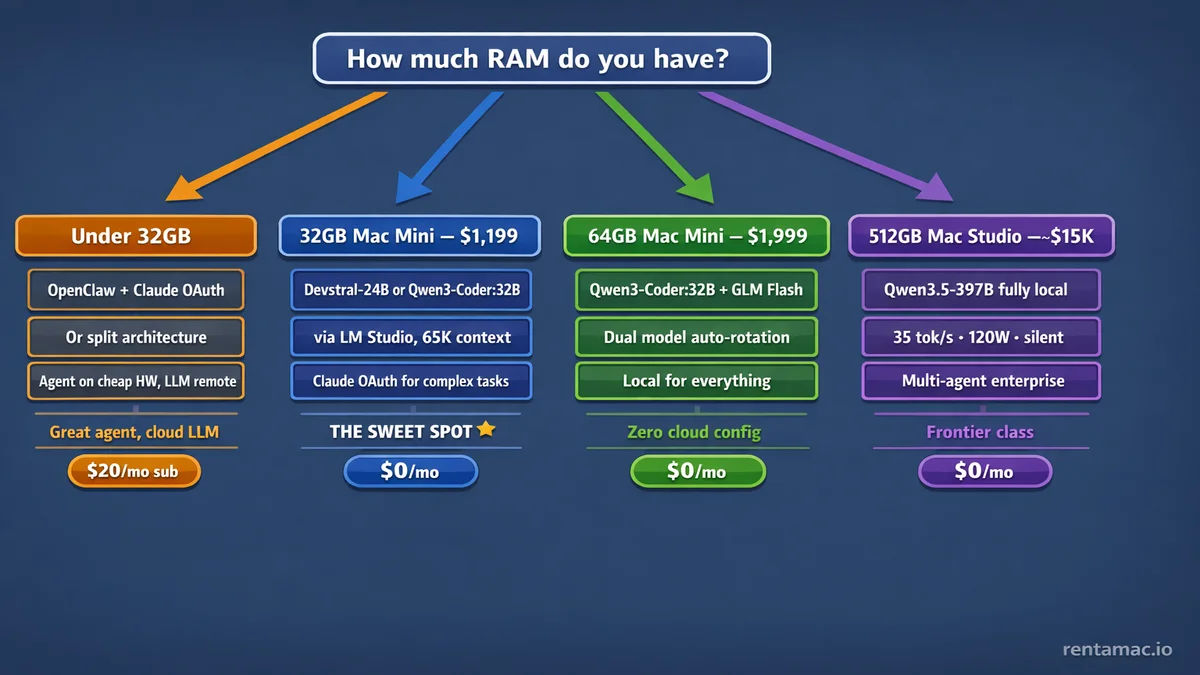
Four paths.
Under 32GB. Don’t fight it. Run OpenClaw with Claude or GPT via OAuth. Great 24/7 agent, the LLM just lives in the cloud.
Or go split architecture: run OpenClaw on cheap hardware, point it at a remote inference server.
32GB Mac Mini ($1,199). Devstral-24B or Qwen3-Coder:32B via LM Studio. Handles most agent tasks locally. Claude OAuth fallback for complex reasoning.
The sweet spot.
64GB Mac Mini ($1,999). Dual model setup with Qwen3-Coder:32B + GLM-4.7 Flash. Local for everything, cloud for nothing. The “zero cloud” config.
192-512GB Mac Studio ($7,999+). Frontier-class models like Qwen3.5-397B running fully local at 35 tok/s. For multi-agent enterprise setups or people who want cloud-grade models without the cloud bill.
Want to try OpenClaw before buying hardware? rentamac.io rents 16GB M4 Mac Minis with full admin access. Won’t fit a local model, but you can set up OpenClaw with Claude or GPT via OAuth and have a 24/7 agent running in an hour.
A 32GB Mac Mini running Qwen3-Coder:32B costs $0/month in inference and about $1.50/month in electricity. The whole machine draws around 15W idle, 40W under load. Compare that to $200/month for Claude Max or $20/month for Pro with rate limits.
The hardware pays for itself in 6 months. A GPU workstation doing equivalent inference draws 1,100W and sounds like a jet engine.
Cloud models still win on the hard problems. But for an always-on agent handling the routine 80%? A Mac Mini in your closet running Qwen3-Coder:32B changes the math completely.
Previous: OpenClaw vs Claude | Related: How to set up OpenClaw | How to secure OpenClaw