On this page
- ›Before you install anything from ClawHub
- ›The best OpenClaw skills to install first
- ›Productivity and knowledge
- ›Search and research
- ›macOS native skills
- ›Communication
- ›Media and content creation
- ›Development tools
- ›AI and agent enhancement
- ›Smart home
- ›Security tools
- ›My actual setup
- ›How to install skills
- ›Frequently asked questions
- ›The bottom line
OpenClaw ships with 53 skills. ClawHub has over 10,000 more. And about 1,200 of those were recently found to contain malware.
So yeah, picking the right ones matters.
I spent a week digging through ClawHub’s most popular skills by downloads, cross-referencing community recommendations, and filtering out anything that looked sketchy. Skills are what make OpenClaw worth using over ChatGPT or Claude. Most “best skills” lists just dump names with no context. This one is different. I’ll tell you what each skill actually does, whether it’s safe, and whether it’s worth the install.
But first: the security stuff. Skip this section at your own risk.
Before you install anything from ClawHub
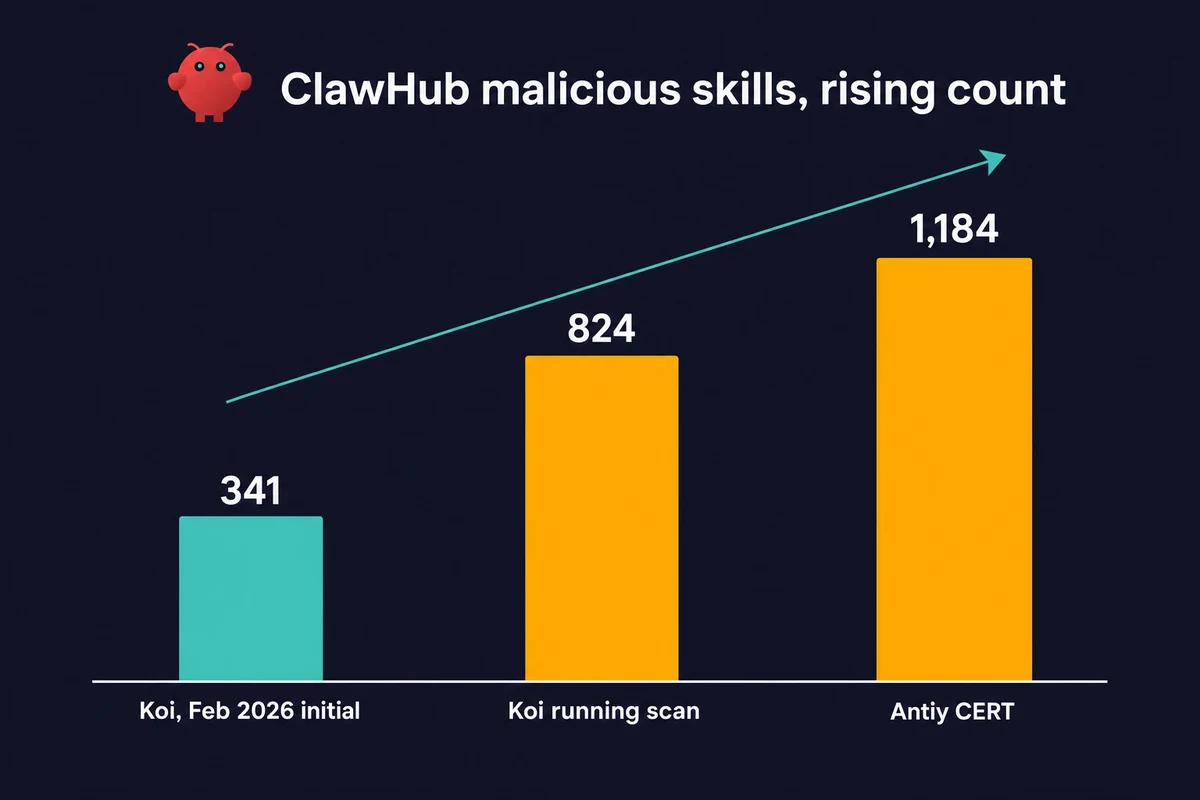
In February 2026, the Koi Security team scanned 2,857 ClawHub skills. They found 341 that were actively harmful. 335 of those came from one planned attack they called “ClawHavoc.”
As the registry passed 10,700 skills, Koi kept scanning and the bad-skill count rose from 341 to 824. Antiy CERT counted 1,184 bad packages on its own, spread across 12 author IDs (one account, hightower6eu, put out 677 of them).
The bad skills had names like “smart-email-assistant” and “calendar-sync-pro.” They looked normal. The SKILL.md files read fine. But hidden commands sat inside fake “setup steps” sections. The payloads waited 24 to 48 hours to fire. By then you would not tie the install to the hack.
What they dropped: Atomic macOS Stealer (AMOS). It is a rented malware kit that runs attackers $500 to $1K a month. Some skills also copied Discord chat history out in Base64 bits.
ClawHub pulled 2,419 of those skills (the registry fell from 5,700 to 3,286 overnight) and added VirusTotal scanning. It has since grown back past 13,729 skills.
Vetting did get better. The scans and the 2,419 takedowns cleared out the obvious malware. But 2026 scans still find bad packages (824 by Koi, 1,184 by Antiy), so better and bulletproof are not the same thing. To lock down your own setup, read the full security guide.
My rules for installing community skills:
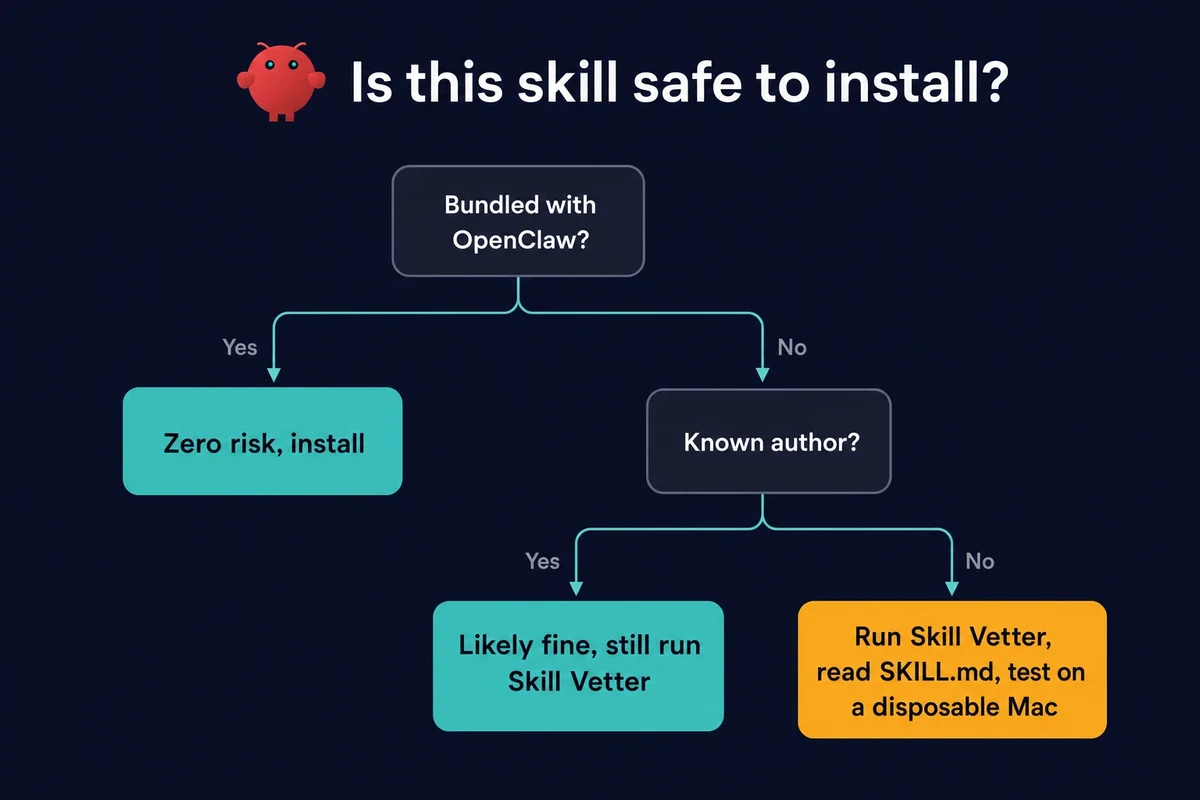
- Prefer bundled skills (the 53 that ship with OpenClaw). Zero risk.
- Check the author. @steipete is Peter Steinberger, who built OpenClaw. His skills are basically first-party. @byungkyu puts out OAuth API wrappers in bulk, they’re fine but plain.
- Look at version count and star count. A skill with 12 versions and 338 stars has been kept up and vetted by the community. A skill with 1 version and 0 stars? Read the source first.
- Install the Skill Vetter skill (256K downloads) before you install anything else from ClawHub. It scans skills for red flags before and after installation.
- If you’re testing unknown skills, do it on a throwaway machine. A rented Mac Mini from Rentamac.io for a week costs less than fixing stolen logins.
With that out of the way, here’s what’s actually worth installing.
The best OpenClaw skills to install first
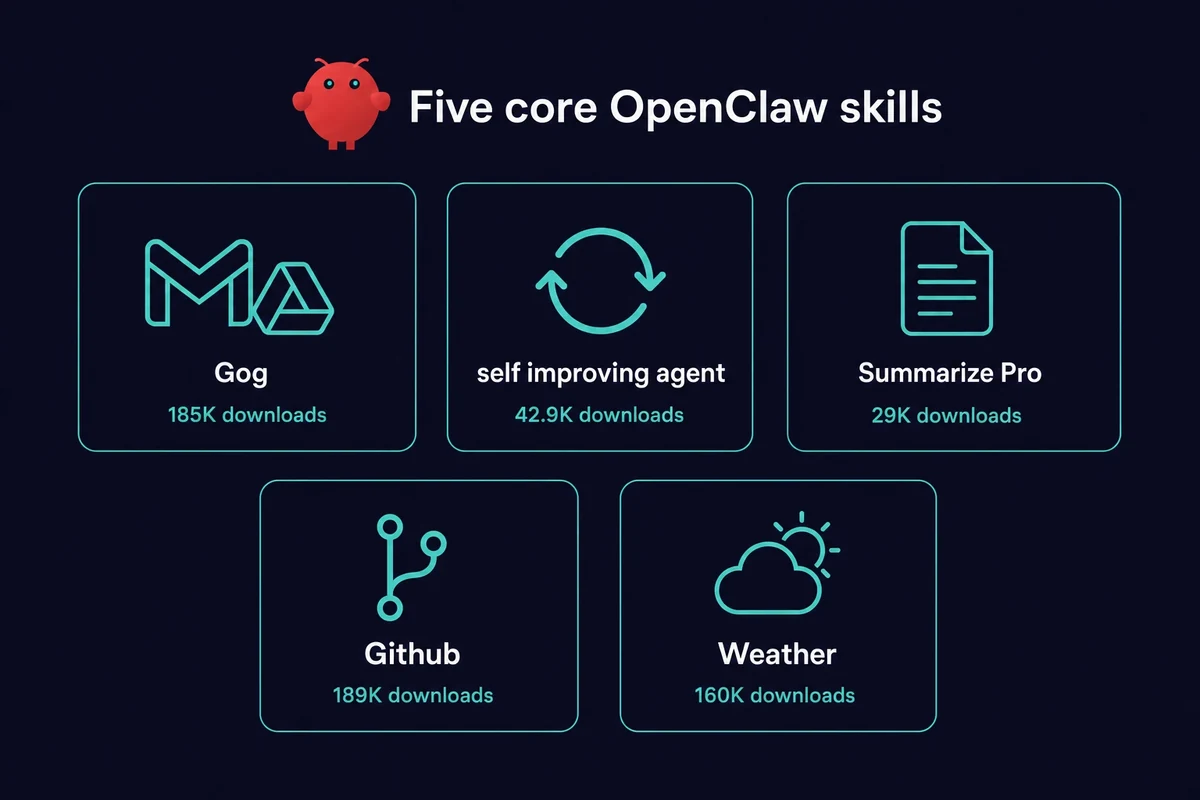
These are the best OpenClaw skills to install first, the top OpenClaw skills ranked by download count and safety: bundled with OpenClaw or from trusted authors like @steipete, high download counts, proven stable, zero security concerns.
| Skill | Downloads | Why install it |
|---|---|---|
| Gog | 185K | One skill for Gmail, Calendar, Drive, Docs, Sheets, and Contacts. The most useful single install. “Send the Q3 report to Sarah and add a meeting for Thursday at 2pm.” One sentence, two Google services, done. By @steipete. |
| self-improving-agent | 42.9K | The clawhub self-improving-agent skill now sits at about 42.9K downloads, up from around 32K. It captures learnings across sessions, so OpenClaw gets better at your workflows. Correct a mistake once and it remembers. By @xiucheng. |
| Summarize Pro | 29K | Feed it a URL, PDF, doc, email, or YouTube transcript. Get a summary back. I use it daily. “Summarize this 45-minute video” saves you 44 minutes. By @mkpareek0315. |
| Github | 189K | GitHub CLI for issues, PRs, and CI runs. “Check if any CI runs failed overnight and summarize the errors.” No more clicking through the GitHub UI. By @steipete. |
| Weather | 160K | No API key, no setup. Sounds basic. But it pairs well in a morning briefing (“What’s the weather, what’s on my calendar?”), so it earns its place. By @steipete. |
A note on “most popular,” since the labels get thrown around loosely. By raw download count, the leaders in this list are Skill Vetter (~256K), Github (~189K), Ontology (~188K), and Gog (~185K). capability-evolver is a notable self-improvement skill at ~36K, but it is not the most-downloaded one. Gog earns its top spot here for breadth, not for topping any single chart.
Productivity and knowledge
Where skills start paying for themselves. These turn OpenClaw from a chatbot into something that actually runs your work.
| Skill | Downloads | Why install it |
|---|---|---|
| Ontology | 188K | A typed knowledge graph for structured memory. Self-improving-agent saves learnings as text. Ontology stores them as data with relationships, like “this contact works at a company that is a client.” The agent can follow those links later. By @oswalpalash. |
| Notion | 91.8K | Full Notion API for pages, databases, and blocks. “Add this book to my reading list and set status to want to read.” It just works. Connects your second brain to your first. By @steipete. |
| Obsidian | 102K | Local-first, plain Markdown, no cloud dependency. The privacy-conscious alternative to Notion. Searches your vault, creates notes, links between them. By @steipete. |
| Clawdbot Docs Expert | 41K | Decision-tree docs navigation. Instead of Googling “openclaw auth profiles” and reading forum posts, just ask your agent. By @nicholasspisak. |
Search and research
OpenClaw can already browse the web, but these skills make it way better at finding things.
| Skill | Downloads | Why install it |
|---|---|---|
| Tavily AI Search | 42K | AI-optimized search. Cleaner, more relevant results than raw Google for agents. Needs an API key, but the free tier is generous. The community’s go-to search skill. By @bert-builder. |
| Brave Search | 59.1K | Privacy-focused alternative. If you already use Brave, the API key comes with your account. By @steipete. |
| Multi Search Engine | 152K | 17 search engines, no API key. The zero-config option if you don’t want to sign up for anything. By @gpyangyoujun. |
macOS native skills
These only work on Macs. And they’re some of the best skills on the platform, because they tap into Apple’s native apps with zero setup. No API keys. No OAuth flows. Just install and go.
| Skill | Downloads | What it connects to |
|---|---|---|
| Apple Notes | 36.1K | Notes app. “Save this as a note called ‘meeting takeaways’.” |
| Apple Reminders | 28.5K | Reminders. “Remind me to call the dentist tomorrow at 9am.” Syncs to iPhone via iCloud. |
| macOS Calendar | 9K | Reads and writes the native Calendar app via AppleScript. Checks availability, adds events. Pairs with Gog for dual-calendar setups. By @lucaperret. |
| Things Mac | 15.5K | Things 3 task manager. Add, schedule, and check off tasks by voice. |
| Shortcuts Automator | 0.6K | Run any macOS Shortcut from OpenClaw. Newer and smaller than the rest. But it is the only skill that triggers your existing Shortcuts. By @ppopen. |
| iMessage | 16.6K | iMessage and SMS. List chats, search history, send messages. |
Most by @steipete; macOS Calendar and Shortcuts Automator are community skills. Together they turn a Mac Mini into a personal helper that talks to every native Apple app on the machine. No accounts to create, no APIs to set up. If you’re running OpenClaw on a Mac, and you should be, install all of them.
Communication
| Skill | Downloads | Why install it |
|---|---|---|
| Himalaya | 45.3K | IMAP/SMTP email. Works with any provider, not just Gmail. Outlook, ProtonMail, custom domains. By @lamelas. |
| Slack | 47.4K | “What did the engineering team discuss about the launch yesterday?” pulls relevant messages without scrolling 200 unreads. By @steipete. |
| Discord | 37.4K | Servers, channels, messages. By @steipete. |
| Signal | 1.3K | Secure messaging. If you use Signal for privacy, you want your messages off cloud APIs too. It runs locally. By @blake-lucas. |
Media and content creation
| Skill | Downloads | Why install it |
|---|---|---|
| Nano Banana Pro | 102K | Generate and edit images with Gemini 3 Pro. “Create a blog header with a Mac Mini and glowing neural lines.” You get something back in seconds. By @steipete. |
| OpenAI Whisper | 83.9K | Local speech-to-text. No API key. It runs on your machine, so your audio stays private. Point it at a meeting recording and get a transcript. By @steipete. |
| YouTube Watcher | 52.2K | Fetches YouTube transcripts. Pair it with Summarize Pro and you can digest a 2-hour talk in 30 seconds. By @michaelgathara. |
| Spotify | 7.5K | Control Spotify playback via spogo CLI. “Play some lo-fi while I work.” Minor, but it makes the agent feel more like an actual assistant. By @2mawi2. |
Development tools
Beyond the Github skill covered above, these help if you write code.
| Skill | Downloads | Why install it |
|---|---|---|
| API Gateway | 82.1K | Connect to 100+ APIs with managed OAuth. Stripe, Salesforce, HubSpot, you name it. 47 versions means it gets active work. By @byungkyu. |
| Mcporter | 66.8K | Official MCP server management. Install, set up, and manage Model Context Protocol servers from OpenClaw. By @steipete. |
| Frontend Design | 25K | Generates production-grade frontend interfaces. Real, usable components. By @michaelmonetized. |
| n8n | 19.5K | Workflow automation via the n8n API. If you run n8n for pipelines, this lets OpenClaw trigger and manage them. By @thomasansems. |
| Conventional Commits | 9K | Writes git commit messages from your staged changes. They follow the Conventional Commits spec. Small tool, daily use. By @bastos. |
AI and agent enhancement
Skills that make OpenClaw itself smarter or cheaper to run. If you want to go even further and run models locally instead of paying per token, check the local LLM guide.
| Skill | Downloads | Why install it |
|---|---|---|
| Free Ride | 66.5K | Access free AI models from OpenRouter. Try different models without paying for API keys. 4 versions. By @shaivpidadi. |
| Model Usage | 37.8K | Per-model cost tracking. Know exactly what you’re spending on Claude, GPT, etc. No more surprise API bills. By @steipete. |
| Oracle | 17.7K | Second-model review for debugging. Sends your code to a different model for a fresh take. Like a colleague reviewing your work, except the colleague is another LLM. By @steipete. |
Smart home
| Skill | Downloads | Why install it |
|---|---|---|
| Sonos CLI | 84.3K | Control Sonos speakers. Discover, play, set volume, group. One of @steipete’s more popular skills. A lot of OpenClaw users have Sonos. By @steipete. |
| Home Assistant | 21K | Full Home Assistant integration. “Turn off the living room lights and set the heat to 68” from your terminal. Controls lights, climate, and scenes. By @iahmadzain. |
Security tools
After the ClawHavoc section above, you probably want these.
| Skill | Downloads | Why install it |
|---|---|---|
| Skill Vetter | 256K | Security-first skill vetting. Scans ClawHub skills for red flags before you install. Install this first, then use it on everything else. By @spclaudehome. |
| Link Checker | 1.4K | URL safety and phishing detection. Scans links before OpenClaw follows them. By @xueyetianya. |
My actual setup
Here’s what I run on my Mac Mini:
| Group | Skills | Why |
|---|---|---|
| Always active | Gog, self-improving-agent, Summarize Pro, Github, Weather | These five handle 90% of my daily interactions |
| macOS stack | Apple Notes, Apple Reminders, Shortcuts Automator | Turned my Mac Mini from “a machine that runs OpenClaw” into “a personal assistant that knows my whole Apple ecosystem” |
| Work | Slack, Notion, Obsidian | Communication and knowledge management |
| Dev | Mcporter, Conventional Commits, Frontend Design | Day-to-day coding workflow |
| Meta | Skill Vetter, Model Usage, Clawdbot Docs Expert | Keep the agent healthy and costs visible |
That’s 18 skills total. Everything else is noise until you have a specific need for it.
How to install skills
You install skills three ways:
1. Bundled skills are already installed. Run openclaw skills list to see the bundled set; this openclaw skills list also covers the community picks worth adding. The skills that ship with OpenClaw just need to be turned on in your config.
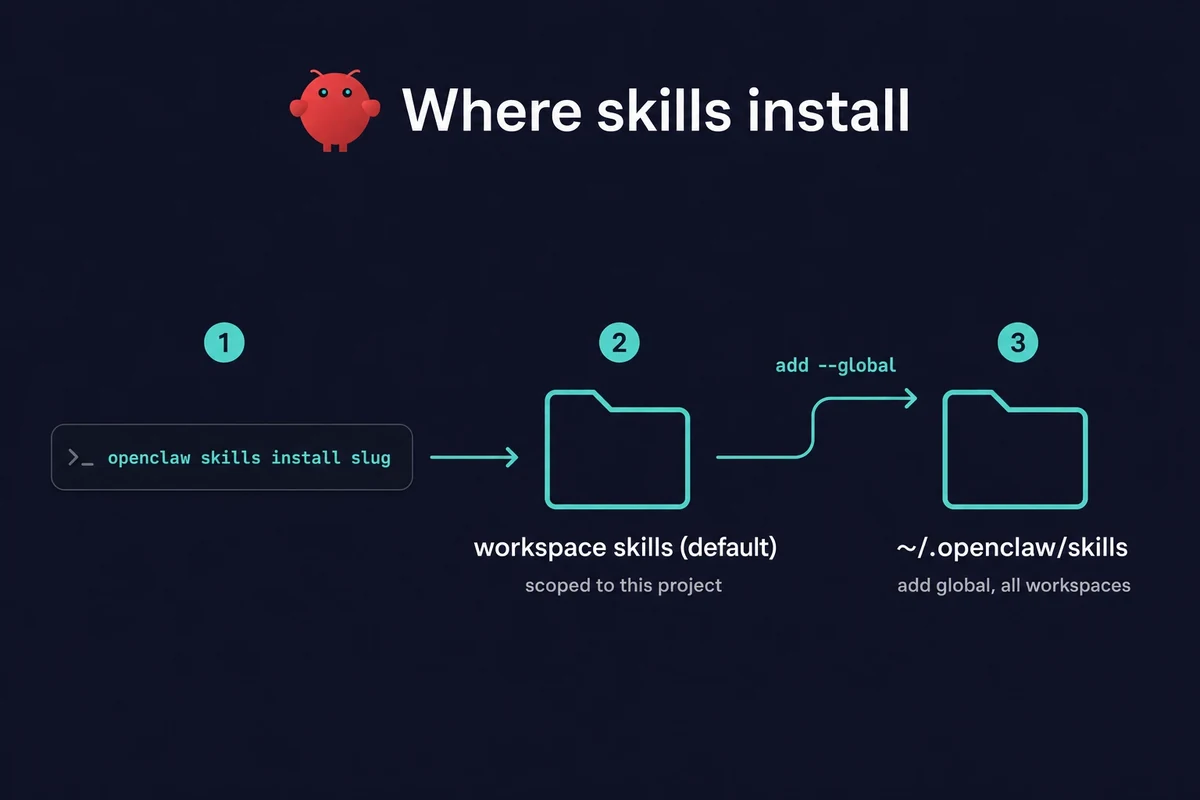
2. ClawHub skills install with one command: openclaw skills install
skills/ folder, so the skill is scoped to the project you are in. Add --global and it goes into ~/.openclaw/skills instead, where every workspace can see it. Run skill-vetter on the name first if you want to check it, then use openclaw skills update to refresh anything you pulled from ClawHub. 3. Custom skills are just SKILL.md files you write and drop into your project folder. OpenClaw picks them up on its own.
When two skills share a name, the closest one wins. A workspace skill beats a project agent skill. That beats your personal agent skill. Personal beats managed or local installs. Those beat the bundled set. And the bundled set beats the plugin folders. So to change a bundled skill, drop your own version in the project folder and it takes over.
Frequently asked questions
Short answers to the questions people ask most about OpenClaw skills. ClawHub now lists over 13,729 community skills across 11 official categories, the most-downloaded are Skill Vetter at ~256K and Github at ~189K, and the safest play is to start with the bundled set and run Skill Vetter before installing anything from the registry.
What are the best OpenClaw skills to install in 2026?
Start with the five essentials: Gog, self-improving-agent, Summarize Pro, Github, and Weather. Add the no-API-key macOS-native Apple stack if you are on a Mac, then layer in communication and productivity skills based on what you actually use day to day.
How many skills does ClawHub have?
ClawHub lists over 13,729 community skills as of 2026, up from around 10,000 a few months earlier. OpenClaw itself bundles roughly 50 to 53 built-in skills you can enable in your config without installing anything from the registry.
What is the most downloaded OpenClaw skill?
Among the skills in this guide, Skill Vetter leads at ~256K downloads, followed by Github (~189K), Ontology (~188K), and Gog (~185K). capability-evolver, a self-improvement skill, sits around 36K.
Are OpenClaw skills safe to install?
Bundled skills are zero-risk. Community skills are not vetted by default, and 2026 scans found 824 (Koi) to 1,184 (Antiy) malicious packages. Run Skill Vetter and read the SKILL.md first, and secure your OpenClaw setup before you experiment.
How do I install an OpenClaw skill?
The OpenClaw skills install command is openclaw skills install
skills/ directory by default; add --global to put it in ~/.openclaw/skills. New to this? Set up OpenClaw first.How many categories does ClawHub use?
ClawHub organizes skills into 11 official store categories: AI/ML, Utility, Development, Productivity, Web, Science, Media, Social, Finance, Location, and Business. The macOS-native Apple skills mostly fall under Productivity and Utility. These store categories are how you filter the 13,729+ registry down to the handful you actually need.
The bottom line
10,000+ skills on ClawHub sounds like a lot until you realize most of them are low-effort API wrappers or duplicates. The good stuff is packed into maybe 30-40 skills, and half of those are bundled already.
Start with the five essentials. Add the macOS native stack if you’re on a Mac. Layer in chat and productivity skills based on what you actually use. Resist the urge to install everything.
And always, always run Skill Vetter before installing anything from ClawHub. The ClawHavoc incident happened four months ago. The next one hasn’t happened yet.
Previous: Best local LLMs for OpenClaw | Related: How to set up OpenClaw | How to secure OpenClaw