People keep comparing these two like they’re rivals. They’re not. One is a piece of software you install on your own hardware. The other is a website you log into.
Comparing OpenClaw and ChatGPT is like comparing Photoshop and Canva. Same general category, totally different approach to getting there.
But the question won’t stop. Every week on Reddit, in Discord channels, on Twitter. “Should I try OpenClaw or just keep using ChatGPT?”
I’ve been running OpenClaw on a Mac Mini for months and I use ChatGPT almost daily. So here’s the actual, honest answer.
One of them is free but will eat your weekend. The other works in 30 seconds but bills you every month. And the differences go way deeper than price.
On this page
Both called “AI agents,” but that’s where the similarity ends
Before any feature comparison, you need the right mental model. These are fundamentally different things.
OpenClaw is an open-source daemon. A background process that runs on your machine, whether that’s a Mac, a Linux box, or Windows via WSL2.
It connects to your messaging apps (WhatsApp, Telegram, Slack, Discord, Signal, iMessage, 12+ others) and sits there 24/7, waiting for instructions. You text it like you’d text a friend.
It can read your files, run terminal commands, browse the web, send emails, and build its own tools. 200K GitHub stars. MIT license. The software costs nothing. You pay your LLM provider for API calls.
ChatGPT (including Operator) is a cloud service. OpenAI runs it on their servers. You open chatgpt.com or the app, type what you need, and it handles it.
The base product does conversation, code, image generation, data analysis. Operator adds web automation: filling forms, navigating websites, multi-step browsing workflows.
Everything sandboxed. Can’t touch your local files. Can’t run while you sleep. Close the tab and it stops.
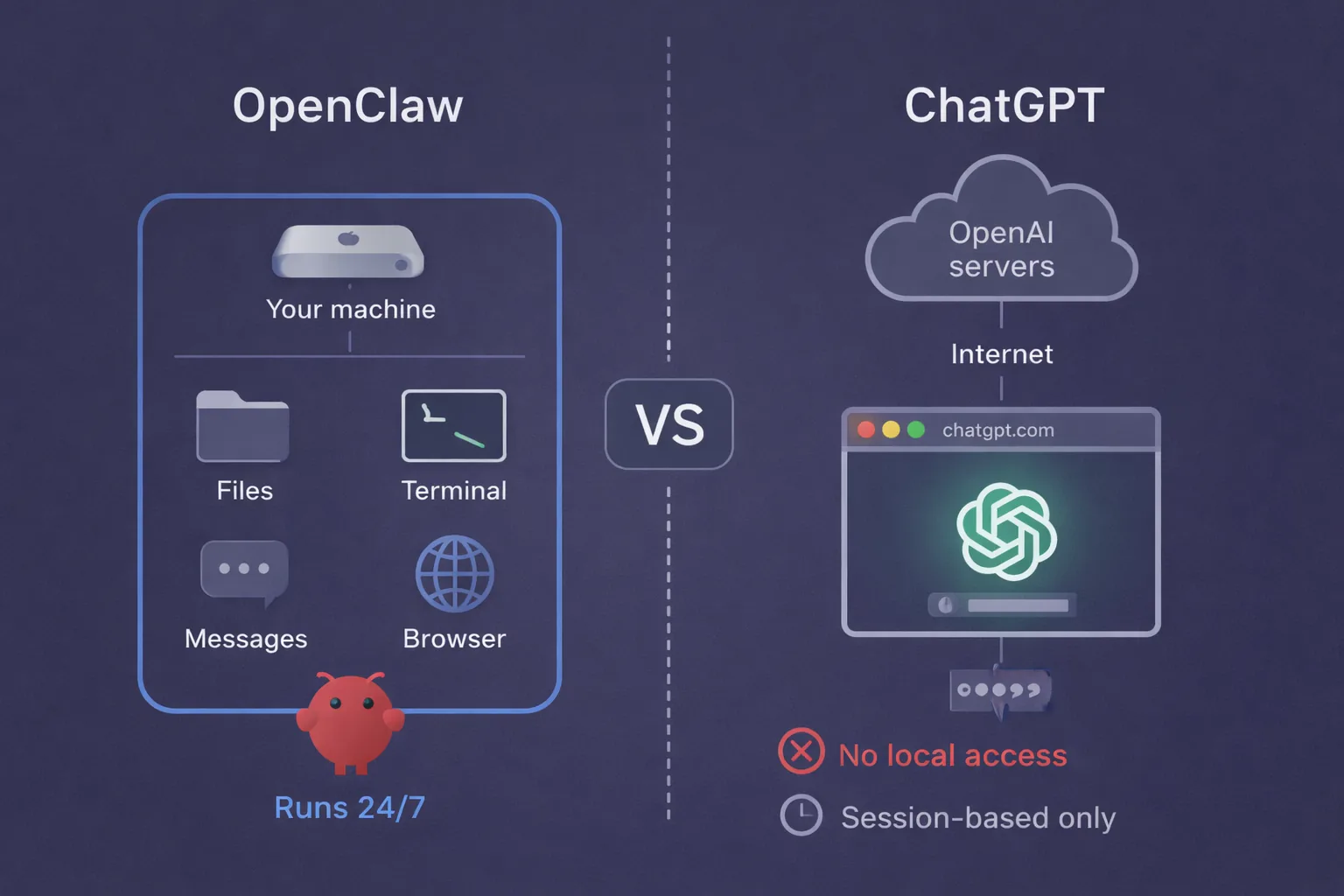
The distinction that matters more than any feature list: OpenClaw is infrastructure you own. ChatGPT is a service you rent. That single difference cascades into everything else.
Where your data actually goes
135,000. That’s how many OpenClaw instances security researcher Maor Dayan found sitting on the open internet. Over 15,000 of those were vulnerable to remote code execution.
I bring this up first because “OpenClaw is private” is only half the story.
In theory, yes. Files, messages, conversation history, agent memory, all of it stays on your hardware. When the agent needs to think, it sends a prompt to your chosen LLM provider (Anthropic, OpenAI, a local model via Ollama) and gets a response back.
But the data on your disk never leaves. That’s the design.
In practice? Self-hosted only means private if you actually lock it down. Default config binds the gateway to 0.0.0.0 with no auth. That’s the opposite of private.
ChatGPT is simpler to reason about. Everything goes to OpenAI. Prompts, uploaded files, generated outputs.
Enterprise and Team plans give you data retention controls and opt-out from training. Plus and Pro? Your conversations live on OpenAI’s servers under their data policies.
My take: if you’re handling client data, API keys, or anything you wouldn’t paste into a public Google Doc, OpenClaw’s local-first architecture is the right call.
But (and this is a big but) default OpenClaw is arguably less safe than ChatGPT. At least OpenAI has a security team. Your fresh OpenClaw install has a wide-open gateway and a prayer.
The gap is wider than the marketing suggests
This is where the “they’re both AI agents” framing breaks down. Let me walk through what each one can actually do, task by task.
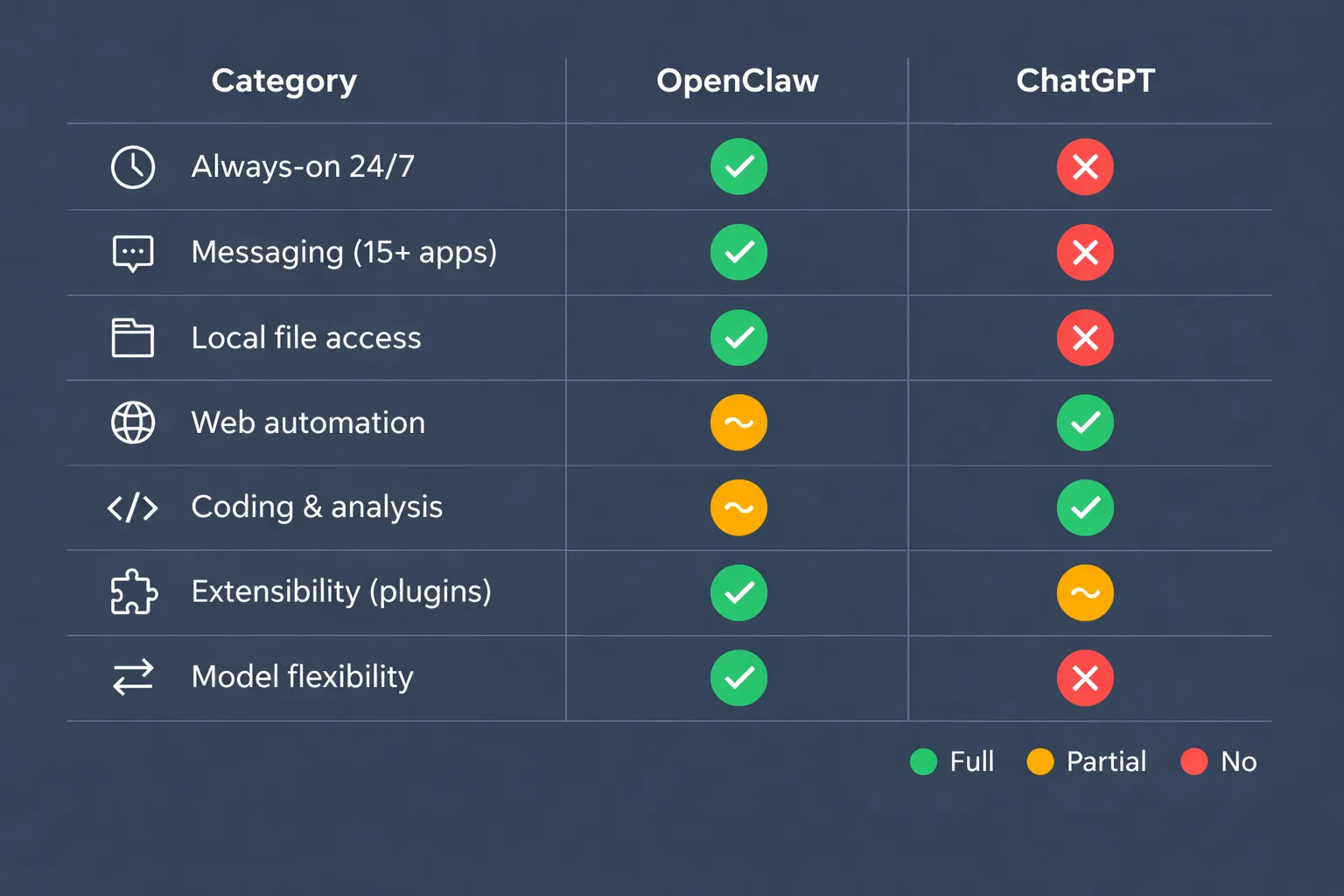
Always-on operation. OpenClaw runs as a daemon with a Heartbeat feature. It can check your email at 6am, draft replies before you wake up, monitor your calendar.
ChatGPT? Session-based. Tab open, it works. Tab closed, gone.
Messaging. This is OpenClaw’s killer feature and it’s not close. Fifteen-plus platforms, native. WhatsApp, Telegram, Slack, Discord, Signal, iMessage (via BlueBubbles), Microsoft Teams, Google Chat.
You talk to it in apps you already have open. ChatGPT has zero messaging integration. You use it through the website or the ChatGPT app. That’s it.
File access and system control. Full local filesystem and shell access with OpenClaw. Create files, edit configs, run scripts, move folders. The machine it runs on is its workspace.
ChatGPT gives you a sandboxed code interpreter. Upload a file, it processes it in a container. But it can’t reach your desktop, your project folder, or your Downloads directory.
Now here’s where ChatGPT actually wins.
Web automation. Both can browse, but Operator is purpose-built for it. Form filling, multi-step browsing, booking flights, navigating web apps.
OpenClaw has built-in browser control too, but Operator feels more polished for pure web tasks. If web automation is your main use case, ChatGPT has the edge.
Coding. OpenClaw can run shell commands and edit files on your machine, so it has real access to your projects. But it’s a generalist, not a coding-first tool.
OpenAI’s Codex is a different story. A dedicated coding agent that runs in a cloud sandbox with your GitHub repo, writes features, fixes bugs, and proposes pull requests. It can work independently for hours on complex refactors. The latest version even handles deployments and CI/CD.
Codex is a separate product from ChatGPT, but it’s part of the same ecosystem and subscription. If coding matters to you, that’s a real advantage on OpenAI’s side.
Two more dimensions that matter:
Extensibility. OpenClaw has 4,000+ skills on ClawHub. TypeScript plugins. Massive community. But Snyk’s ToxicSkills audit found 10-20% of marketplace skills are malicious. Some exfiltrate API keys. Others run hidden curl commands. Wild West.
ChatGPT has Custom GPTs with Actions and the GPT Store. Smaller ecosystem, way more controlled. Safer, less flexible.
Model flexibility. OpenClaw lets you pick any model. Claude Opus, GPT-4o, Gemini, local models through Ollama. Switch per conversation if you want.
ChatGPT locks you into GPT. Whatever OpenAI ships, that’s your option. No bring-your-own-model.
What you’ll actually spend per month
Not the pricing page. The real math.
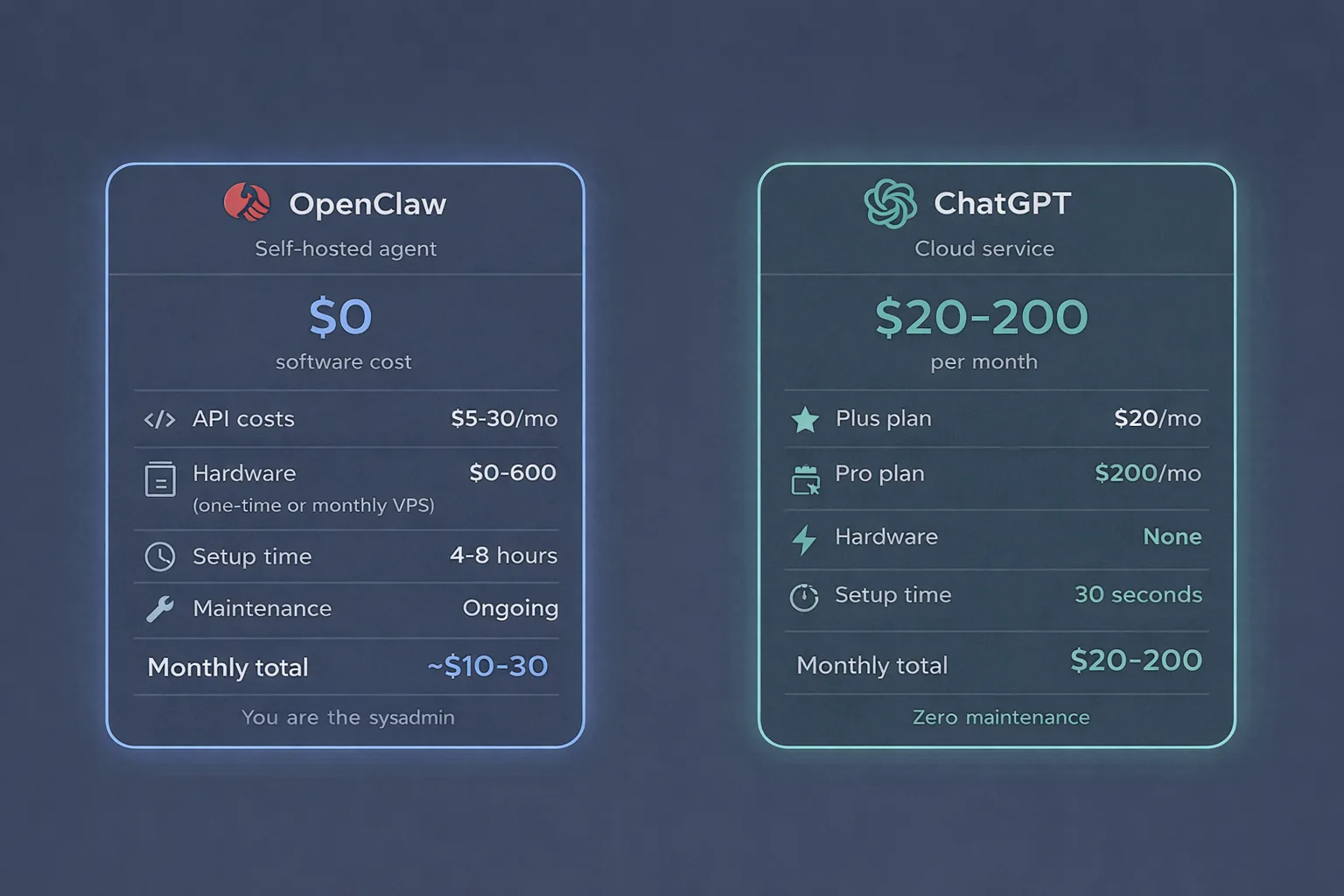
OpenClaw:
- Software: $0. Open source, MIT license, free forever.
- API costs: $5-30/month depending on your model and volume. Heavy use with Opus? $40+. Or run a local model through Ollama and pay nothing at all.
- Hardware: you need something running 24/7. Mac Mini you already own, that’s free. Don’t have one? Rent a dedicated M4 Mac Mini at rentamac.io starting at a fraction of the purchase price. Or grab a cheap Linux VPS for $5-12/month.
- Setup time: budget 4-8 hours for the install, config, and security hardening. That’s being realistic, not pessimistic.
- Total ongoing: roughly $10-30/month once you’ve got hardware sorted.
ChatGPT:
- Plus: $20/month. Gets you Operator with around 400 runs per month.
- Pro: $200/month. Unlimited everything, priority access.
- Hardware: none. Setup: 30 seconds.
- Total: $20-200/month.
Here’s what nobody mentions in these comparisons. OpenClaw looks cheaper on paper. For pure dollar cost, it usually is.
But you’re the sysadmin now. Updates. Security patches. Config tweaks. Skill vetting. Debugging at 3am when your gateway silently falls back to 0.0.0.0 (remember the privacy section? This is that problem showing up again).
If your time has any value, factor it in. ChatGPT costs more per month but the operational cost is zero. You never maintain a thing.
Pick based on your workflow, not the hype
Pick OpenClaw if you want a 24/7 personal agent you text through WhatsApp or Telegram. You’re comfortable in a terminal. You care about keeping data on your own hardware.
You want the freedom to pick your own LLM. You don’t mind a weekend of tinkering plus ongoing maintenance. Treat it like a home server project, because that’s what it is.
Pick ChatGPT if you want something that works right now, this second. Your tasks are mostly web-based: research, writing, analysis, booking, form filling.
You don’t need local file access or 24/7 background automation. You’d rather pay $20/month than spend a Saturday configuring a daemon. And you’re fine with your data on OpenAI’s servers.
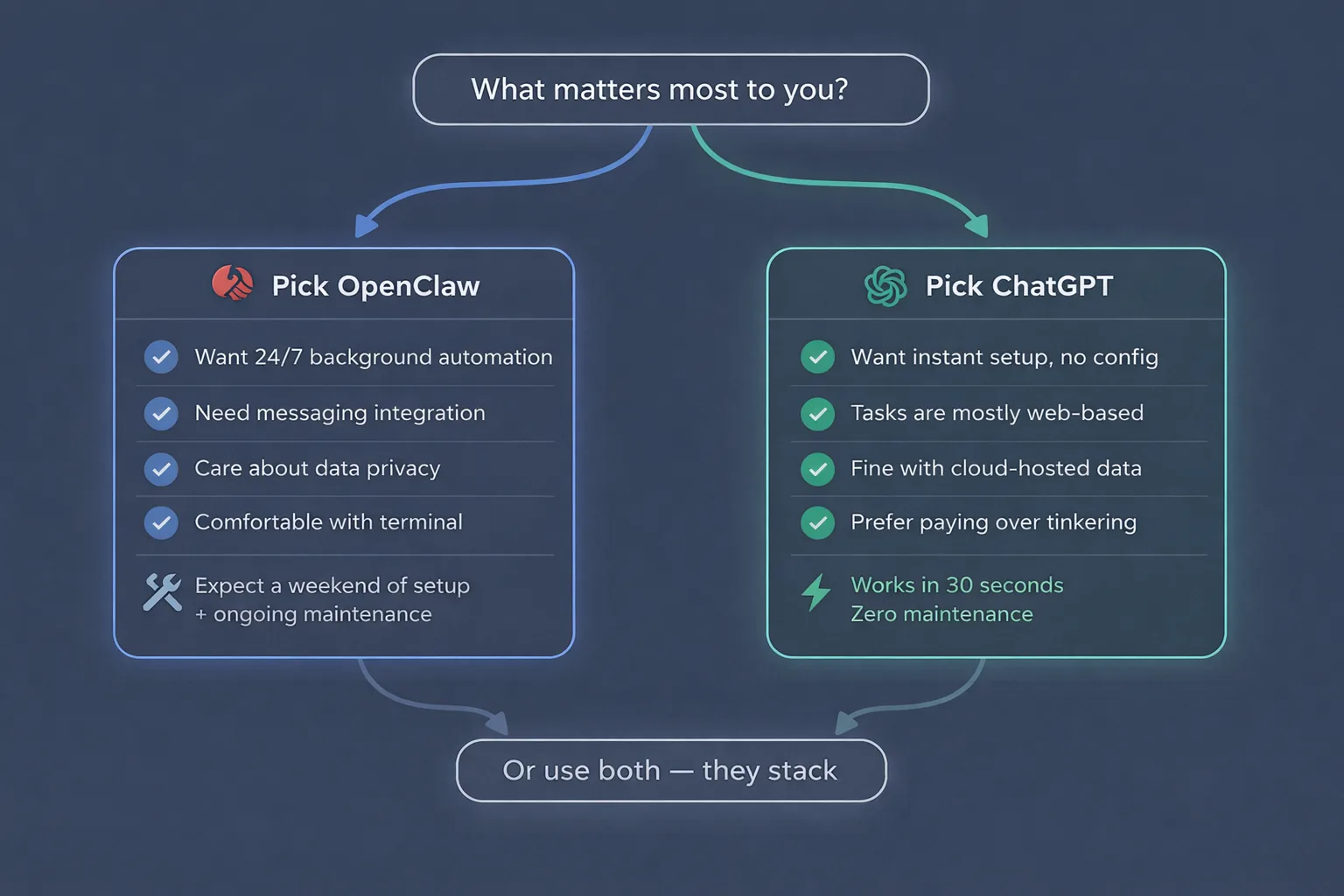
Or just use both. They’re not mutually exclusive. OpenClaw can run GPT-4o as its backend model.
Plenty of people use OpenClaw for always-on messaging and automation, then pull up ChatGPT in a browser for quick one-off tasks. That’s a perfectly solid setup.
These products are converging
Peter Steinberger, OpenClaw’s creator, just joined OpenAI. ChatGPT keeps getting deeper tool-use and computer capabilities. A year from now the line between “self-hosted agent” and “cloud service” might be gone entirely.
But today the gap is real. One is a tool you build with. The other is a tool you use.
Next up: how OpenClaw compares to Claude, which sits somewhere in the middle of these two.